All posts in “tech”

Going to a Protest? Change These 7 Phone Settings First

Welcome to Product Support, a column devoted to helping you get the most out of the gadgets and software you already use.

If you are attending one of the thousands of #BlackLivesMatter protests against racist police violence in the wake of George Floyd’s on-camera murder by the Minneapolis Police Department, there are precautions you should take beyond simply wearing a mask to hamper the spread of COVID-19. Your smartphone is a crucial tool for communication and documenting police brutality, but it generates a lot of information that law enforcement can use to strengthen charges against you or other protesters, even if you are completely innocent of any crime. Unfortunately it falls to you to keep that data private.

Just like attending a protest at all, securing your phone is an exercise in assessing risk. Making your phone more secure takes time and will make it significantly harder to use. It’s up to you to decide what risks are and are not worth it for you, but here are measures you should certainly consider before you leave the house.

0. Don’t bring your phone at all.

The best but also most irritating way to keep your data private while engaging in any activity is to not bring a smartphone with you. Prepaid “dumbphones” are incredibly cheap though don’t be fooled into thinking that having a burner phone magically makes you invisible to surveillance. Considering the extreme inconvenience of this approach, it’s hard to recommend broadly but worth noting nonetheless.

1. Turn off biometric login

Features like Face ID and fingerprint login make it easier to get into your phone, but they also make it easier for the police to get into your phone if you are detained. While your 5th amendment rights protect you from having to divulge a PIN or password to the police, you can’t count on that to prevent them from pressing your finger to a scanner or holding your phone to your face. Make sure you disable all biometrics before leaving the house, and consider setting an alphanumeric password instead of a mere PIN. For extra security, you can also enable the feature on iOS that will fully erase your phone on multiple failed login attempts. Just be sure you know what your password is before you go that far.

2. Record from behind the lock screen

Both Android and iOS allow you to use your camera without unlocking the phone. Not only is this convenient after you’ve set up a long password, it also prevents anyone who may snatch your phone out of your hands while you are recording from having full access to your device. Recording from behind the lock screen is a good habit in general, but it is especially vital if you are planning on recording police activity from within arm’s reach.

3. Disable location tracking, Wi-Fi, Bluetooth and cell service

Your phone is an incredibly useful communication device but it is also a tracking beacon. Any and all wireless connections — from Wi-Fi to Bluetooth to cell service to GPS — can create a record of your location that could come back to bite you. Even law-abiding protesters can be caught up in legal trouble by mere proximity to illegal events, which your phone’s location data could bear out when search warrants are in effect. It’s wise to disable them all in individually in settings and only reenable them if and when you need them. Beware that your phone may automatically re-enable some connections in an attempt to be helpful. For maximum security, coordinate with friends to check in at specific times before you set off on your way and turn off your phone entirely when you aren’t using it.

4. Use a secure messaging app

SMS is convenient but also horrendously insecure, and you should avoid using it in general, but especially at protests where law enforcement may be warrantlessly deploying quasi-legal devices called “Stingrays” which can easily monitor all text messages and even phone calls in a given area. If you are using iMessage, your messages to other iMessage users are encrypted by default, but texts to green bubble folks are not. A better way to ensure your messages are protected as they travel over the air is to install a secure messaging app like Signal (free on iOS and Android), which also comes with additional security features like disappearing messages and a built-in face-blurring tool.

5. Keep your photos from tracking you

When you take photos, you’re recording more than a picture. Your phone will also record what’s known as EXIF data, which typically includes capture settings and literal location data. You can turn this feature off in iOS 13, as well as in the settings on Google’s Android camera app. If you can’t find the setting on your specific phone, or just want to be extra safe, there is another trick: simply take a screenshot of your photo and share that instead. Also, be mindful that sharing photos with identifiable bystanders can endanger them as well, as law enforcement is known to use facial recognition and social media postings for surveillance purposes.

6. Turn off lock screen notifications

Both iOS and Android can display notifications on the lock screen, with varying levels of information. The safest choice is to disable lock screen notifications entirely, but you can also lock down the amount of information they relay, app by app. At the very least, be sure that your messaging app only shares the name of the person sending the message on the lock screen, and no part of the message itself.

7. Add emergency information

If you’ve watched any protest footage filmed over the past few weeks, you’ll know full well that even a peaceful protest isn’t safe from police escalation. Before you go, make sure to fill out your emergency information in your phone in case you end up injured and in need of medical attention. Both Android and iOS have features that allow you to store crucial info like who to contact, and pertinent health information. It’s good to have it filled out wherever you plan on being.
Note: Purchasing products through our links may earn us a portion of the sale, which supports our editorial team’s mission. Learn more here.
Eric Limer

Eric Limer is Gear Patrol’s tech editor. A resident of Weehawken, NJ, his current obsessions include mechanical keyboards, mechanical pencils and Formula 1.

More by Eric Limer | Follow on Instagram · Contact via Email

A New York Hi-Fi Shop Owner Shares Home Hi-Fi System

When the people behind record stores and hi-fi shops leave work at the end of the day, what kinds of hi-fi systems are they going home to? And what music are they playing? That’s exactly what we set out to uncover in Hi-Fi at Home. Mike Garry is the owner of Hudson Valley HiFi, an New York hi-fi shop that specializes in buying, restoring and selling vintage audio equipment. His own setup frequently changes, but he was kind enough to share the highlights.

Amplifiers

Price: $1,795 (Rogue Audio RP1); $2,395 (Atlus Magnum II)

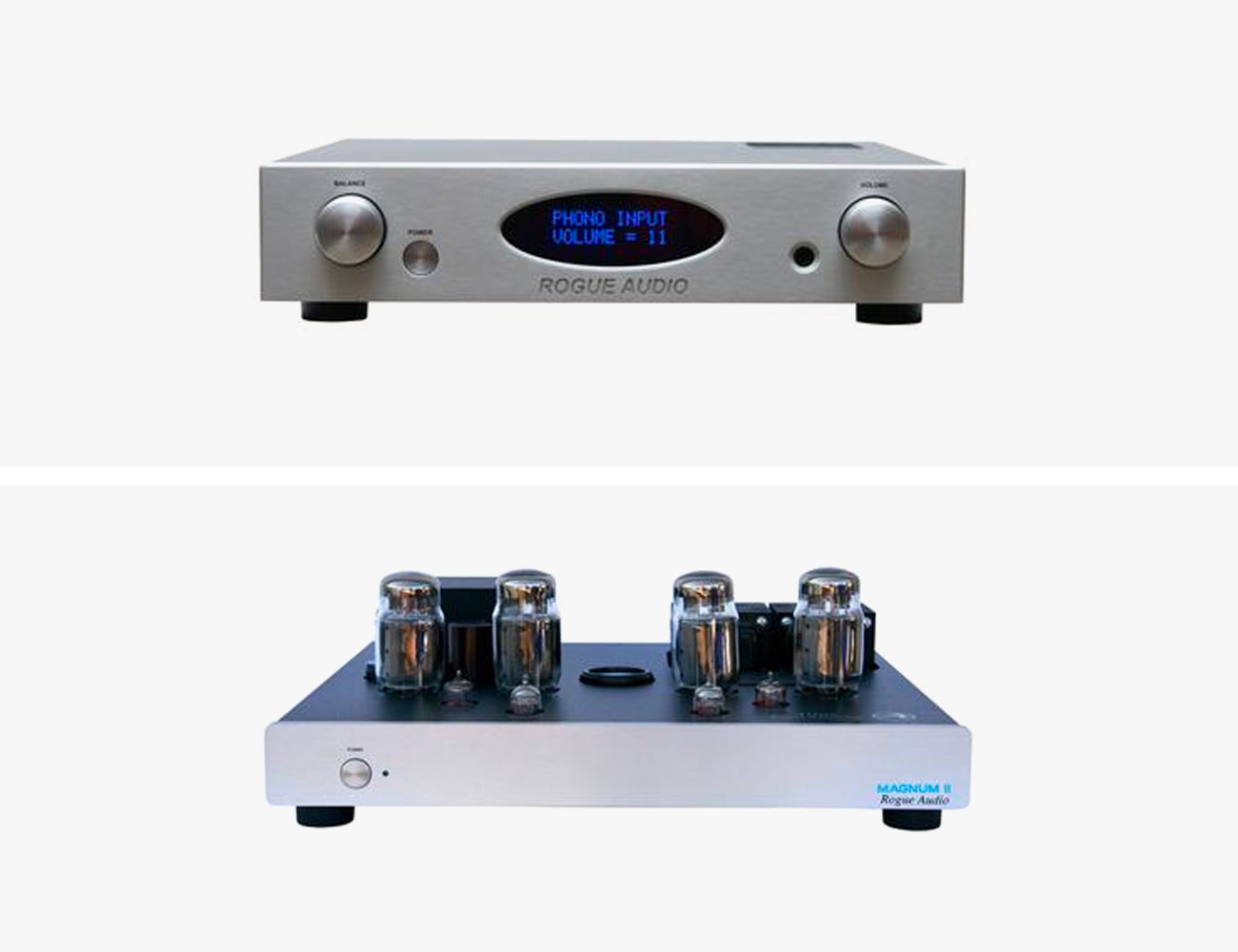
For several years, I was running Rogue Audio’s RP1 preamplifier and Atlas Magnum II power amplifier with an Audioquest Water interconnect between them, which is a full vacuum tube setup. I love the versatility of the Rogue Audio setup since they are vacuum tube but produces plenty of power to play inefficient speakers.

|

Turntables

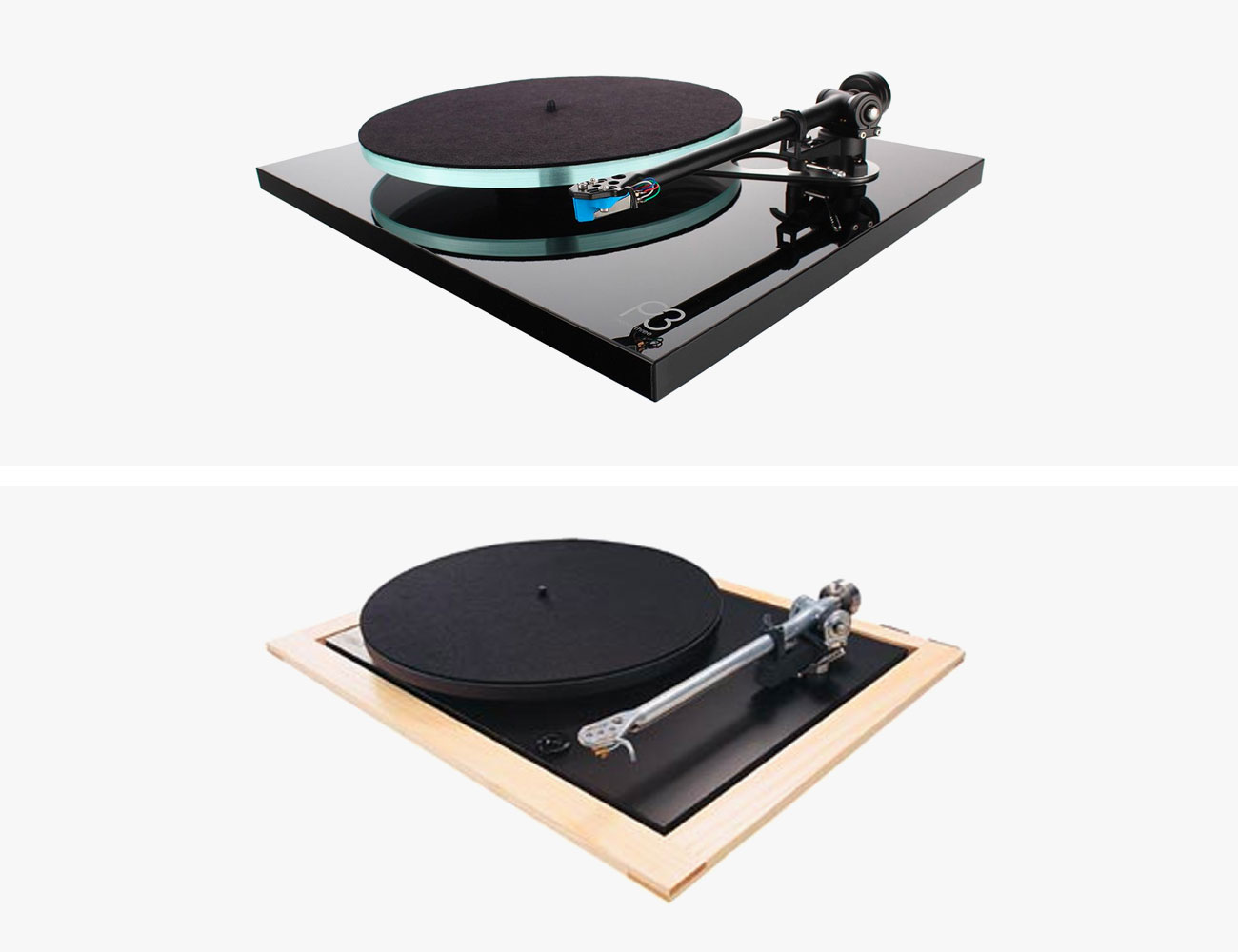
Price: $945+ (Planar 3); N/A (Planar 25)

For turntables, Rega Planar 3 and Planar 25, one with MM and the other MC cartridge. The Regas are so simple to setup, require very minimal maintenance, and are proudly still hand built in England. The one turntable we have at the store that I would say is my holy grail is the Luxman PD-151. Amazing overbuilt Japan built turntable that I can see being a turntable you can pass on to your grandkids.

|

Speakers

Price: $3,995 (Klipsch Forte); $1,099 (Monitor Audio Silver 300); $5,300 (Totem Acoustic Tribe Tower); $2,495 (Fyne Audio F502)

I really have not had one pair [of speakers] for long. I enjoy cycling through various speakers to enjoy the various qualities of different brands and models. Speakers I have greatly enjoyed in the last few years, Klipsch Forte, Monitor Audio Silver 300, Totem Acoustic Tribe Tower, and recently I’ve been auditioning Fyne Audio F502.

|
|

Note: Purchasing products through our links may earn us a portion of the sale, which supports our editorial team’s mission. Learn more here.
Tucker Bowe

Tucker Bowe has been on Gear Patrol’s editorial team since 2014. As a Tech Staff Writer, he tracks everything in the consumer tech space, from headphones to smartphones, wearables to home theater systems. If it lights up or makes noise, he probably covers it.

More by Tucker Bowe | Follow on Instagram · Twitter · Contact via Email

The California Company Making Hi-Fi Headphones More Affordable

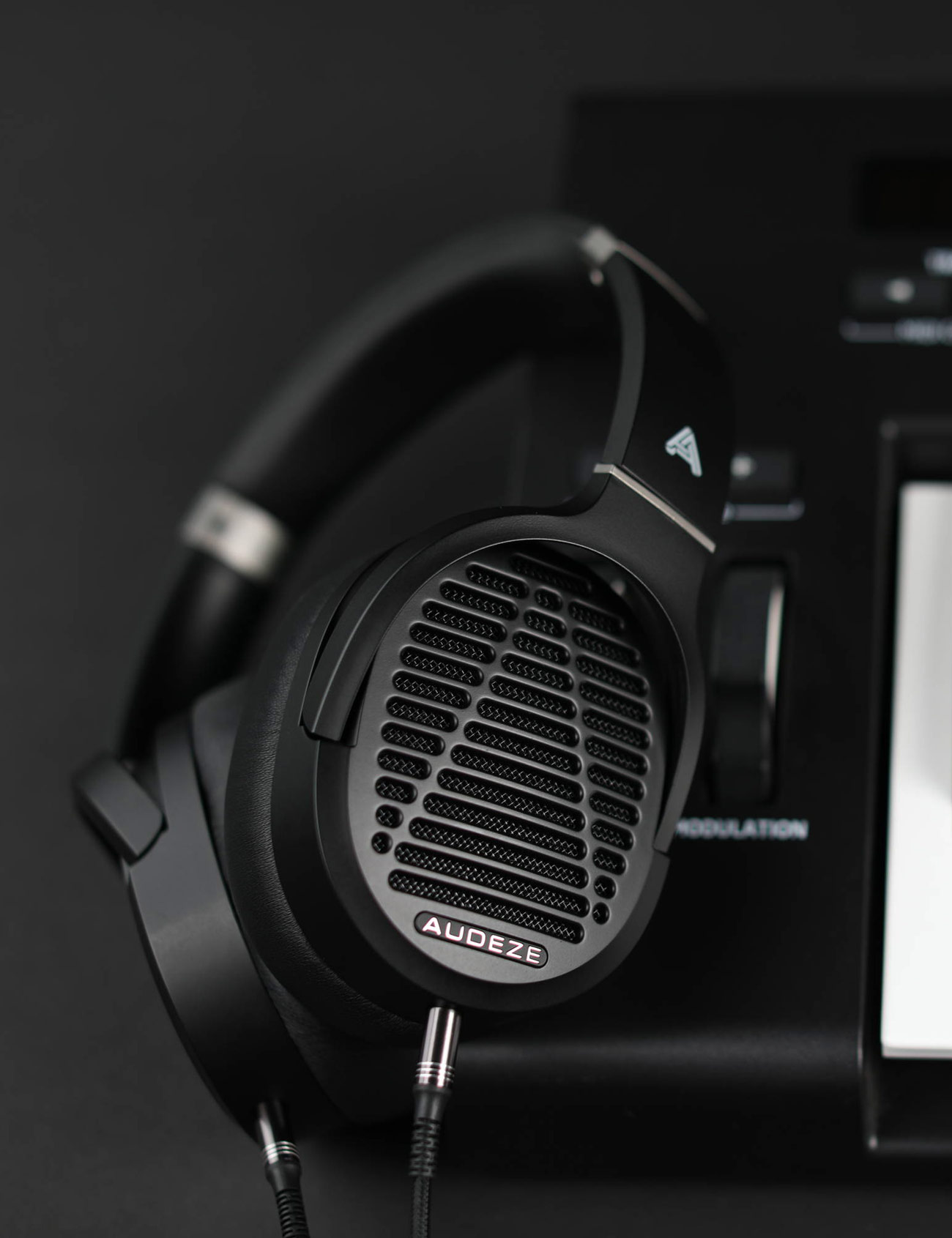
Audeze, based out of Orange County, is an audio company with a very particular focus. Not concerned with speakers or amps or earbuds, it instead focus on a headphones, and ones of a very specific kind. It’s cans use planar magnetic drivers (as opposed to conventional dynamic drivers), in order to achieve a greater range of sound than other approaches can match.  The result? “Extremely low levels of distortion and very high-fidelity over the entire frequency range,” according to Sankar Thiagasamudram, the co-founder & CEO. “It’s a very clean-sounding headphone.”

The problem with planar headphones, and why you may have never used a pair, is not about their sound quality but their price, historically reaching well up into the quadruple digits, and accordingly reserved for the sound engineers and well-off audiophiles. But in the past two years, Audeze has released two pairs of planar magnetic headphones that crawl in just under the $400 mark. Its Mobius ($399) and LCD-1 ($399), designed for gaming and hi-fi respectively, use the same planar magnetic technology that is in Audeze’s flagship headphones that cost almost ten times as much, the LCD-4 ($3,995).

The thing that makes planar cans so expensive is, you guessed it, their signature magnetic field.

Dynamic headphones, the kind you probably own, send an audio signal through a coiled wire. This, in the presence of a magnet, creates a magnetic field which moves the coil, and the speaker diaphragm it is attached to, back and forth. This is how your conventional Bose, Sony or Beats headphones play music.

Planar magnetic headphones work similarly to dynamic headphones but instead of a coiled wire, they use an incredibly thin film that spreads across the entire speaker diaphragm. When the audio signal goes through this film, it reacts similarly to magnets, causing the film and speaker diaphragm to move.

The difference, however, is in how much movement happens. “It’s not just driving the soil and large coil, it’s driving across the entire surface of the diaphragm,” said Thiagasamudram. Because the film has a larger surface area, planar magnetic drivers require two larger magnets (instead of just one small one) on either side of the diaphragm.

Planar headphones are not by any means the best headphones you can buy. That honor belongs to even more expensive and sophisticated electrostatic headphones. But the even higher price and the need for extra equipment has left electrostatics squarely in the far enthusiast real for now.

“The advantage of planar magnetic [headphones] is that you plug it into almost anything,” explains Thiagasamudram. “You can plug it into a traditional headphone jack and you don’t have to have a special amplifier.” With electrostatic headphones, you need a special high-voltage amplifier, which in addition to adding a (substantial) extra cost, it also means electrostatic headphones aren’t portable.

You’d be forgiven for thinking that planar tech is new, but the very opposite is true. Headphones that operate on the principle have been around in some form since the 1920s. But Audeze’s triumph isn’t inventing the form, but rather perfecting it. It has turned to modern manufacturing techniques so that it can cast and make its own films. “Instead of chemical etching we used lasers, for example,” explained Thiagasamudram. This has enabled Audeze to make its films extremely small, thin and durable. This is important because the thinner the film, the faster the diaphragm moves, creating a cleaner sound. Audeze also developed its own variety of magnets specifically for this usecase.

The Audeze Mobius gaming headset.To keep the prices low, the LCD-1 and Mobius have plastic earcups instead of wood like in the company’s more expensive flagship and reference lines. The plastic housing doesn’t affect sound quality, says Thiagasamudram, but affects the weight, comfort and look of the headphones. The rest comes down to automation and mass production. “Over the last two years we’ve automated the driver assembly here in Orange County, so now every 18 seconds we can make a driver,” Thiagasamudram said. The company makes and assembles every LCD-1 headphone in California. The Mobius headphone, which has a lot more built-in electronics to make it play nice with gaming hardware, is assembled in China.

As far as how Audeze’s new LCD-1 and Mobius headphones, Thiagasamudram says that there’s a lot of trickle-down from their higher-end headphones. It uses similar types of film and the same types of magnets. They’re not going to sound quite as good as its really high-end headphones, of course, as a lot comes down to the thickness of the film. Thinner films are better because they move the diaphragm faster, but they’re also more difficult and expensive to make. But if you appreciate good sound, the LCD-1 promise to be a noticeable upgrade from the standard pair of over-ears you’ve been listening to for the past few years.

|

Tucker Bowe

Tucker Bowe has been on Gear Patrol’s editorial team since 2014. As a Tech Staff Writer, he tracks everything in the consumer tech space, from headphones to smartphones, wearables to home theater systems. If it lights up or makes noise, he probably covers it.

More by Tucker Bowe | Follow on Instagram · Twitter · Contact via Email

Need a New Bluetooth Speaker? Just Get This

<!–Need a New Bluetooth Speaker? Just Get This • Gear Patrol<!– –>

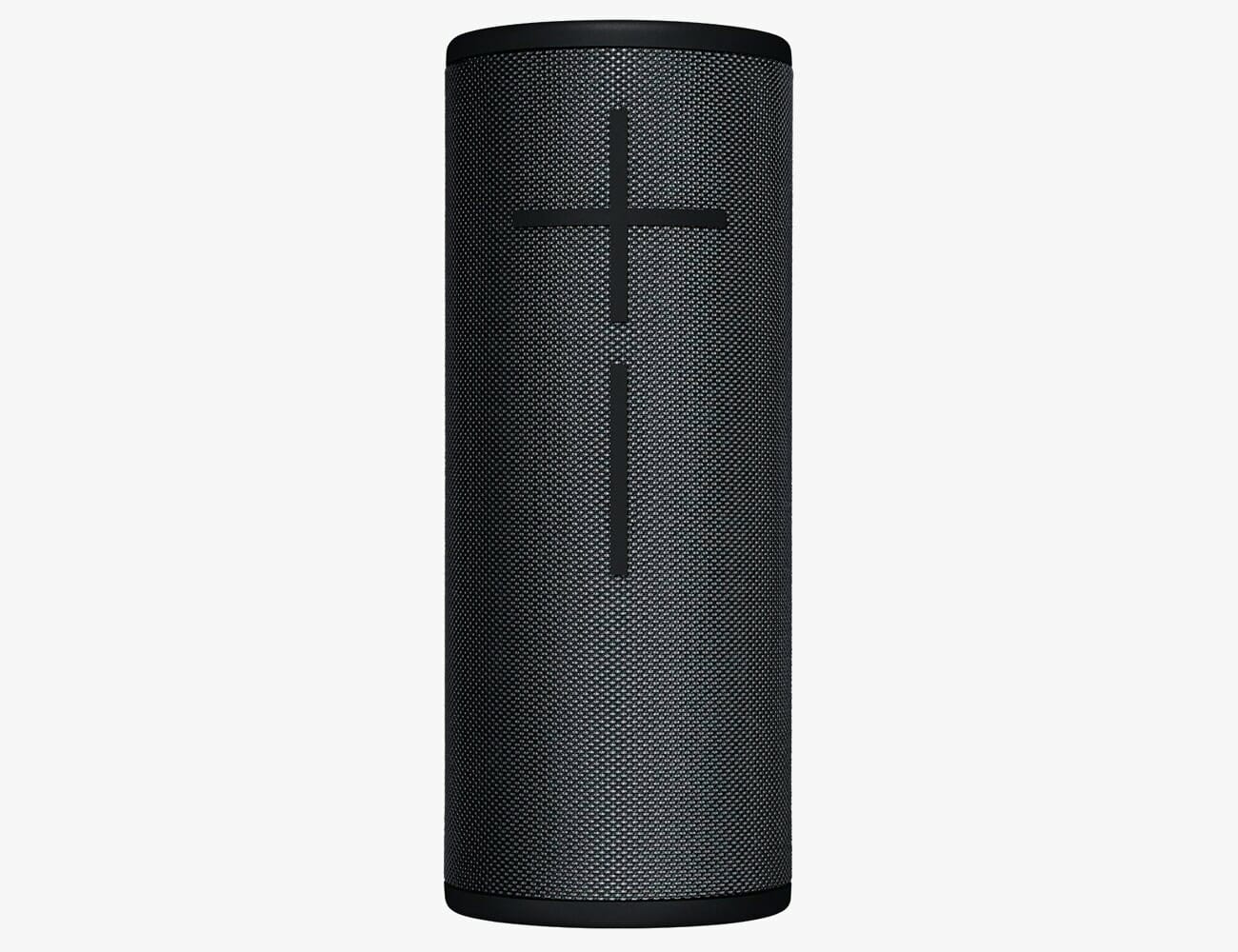
Ultimate Ears Boom 3


Skip the heavy lifting and go straight to what’s best. Just Get This is our no-nonsense guide to the gear you need, now.

There are a lot of good portable Bluetooth speakers to choose from. But if you don’t want to dig through the bottomless pit of options, just get the Ultimate Ears Boom 3 ($150). Its combination of good sound, size, ruggedness and accessible price point make it a no-brainer buy. That’s why it’s the king of all the Bluetooth speaker’s we’ve tried.

Since Ultimate Ears released the first Boom in 2013, it’s become a mainstay pick. The Boom 3, released in 2018, carries on the legacy. Its true 360-degree design lets it fill up a room with ease. Two 2-inch drivers and two passive radiators deliver good and loud audio with surprisingly punchy bass. Battery life of up to 15 hours and IP67 waterproof ratings make it extremely beach- and pool party-friendly. Oh, and it floats.

If you want to splurge for an upgrade, the available Power Up dock replaces the Boom’s micro-USB cable with a wireless-charging cradle. And the Megaboom 3 offers everything the Boom has, but bigger (for an extra $50).

But even that is a little too much to worry about, you really can’t go wrong with a classic.

| |

Note: Purchasing products through our links may earn us a portion of the sale, which supports our editorial team’s mission. Learn more here.
Tucker Bowe

Tucker Bowe has been on Gear Patrol’s editorial team since 2014. As a Tech Staff Writer, he tracks everything in the consumer tech space, from headphones to smartphones, wearables to home theater systems. If it lights up or makes noise, he probably covers it.

More by Tucker Bowe | Follow on Instagram · Twitter · Contact via Email

<!–

–>

<!– –><!–

–>

The Best Bluetooth Speakers You Can Buy in 2020

Our definitive guide to the best Bluetooth speakers of 2020 explores everything you need to know before buying your next portable wireless speaker, including what features to look out for and the best options available.

Ultimate Ears Boom 3

Best Overall

Release date: mid-2018
Drivers: two 38mm 1.5-inch full range, 4 ohm
Waterproof: IP67
Battery: Up to 15 hours

The Boom 3 is the successor to UE’s Boom 2. It has a two-toned outer fabric and Magic Button on top of the speaker that’s used for play/pause and skipping tracks. The charging port has been moved from the bottom of the speaker on the Boom 2 to the side here, so you can charge and listen to each speaker simultaneously, which was a small design flaw in the Boom 2. For deeper, richer bass and longer battery life, check out the bigger and slightly more expensive Megaboom 3. (Both the Boom 3 and Megaboom 3 have the same 90dBA maximum sound level.)

|

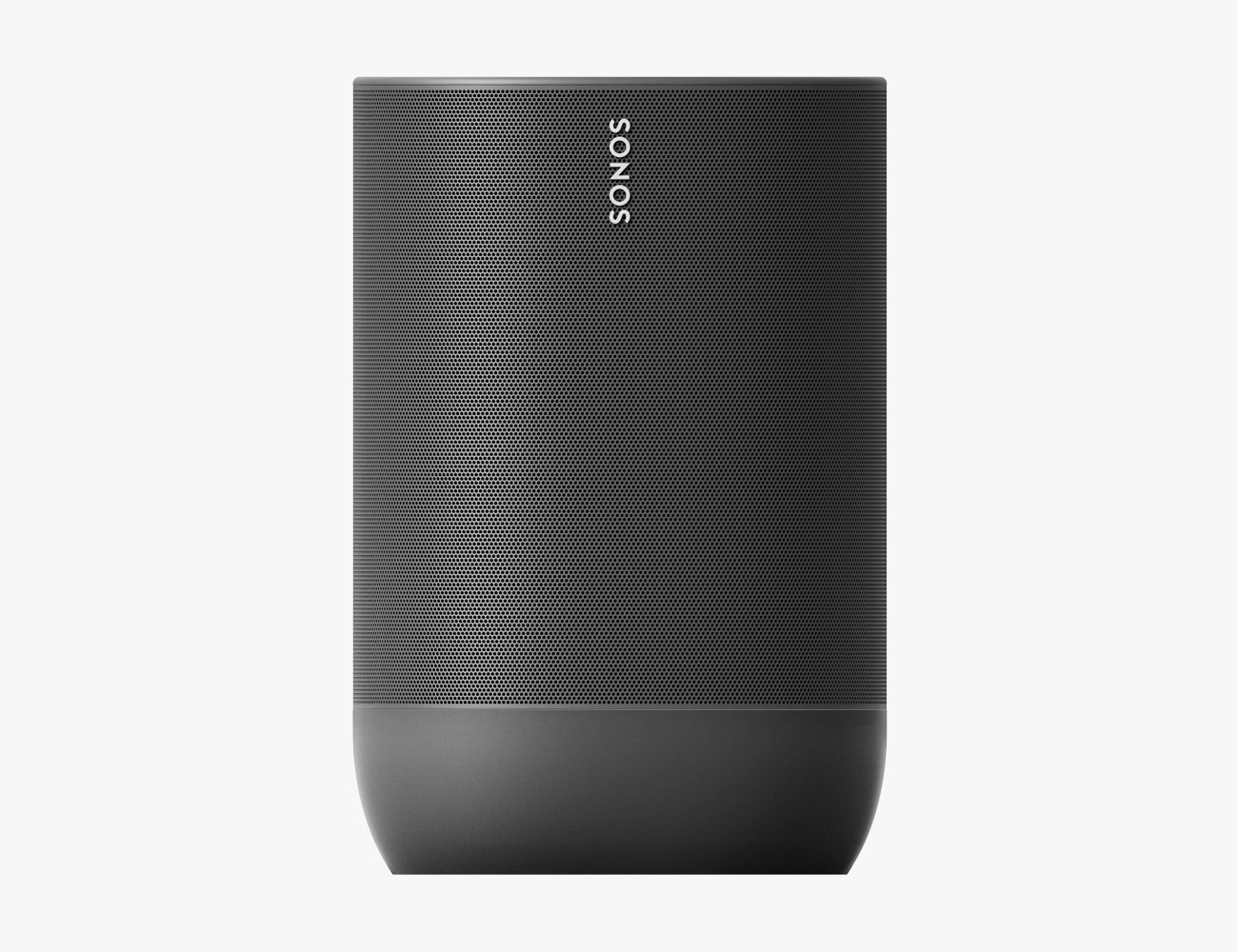
Sonos Move

Best Sound

Release date: late 2019
Drivers: one downward-firing tweeter, one mid-woofer, two Class-D digital amplifiers
Battery: IP56
Waterproof: IP56
Charge: USB-C

The Move is Sonos’s first portable Bluetooth speaker and the best-sounding portable speaker on this list. In addition to being a Bluetooth speaker that is drop-resistant and IP56-rated, it also has built-in Wi-Fi and can work almost exactly like a Sonos One. When connected to Wi-Fi, it can play in a Sonos multi-room system and respond to either Alexa or Google Assistant voice commands. Unlike every other Sonos speaker before it, the Move has automatic Trueplay, meaning it automatically optimizes its sound for the space that it’s in.

|

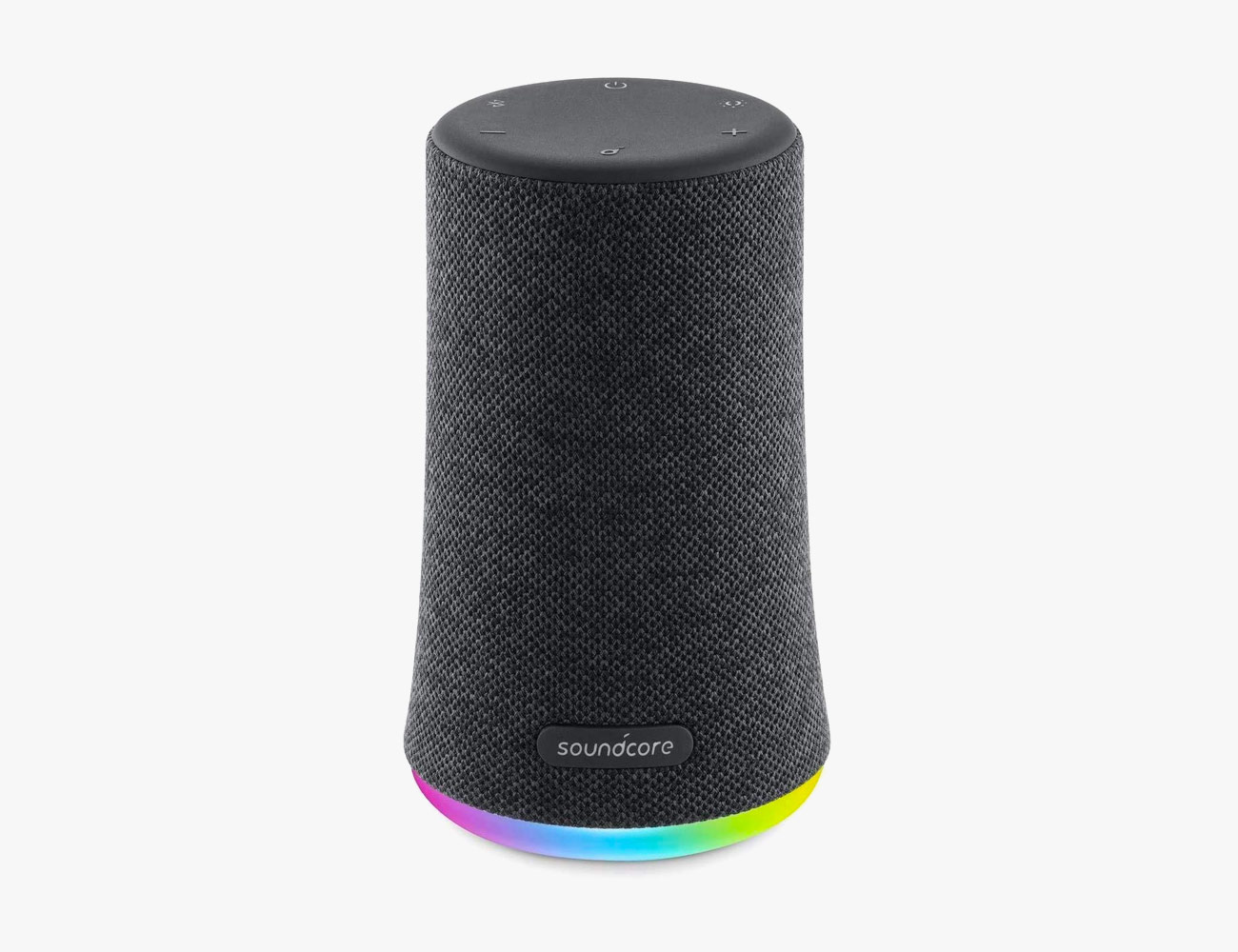
Anker Soundcore Flare Mini

Best on a Budget

Release Date: mid 2019
Drivers: dual drivers, 360-degree sound
Battery: up to 12 hours
Waterproof: IPX7
Charge: micro-USB

The Soundcore Flare Mini is a little portable speaker that produces surprisingly good 360-degree sound. Throw in the fact that it costs less than $50, so you can’t really beat it. It’s extremely waterproof and has a dedicated button on the outside to boost its bass, in case you like more bass-heavy audio. Additionally, through Anker’s Soundcore app you can tweak the EQ settings and customize the LED lights that flash on the outside of the speaker.

The Most Important Factors to Consider

So you want to make a carefully considered choice. Good on you! There are a lot of factors to consider, and Bluetooth speakers come in all different shapes and sizes, with different sound qualities and price points. Also, they also come with many different features. Here’s the short list of things to make note of.

Brand

You’ve probably heard of all the speaker manufacturers on this list, which is a good thing. You want to trust that the speaker is not only going to sound good but also last. Many portable speakers on this list work with other like-branded speakers; for instance, you can pair two Bose Soundlink speakers together or two of Kicker’s Bullfrog speakers together for more of a party (or multiroom) setup.
Size and Shape

Generally, the bigger the speaker, the louder and better it is going to sound. You also want to consider the shape and design of the speaker. The two most popular shapes these days are 360-degree (cylindrical) or monodirectional speakers. The 360-degree speakers are generally better when placed in the middle of a room while monodirectional speakers are better for stereo audio.

Ruggedness

All rugged speakers aren’t the same. And in order to know how water-resistant or drop-proof a speaker is, you really need to understand IP (Ingress Protection) ratings. The easy way to explain it is that the higher the IP rating of the speaker, the more water-resistant it is — an IP7-rated speaker is more durable than an IP4-rated speaker. You can check out how the IP ratings are explained, here.

Voice Assistance

Some of the newer portable speakers have wi-fi connectivity and support a voice assistant, such as Amazon’s Alexa or Google Assistant. This allows you to use a speaker similar to an Amazon Echo or Google Home, using voice commands to request songs, answer general queries and control smart home devices. However, you’ll only be able to access the voice assistant when connected to wi-fi or a mobile hotspot.

Battery Life

Bigger speakers tend to have larger and longer-lasting batteries. That said, it varies from speaker to speaker. If you know you’re going to listen to the speaker a lot and you’re also going to have to go days between charges, these are things you should consider before purchasing a portable speaker.

Charge

Most of today’s portable speakers need a micro-USB cable to charge. However, there are some speakers that require a USB-C or AC cable to charge. Knowing what kind of cable might seem like a small thing, but it’s actually really convenient to be able to use the same cables to charge a few of your devices, like wireless headphones, your smartphone and computer.

Other Good Options

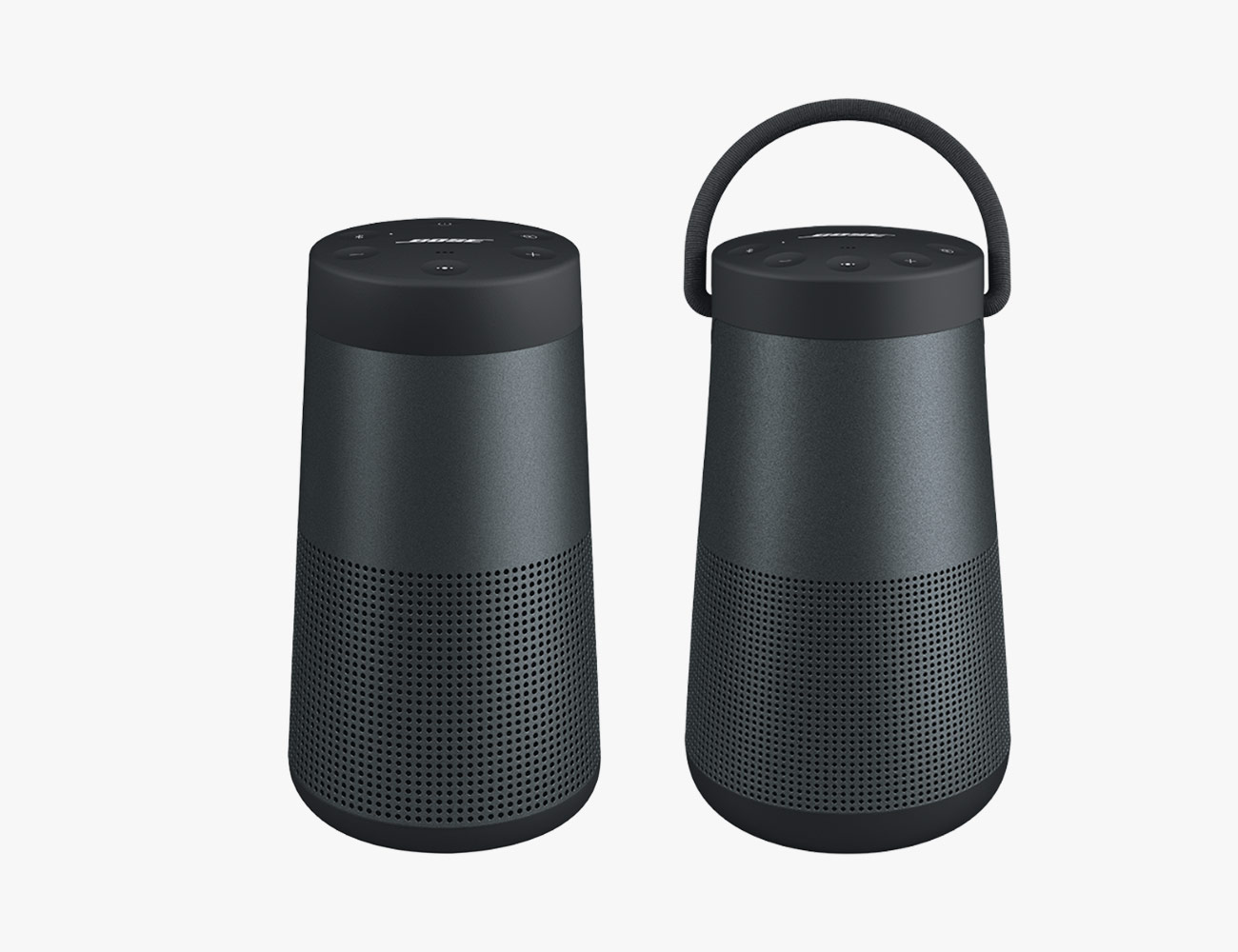
Bose SoundLink Revolve and Revolve Plus


Release date: mid-2017
Drivers: dual passive radiators, downward-facing transducer, deflector
Battery: up to 16 hours
Waterproof: IPX4 (splash-proof)
Charge: micro-USB
The Bose SoundLink Revolve and Revolve Plus are the company’s first 360-degree Bluetooth speakers. They’re loud and powerful, and they’re able to deliver accurate and spacious audio; each speaker is engineered with dual-opposing passive-radiators and an efficient transducer to eliminate distortion. They’re not the most rugged speakers on this list, but each still splash-resistant. And they’re simple design and easily-defined buttons make this traditional Bluetooth speaker very intuitive to use. It also has a built-in mic so you can answer calls without having to take out your phone — super convenient. For anybody who loves the Bose sound and style, the SoundLink Revolve and Revolve Plus are easy next buys. (Even if they look a little like lanterns.) | |

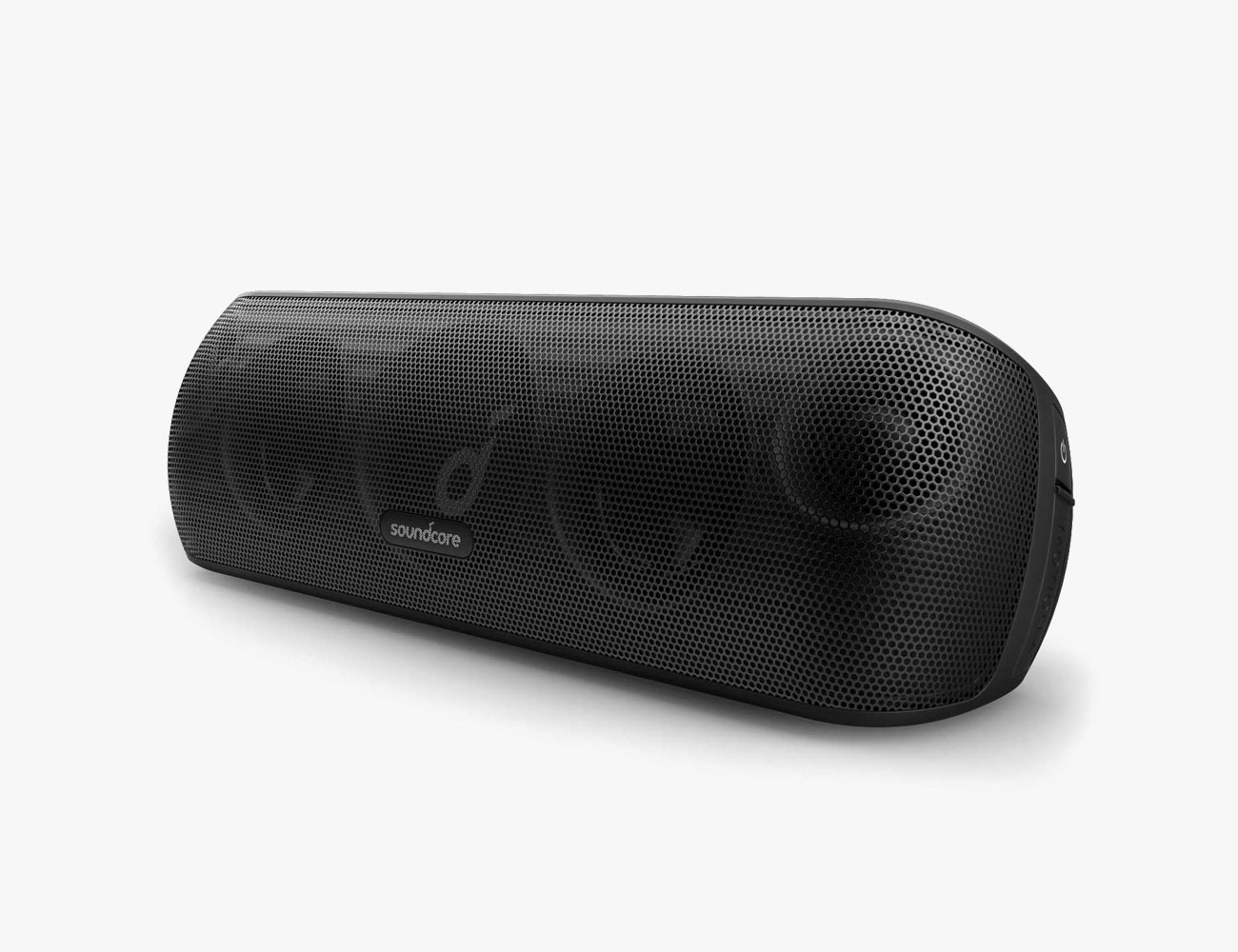
Anker Soundcore Motion+


Release date: mid-2018
Drivers: two high-frequency tweeters, two neodymium woofers, one passive radiator
Battery: up to 12 hours
Waterproof: IPX7
Charge: USB-C
The Motion+ might just be the best-sounding portable speaker at the $100 price point. It has four drivers, two high-frequency tweeters and two neodymium woofers, and a central passive radiator, and can play loud music with extra bass. It’s really rugged, with IPX7 water-resistance rating, so it’s no problem if it gets dropped out in the pool and left out in the rain. Since it’s one of Anker’s newer portable speakers, it also charges via USB-C |

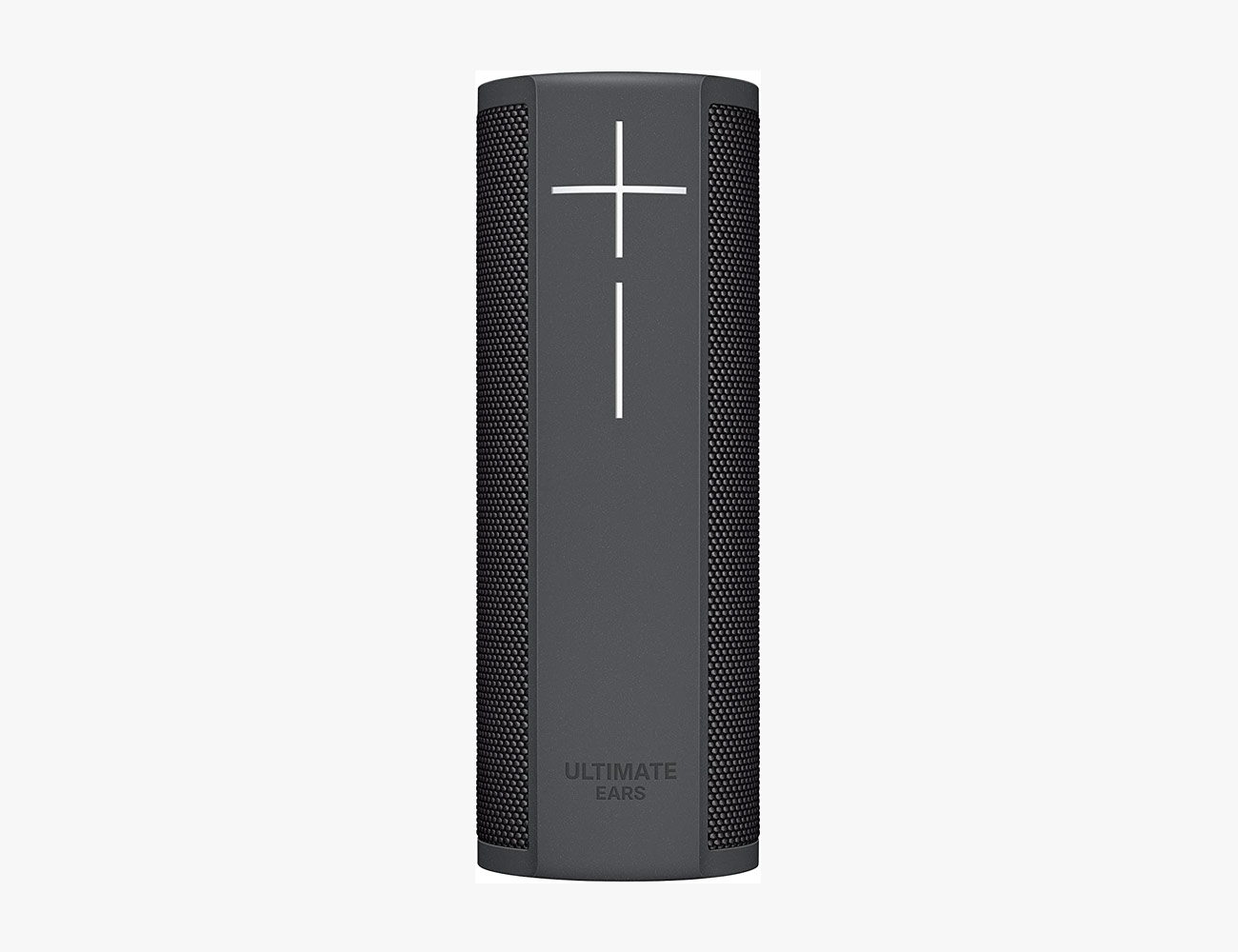
Ultimate Ears Blast Megablast

Release date: 2017
Max Volume: 90 dBC
Drivers: two 35mm active drivers, two 81mm x 39mm passive radiators
Battery: 12 hours
Waterproof: IP67
Charge: micro-USB, companion charger

The UE Megablast and UE Blast are the company’s first smart speakers and are equipped with both Wi-Fi and Bluetooth. When connected to Wi-Fi, they support Alexa voice commands and essentially work exactly like an Amazon Echo. When not connected to Wi-Fi, they function as normal Bluetooth speakers. When I originally reviewed these speakers in early 2018, my two criticisms were that they were too expensive and didn’t support Alexa voice commands with Spotify — both of the problems have now been rectified; UE has significantly dropped the price of each speaker (albeit slightly) and updated its software to support Spotify. As far as sound quality, they are similar to the company’s Megaboom 3 and Boom 3 speakers.

| |

Sony SRS-XB23


Release date: early 2020
Drivers: two full-range drivers, passive bass radiator
Battery: up to 12 hours
Waterproof: IP67
Charge: USB-C

The SRS-XB23 is the smallest and most affordable portable Bluetooth speaker in Sony’s 2020 Extra Bass series. It lacks the lighting strobes that the company’s larger speakers, SRS-XB33 ($150) and SRS-XB43 ($250), have, which helps keep the price of the SRS-XB23 down. It has a new more cylindrical design and packs two new full-range drivers and a passive bass radiator, as well a strap so that you can hang it on a chair or tree (Yes, it’s an ideal campground speaker.) One of my favorite things about the SRS-XB23, however, is that it’s the first Extra Bass speaker to charge via USB-C.

|

Ultimate Ears Hyperboom


Release date: early 2020
Drivers: six total (two 1-inch tweeters, two 4.5-inch woofers, two 3.5-inch passive radiators)
Battery: up to 24 hours (only 3 hours at max volume)
Waterproof: IPX4
Charge: USB-C

The Hyperboom is Ultimate Ears’s biggest, loudest and “boomiest” portable speaker to date. It’s no small fry, either, weighing in at 13 pounds and reaching up to your knees when standing on the ground. It’s a 270-degree, not a true 360-degree speaker, meaning it’s best placed in the corner of a room rather than the center. It’s also Bluetooth-only speaker, (no Wi-Fi, like the Sonos Move and UE Megablast), so it can’t be used as a smart speaker. The Hyperboom is a speaker that’s designed for people looking for a versatile party speaker that can be carried around the house.

|

Bose Portable Home Speaker


Release date: late-2019
Drivers: high-excursion driver, three passive radiators, deflector
Battery: up to 12 hours
Waterproof: IPX 4
Charge: USB-C

Bose offers a variety of smart home speakers that work Alexa and Google Assistant, like the Home Speaker 300 and Home Speaker 500, but they require constant power. Like its name idicates, the Portable Home Speaker is essentially a portable version of those speakers. It has built-in Wi-Fi and Bluetooth, meaning that you can streaming music away from Wi-Fi like any other portable speaker, or you can connect it to Wi-Fi and sync it with Bose other multi-room speakers. In this way, it’s Bose’s direct rival to the Sonos Move. It’s also the only Bose portable speaker that charges via USB-C.

|

Ultimate Ears Wonderboom 2


Release date: mid-2019
Drivers: four total (two active drivers and two passive radiators)
Battery: up to 13 hours
Waterproof: IP67
Charge: micro-USB

The Wonderboom 2 is the smallest speaker that Ultimate sells. It’s a true 360-degree speaker with a durable IP67 design — and yes, it floats if you throw it in water. Compared to its predecessor, the original Wonderboom, the second-generation model gets louder and has a three-plus-hour battery life, but it can also stereo pair with another Wonderboom 2. There’s also an Outdoor Boost mode button on the bottom of the speaker, which essentially boosts the bass.

|

JBL Xtreme 2

Release date: mid-2018
Drivers: two 2.75-inch woofers, two 20mm tweeters
Battery: up to 15 hours
Waterproof: IPX7
Charge: micro-USB

JBL has made some of our favorite Bluetooth speakers for years and its Xtreme 2 speaker is probably the best sounding and most rugged of the bunch. It’s powerful and bass-heavy, yet still sounds accurate, comfortably handling mid- and high-range frequencies. Through its companion app, you can pair multiple JBL speakers together. It has a built-in mic to answer phone calls. And it’s waterproof.

| |

Tucker Bowe

Tucker Bowe has been on Gear Patrol’s editorial team since 2014. As a Tech Staff Writer, he tracks everything in the consumer tech space, from headphones to smartphones, wearables to home theater systems. If it lights up or makes noise, he probably covers it.

More by Tucker Bowe | Follow on Instagram · Twitter · Contact via Email

This Big Bang E is a premium Wear OS smartwatch from Hublot

In the smartwatch market, the Apple Watch is currently the king thanks to its formula of packing innovative features with a stylish form factor. Samsung appears to come second as its own series of wearable boast handy functionalities. While Fitbit and other brands are likewise popular many consider these as fitness trackers instead. Google’s Wear OS, on the other hand, can never seem to catch a break. However, Hublot thinks it’s good enough for the Big Bang E.

Apple has its WatchOS, Samsung with Tizen, and the rest use their own proprietary operating systems. The Big Bang E appears to rely not only on brand recognition but on Google’s flexible software as well. Many might remember Hublot’s first attempt at a luxury-tier smartwatch a few years back. The $5,100 Big Bang Referee was a titanium-clad tribute to the 2018 World Cup Russia.

Now, it’s ready to dive right in all over again with an equally stylish wearable for 2020. This time Hublot is offering two versions of the Big Bang E. For $5,200, it comes in a stunning titanium case. Meanwhile, a few hundred more at $5,800 bags you a ceramic variant. The watchmaker adds its own flavor of watch faces as well as extra functions such as a lunar calendar.

Both trims of the Hublot Big Bang E sport a 42-mm OLED touchscreen with a sapphire crystal. Inside, the smartwatch is running on a Qualcomm Snapdragon Wear 3100 chipset with 1 GB of RAM and an 8 GB internal storage. Finally, its 300 mAh battery appears enough to last a full day of regular use.

Discover more about it: here

Images courtesy of Hublot

Business promotion on Instagram

Over the past 10 years, the number of people who register on social networks has been growing rapidly. Entrepreneurs also do not standstill. They understand that the development of their business in social networks guarantees a good increase in customers. Based on the type of business, you should choose the appropriate social media. For example, some of them shoot funny video reviews of clothes for TikTok, others buy Telegram group members and promote their channel there. But, as practice shows, most still use Instagram.

In this article, we will look at how to use Instagram to promote your business and how to get Instagram followers and likes on your profile.

Content:

  • The benefits of doing business on Instagram in facts
  • Useful features for doing business on Instagram
  • New feature
  • How do I increase the number of likes and followers on Instagram?
  • Conclusion
Advantages of doing business on Instagram in facts

If you decide to promote your business through Instagram, you can be congratulated on your successful choice. Here are some reasons for this:

  • 74% of influential people prefer to work with businesses via Instagram.
  • According to recent research, such marketing is 43% more effective and convincing than simple targeted advertising.

  • Ability to plan a marketing campaign and all its content.
  • Instagram is the cheapest form of marketing among the media community.
  • In 2018, approximately 863 000 000 users log on to their accounts for a month. In 2019, this number exceeded 1,000,000,000! This is 2 times more than on Twitter or 3 times in WhatsApp.
  • 71% of businesses today use Instagram, but only 40% of them invest time and money in the service.
  • 80% of users follow business profiles on Instagram.
  • In March 2019, 250 million users visited the site, clicked on ad posts, or otherwise responded to Instagram ads. At least 30% of users bought a product that they saw for the first time on Instagram. On average, 237,000,000 people.
Useful features for doing business on Instagram

  1. Follow to hashtags

Users can follow to hashtags. They will help you keep track of photos with a specific tag.

The follower clicks on a specific hashtag. A page in the form of a feed with stories and photos is displayed in front of it. There is a “Follow “button.

The service managers did a very convenient thing from the point of view of doing business. They have programmed special algorithms that allow users to track only popular and recently posted publications. This way, the service filters out unnecessary photos and stories posted by ordinary users that have nothing to do with the business.

  1. How do I promote my business through tags?

Over the past 5 years, many bloggers and entrepreneurs have used a plentiful number of hashtags on Instagram. In this regard, it was difficult to promote your product through hashtags, because there are many other publications under this label. It will be very difficult to put your publication in the top of queries for this tag. Therefore, if the Instagram admins detect a lot of tags on a user, then their publication will be considered as spam. First, don’t use too many tags. Second, carefully select hashtags based on your topic, focusing on the target audience. Don’t use the most popular tags like #instagood.

  1. Stories Highlights

Now stories will not disappear after publication. You can save them to an album. How does the function work? You posted a story, it gets lost in publications after a while. But these photos will be quickly available to followrs. They can find stories in your albums.

You can activate saving stories in your profile settings. To do this, go to the “Account” section, and then to “history Settings”. After that, all posts will be automatically saved to the album 24 hours after you post them. Your followers can see them by clicking on the clock icon in the upper-right corner of your profile.

What information can be published in albums?

  • company contacts;
  • contests and promotions;
  • information about services and products;
  • instructions for use of the product;
  • product reviews; event announcements;
  • menu;
  • offers that are relevant in the season;
  • videos and photos from events.
  1. Statistics on Instagram
  • The total number of views of your post.
  • The number of unique accounts where your message was viewed. Each user counts only once, even if they have viewed the post several times.
  • Clicks that redirect to the site.
  • Activity – the time when your readers are most active.

Thanks to these indicators, you can see the coverage of your post (the norm is 30-60% of the total number of followers). For example, you have 1000 followers, so the range should be from 300 to 600 people.

Activity helps you see how many users have seen a post, liked it, or left a comment. The norm is from 5% to 10% of the entire range. So, you have 3000 posts, then there should be up to 300 likes and comments.

If you check the General profile statistics, you can see the General indicators: impressions, coverage, profile views (people who viewed your profile), site visits. There is information about the audience (how old they are, what city they live in, when they visit Instagram). You can determine the most popular publications for any period of time.

Using statistics, you can find out when it is best to publish messages so that they have the widest possible coverage. What is the prevailing gender of your audience and age? You will see how effective the transition from your profile to your site is. Instagram profile statistics are extremely important, especially if you manage your company profile and want to sell your products as much as possible.

  1. Active hashtags and links to other accounts

You can put your main tag (but it can also be several hashtags) in the account header. It is also possible to add a mention of accounts to the profile header using @ before the nickname.

New feature

Recently, Instagram has added very useful features that will effectively help you promote services or products:

  • Shopping tags. You mark the product or result of your activity on the photo, and users click on the label and learn more about the description of products or services. You can also use these tags to transfer a potential customer to your online store.
  • Stories reposts. Users will share your information about your activities. With this feature, even more people can learn about your company.
  • Links to sites in stories. Now you can instantly forward Instagram users to another resource using the link.
How do I increase the number of likes and followers on Instagram?

In order for your products to be bought or you are in demand as a specialist, you need to live followers on your profile. Imagine that you have applied to the service to promote your account. You bought likes and followers there. But the goods from this did not sell better. There are a lot of such sites.

Many Instagram users who promote their business on this social network note that they had the most successful result on ALL-SMM. On this service, the quality corresponds to the price. Judging by the reviews, many people note the high quality is to buy Instagram views and followers. On average, the number of clients increases by 2 times.

Conclusion

Any company that sells products or performs services needs a page on Instagram in the 21st century. It is important for most businessmen to think about holding events aimed at increasing the number of followers and increasing their activity. Don’t waste your money on anything. Choose a reliable ALL-SMM service for the Instagram promotion of likes and followers.

Let the YuJet Surfer take you for a ride this summer

Folks lucky enough to have a sizeable outdoor space at home should welcome the summer months in style. Just recently, we were featuring some great items to enhance your isolation experience. There was this huge 85-inch Samsung Terrace – a weather-resistant TV – for entertainment. Another was a minimalist charcoal grill from Spark Grills. Up next is something awesome for those who plan to hit the beach soon. This here is the YuJet Surfer, which the manufacturer describes as an electric jetboard.

While the concept is not exactly new, YuJet hopes to cater to the needs of adventurous souls who love to carve through water. While most watersports rely on the wind and the waves, the Surfer hopes to deliver enjoyment anytime and anywhere. Roughly the size of a regular surfboard, experts will feel right at home. Meanwhile, newbies can also enjoy the ride with its user-friendly controls.

The Surfer promises a lightweight yet versatile platform courtesy of its carbon fiber construction and hydrodynamic design. This allows the powerful electric motor to push you up to speeds of 24 miles per hour. To ensure that the fun does not end prematurely, YuJet equips it with a waterproof and rechargeable 36-mAh lithium-ion battery.

A full charge should be good enough for up to 40 minutes or a 16-mile range. Its user-friendly nature makes it easy for owners to swap out the batteries, or attach and remove the quick-release FCSII fins. Pros can toggle Sport Mode to unleash its full potential, while casual users can go for the Beginner Mode instead. Finally, the YuJet Surfer connects to a wireless remote with a variable speed trigger.

Grab yours now – $9,999

Images courtesy of Yujet

Chasing lets you dive down deep from the surface with the M2 underwater drone

When regular drones begin to lose their charm, it might be time to check out another hobby. For those of you already planning your excursions once the COVID-19 pandemic ends, we got something awesome in mind. Given that it’s already summer, what comes to mind are usually the sun and sea. On the other hand, it could also be other bodies of water. It does not really matter because the Chasing M2 is here to spark your adventurous spirit.

After conquering the skies with quadcopters and other similar toys, its time to take the action underwater. Unless you prefer to personally get into the action with the proper gear, this might be the alternative you wanted all along. To ensure superior maneuverability, the Chasing M2 relies on eight thrusters in strategic locations.

This allows whoever is in control to enjoy dynamic 360-degree movement. In addition to its vectoring versatility, this underwater drone is compatible with various add-ons. Owners can keep the stock configuration for casual usage. Meanwhile, others can likewise equip it with attachments according to their industrial requirements.

Chasing lists various applications such as aquaculture inspection, search & rescue, underwater photography, and so much more. Providing the M2 power is a 97.68-Wh battery enough for roughly 2-4 hours of runtime. The M2 is capable of recording 4K videos and navigate through low-light environments with the help of its 4,000-lumen LED lights. It can even dive to a maximum depth of 330 feet and cruise effortlessly with a maximum speed of 3 knots.

Start your underwater exploration now: here

Images courtesy of Chasing

The iPhone May Be Losing Its Lightning Port. How Would That Even Work?

As October draws nearer and the inevitable (but potentially delayed) release of the next iPhone approaches, rumors have been heating up. Not only about that upcoming iPhone 12, but what Apple has planned for even further down the pipeline in 2021 and beyond. And one thread that keeps cropping up can seem equal parts unbelievable and inevitable: that after the next big redesign in 2021, the iPhone won’t have a charging port.

Rumors that 2021 will be the year the iPhone loses its Lightning port date back to 2019, but have resurfaced with additional leaks, and there’s plenty of reason to believe its true. Apple stayed the course on its controversial decision to nuke the beloved headphone jack in the name of thinness, simplicity, and upselling iPhone users to AirPods, and has already started abandoning the now eight-year-old connection method on its iPads which instead utilize USB-C. Its MacBooks have never bothered with the port, even though that meant that, for years, they were completely incompatible with the iPhone’s pack-in wired headphones. To top it all off, the European Union is throwing its considerable weight around in an attempt to pressure tech companies into adopting a single charging standard, which Apple has so far resisted.

It all leads to a juncture where Apple has essentially two choices to move forward if it wants to go beyond Lightning: adopt USB-C charging and appear to be following Android’s lead, or be the first to go full wireless and forge its own path. It’s easy to imagine which is more appealing.

But how would a fully wireless iPhone work? Only time will tell exactly, but there are a few assumptions that make a fair amount of sense. First, is that Apple would include a wireless charger with its new phones. It’s already standard practice to include a charger with a phone, of course, and Apple also provided a free 3.5mm-to-Lightning dongle when it killed off the headphone jack. Temporarily anyway.

Of course the Lightning port does more than just deliver a charge; it’s also used for data transfer, either by wire or directly with iPhone accessories like speakers, or your car. A pack-in wireless charger could help here as well. Phones and chargers, even wireless ones, pass information back and forth through the charging process, which companies like Google have already leveraged to send other information with devices like the Pixel Stand.

Alternatively, or in addition, Apple could produce dongles that, instead of plugging into your phone, plug into your old, wired accessories and make them wireless. In fact, there are already devices that do this. You can purchase a “CarPlay Adaptor” that allows you to wirelessly connect your phone to a car that otherwise only supports CarPlay through a wired connection. Such a device, which might run you a pretty penny going by existing adaptor prices, could bridge the gap for users who are extremely attached to their old accessories while Apple quickly pivots to pushing wireless connections on everything else.

Ultimately while the changeover to fully wireless would be painful, Apple can make it happen. With the full control of all hardware and software that Apple’s business model affords, it has the fairly unique capacity to make sweeping, transformative decisions about how its products work in ways that competitors like Google and Microsoft could never dream of. By the same token, you won’t have a choice when the wireless future invariably arrives. So might as well start bracing yourself now.

Note: Purchasing products through our links may earn us a portion of the sale, which supports our editorial team’s mission. Learn more here.
Eric Limer

Eric Limer is Gear Patrol’s tech editor. A resident of Weehawken, NJ, his current obsessions include mechanical keyboards, mechanical pencils and Formula 1.

More by Eric Limer | Follow on Instagram · Contact via Email

The Hottest Trend in Noise-Canceling Headphones Is Missing One Big Player

There’s a great, ongoing trend when it comes to noise-canceling headphones: they’re getting cheaper. Once focused solely on the high end, more and more manufacturers are releasing noise-canceling headphones that are $200 or less. But one major player appears to be sitting out the fight: the historical king and originator of the category, Bose.

Sennheiser and Sony are the two biggest players in the premium noise-canceling headphone market, that are taking this swing. Sennheiser’s Momentum Wireless headphones have a list price of $400, and Sony’s WH-1000XM3 cost $350 — though both can be found on the second-hand market for much cheaper. And perhaps to bring those buyers back into the fold, the brand-new Sennheiser HD 450BT and the Sony WH-CH710N both cost $200 and have similar acoustic and noise-canceling qualities of their flagship siblings, but with a larger percentage of plastic than their more luxe cousins.

Meanwhile, if you wanted to buy a pair of Bose noise-canceling headphones for less than $200 right now, you’d have to buy a pair of Bose QuietComfort 25, which aren’t wireless and are over five-years-old. Or you’d have to go the refurbished route, but even then you’re still unlikely to find a pair of QuietComfort 35s (Series I or II) that are under $200.

Instead, Bose has turned in a different direction. Last year’s Headphones 700 ($400) mark the first time in the company’s history that Bose’s flagship noise-canceling headphones weren’t in its QuietComfort line. It’s a move that has relegated Bose’s QuietComfort line to a position of “great-but-not-best.” Except those  “great-but-not-best” QuietComfort 35 IIs still cost $350.

So far there are no indications that Bose is working on a pair of sub-$200 noise-canceling headphones but with more manufacturers of noise-canceling headphones, Bose has more competition today than ever before. If it were to release a pair of $200 noise-canceling headphones, like Sennheiser and Sony, there’s little doubt the large, legacy brand could throw some serious weight around. But it seems like the giant may be content to leave that ground to its competitors, at least for now.

Note: Purchasing products through our links may earn us a portion of the sale, which supports our editorial team’s mission. Learn more here.
Tucker Bowe

Tucker Bowe has been on Gear Patrol’s editorial team since 2014. As a Tech Staff Writer, he tracks everything in the consumer tech space, from headphones to smartphones, wearables to home theater systems. If it lights up or makes noise, he probably covers it.

More by Tucker Bowe | Follow on Instagram · Twitter · Contact via Email

Want a Cheap New iPhone? You’ve Got Options

If you’re in the market for a cheap iPhone, Apple just started selling refurbished models of the iPhone XR that it released last year. You can get a 64GB refurbished model for $499, which is $100 less than what Apple is currently selling new models. Or you can get a 128GB refurbished model for $539, which is $110 off. Or you can get a 256GB refurbished model for $629, which is $120 off.

The obvious question for anybody considering a refurbished iPhone XR, is how does it compare to the iPhone SE, which Apple just released this past spring? In terms of price, the new iPhone SE, which starts at $399 for a 64GB model, is still the cheapest option. It’s also the smaller and lighter option (but not by much).

The iPhone XR and the iPhone SE are actually pretty similar in terms of power, speed, battery and camera capabilities, too, so the real differentiating factors are 1) how you want to interact with the iPhone and 2) if you care about bezels and a bigger, better display. The iPhone XR obviously has Face ID and more contemporary touch controls, while the iPhone SE has a Home button, which will be more familiar for people transitioning from older iPhones. The iPhone XR also has a significantly bigger display (6.1″ versus the iPhone SE’s 4.7″).

Apple is currently the refurbished iPhone XR in five colors: white, black, blue, orange and yellow. The larger 256GB capacity model is only available in black. Apple currently doesn’t sell refurbished models of the new iPhone SE, and I wouldn’t expect that to change in the next few months.

|

Note: Purchasing products through our links may earn us a portion of the sale, which supports our editorial team’s mission. Learn more here.
Tucker Bowe

Tucker Bowe has been on Gear Patrol’s editorial team since 2014. As a Tech Staff Writer, he tracks everything in the consumer tech space, from headphones to smartphones, wearables to home theater systems. If it lights up or makes noise, he probably covers it.

More by Tucker Bowe | Follow on Instagram · Twitter · Contact via Email

The Perfect Outdoor Office, 3 Ways

The weather is getting nicer and most of us are still working from home. So, why not bring your office outside? Heck, maybe take a roudtrip? It’s 2020 and the truth is that a lot of us can work anywhere (so long as there are a stable Wi-Fi connection and a reliable power source). Whether you just want to bring your workstation to your outdoor deck or you’re traveling and want to build a more robust remote workstation, we’ve rounded up the necessary gadgets and accessories to build the perfect remote workstation.

The Bare Essentials


Sometimes, whether in an airport lounge or a remote campground upstate, the nearest electric outlet or Wi-Fi signal is miles away. If you’ve got to check in with home base despite the trouble, these gadgets are the bare minimum you need to get up and running, at least for in the short term.

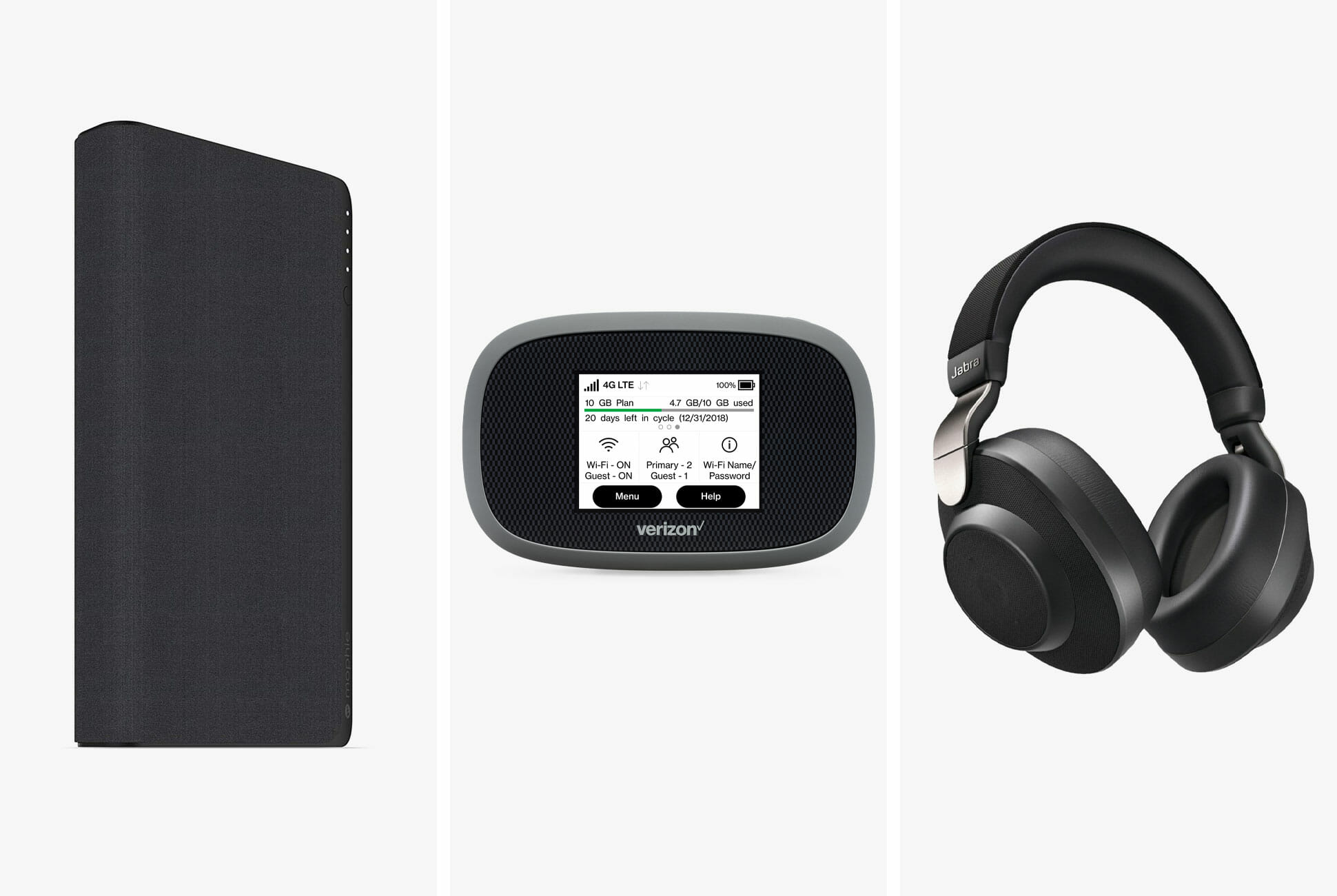
Verizon Jetpack MiFi 8800L: Don’t kill your smartphone’s battery by turning it into a hotspot. This is the best mobile hotspot for anyone willing to go on contract with Verizon which, if you need to be sure of your coverage, is a good bet. $200

Mophie Powerstation USB-C Power Delivery XXL: The 19,500mAh portable power bank can breath an extra 14 hours into your MacBook Pro. $149 $76

Jabra Elite 85h: Released in 2019, Jabra’s noise-canceling headphones have an 8-microphone array and deliver great call clarity. $250

Upgrade Options


If you want your workspace-to-go to be a little more robust than just the tools that meet the minimum of what you need to stay connected, keep your laptop on, and keep your brain focused, here are a few options that will take your setup from “good enough” to “good” and let you report in from the wilds for a few working days.

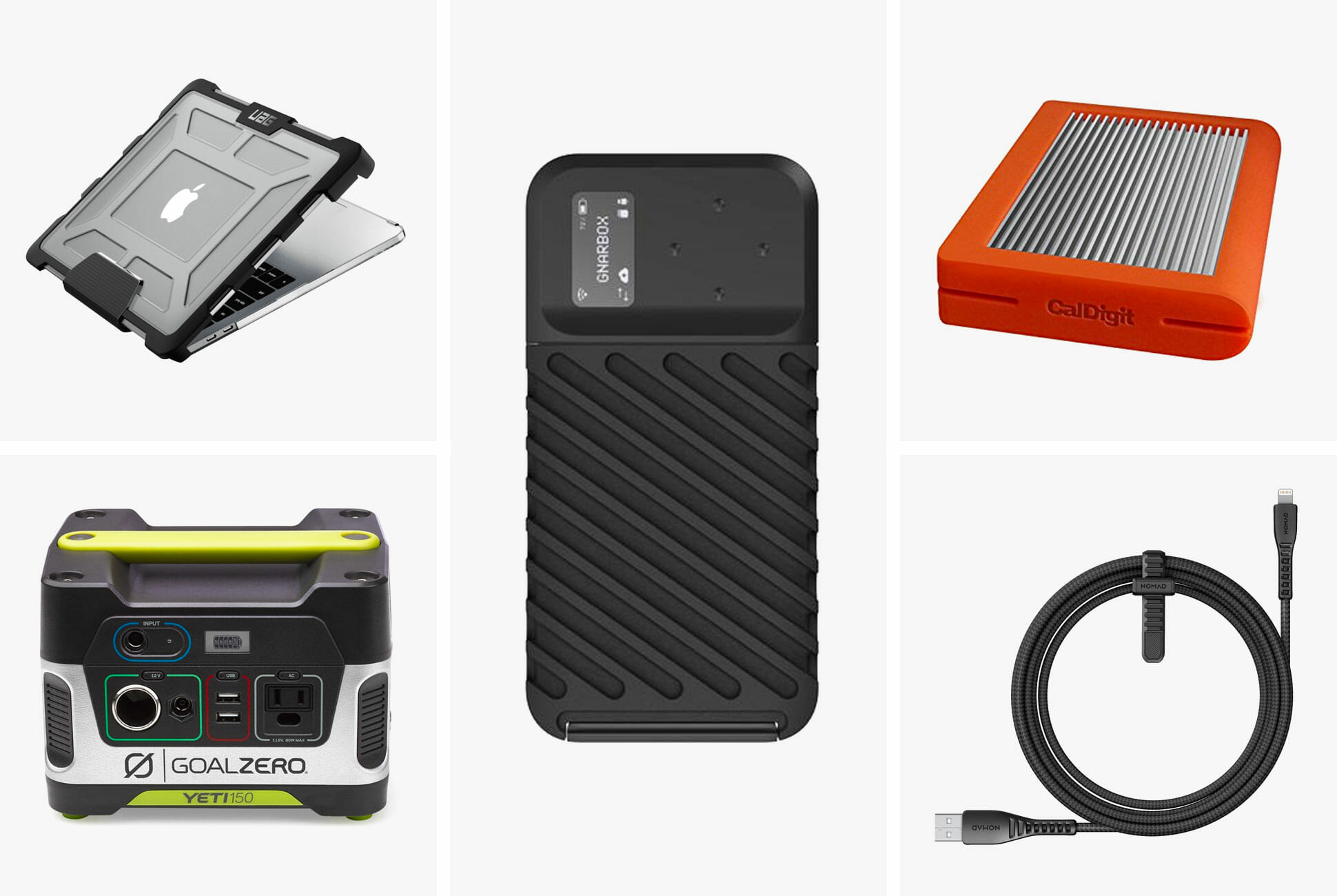
Goal Zero Yeti 150: This durable, 12-pound portable power station can charge a number of devices simultaneously. $200

UAG Plasma Case for MacBook Pro: This rugged case puts an armored shell and impact resistant bumpers on your MacBook Pro. It adds an extra layer of protection against drops and scratches. $80

CalDigit Tuff: This very fast and very portable hard drive is a great MacBook Pro accessory, but because it’s drop-proof and water-resistant, it’s ideal for folks working in hard environments. $160+

Gnarbox 2.0 SSD: A step beyond your average SSD, the Gnarbox gives photographers a quick-and-easy way to backup their photos and upload them to Instagram. $499+

Nomad Charging Cables: Don’t worry about cables breaking. Nomad’s rugged cables are wrapped with the same material that the military uses to guard against shrapnel and bullets. $40+

The Full Power Setup


For some people, the remote office is the main office. They don’t have the luxuries of free Wi-Fi or even an office chair, but they do wake up knowing they’re going to be somewhere and do something different — it’s a professional life that some revel in, and if you’re one of them, you probably require more substantial and dependable tools to stay connected.

Dell Latitude 7424 Rugged Extreme: Anybody living off the grid but still reporting into it will want a rugged laptop — and this is one of the best. It meets all the military’s rigorous standards, and it’s virtually indestructible. $3,499

EcoFlow River Bank Main Module: This is the highest capacity portable power bank that TSA allows you to fly with. But it also acts as a USB hub, so you can transfer files between your various devices. $599

Anker PowerHouse 200: Anker’s largest portable power station is perfect for a long weekend camp trip. It can charge your devices several times over and still have charges to spare. $230+

EcoFlow 21W Solar Panel: Eventually, you’ll have to charge the devices that are charging your devices. That’s where a solar panel comes in. $159

Lacie Rugged Raid: The Rugged Raid has a huge 4TB storage capacity, meaning photographers can shoot as much RAW as they want without worrying about running out of space. $255+

Anker PowerLine+ Charging Cables: Anker’s line of nylon-braided cables is significantly tougher than the stock cables that come with your smartphone or laptop. $13+

Goal Zero Sherpa 100AC: This rugged portable battery has a 25,600mAh capacity and can charge a number of your devices simultaneously, including your laptop. $225+

MCD-4800 Portable Global Hotspot This is definitely overkill for the vast majority of people, but it’s the ultimate mobile hotspot. It can get an LTE signal from anywhere in the world. $12,995

Bose QuietComfort 35 II: These are still the most comfortable noise-canceling headphones to date. If you need to wear headphones for many hours at a time, these are what you want. $350

Note: Purchasing products through our links may earn us a portion of the sale, which supports our editorial team’s mission. Learn more here.
Tucker Bowe

Tucker Bowe has been on Gear Patrol’s editorial team since 2014. As a Tech Staff Writer, he tracks everything in the consumer tech space, from headphones to smartphones, wearables to home theater systems. If it lights up or makes noise, he probably covers it.

More by Tucker Bowe | Follow on Instagram · Twitter · Contact via Email

Samsung lets you watch TV outdoors with its Terrace series

Reading the news, it’s clear that the 2019 novel coronavirus pandemic is not going away anytime soon. Even though there have been groundbreaking developments that appear promising, experts believe it will still take time to ensure that treatments and vaccines are safe. Hence, we have no choice but to isolate at home and just find different means of entertainment. Thankfully, Samsung understands that we would like to step out for a breath of fresh air occasionally. Thus, it’s presenting the Terrace – a huge TV specifically for outdoor use.

Traditionally, televisions are designed for indoor locations such as bedrooms, man caves, and living rooms. As such, the construction is just enough for dissipating heat and keep dust away from its internal components. This presents a challenge for homeowners who want one in spaces exposed to the elements. Given that moisture and direct sunlight are the biggest factors that contribute to corrosion, there aren’t a lot of options.

Therefore, it’s such an awesome move on the part of Samsung to present a solution nobody knew they needed. The Terrace, as the name implies, is a huge QLED smart TV that you can mount or set indoors or outdoors. The IP55-rated housing means that it will survive what regular models cannot.

For visibility even when its sunny outside, the panel boasts an anti-reflective coating and more than 2,000 nits of brightness. Our only gripe is the fact that it runs on Tizen OS instead of Android. Nevertheless, it produces vivid colors which look absolutely amazing thanks to its 4K UHD resolution and quantum dot technology. Samsung is offering the Terrace in three sizes: 55 inches, 65 inches, and 75 inches.

Purchase one now: here

Images courtesy of Samsung

How to Take Care of your Vinyl Collection

The immense popularity of music streaming has also, ironically, helped bumper vinyl sales. It turns out that the ease of listening to music these days, from services like Spotify, Apple Music, Tidal and Youtube, has actually cultivated a desire for people to have an analog listening experience. They want to physically hold, place and play a record, and then ultimately collect it; a growing vinyl collection can actually be shown off as decor.

A proper vinyl collection requires more care that storing CDs or, of course, digital music files; and there are a few fundamental things that every vinyl enthusiast, whether they have a large or small collection, should know. That way their records can sound great and last years to come.

Keep your collection cool and dry. Vinyl is, in layman’s terms, a type of plastic material and thus needs to be taken care of accordingly. To preserve any time of plastic you want to keep it in a cool, dark and dry climate. If the room where you’re storing your records is too hot or humid, they are more prone to bending or warping and thus can’t be played.

Never stack your records. Stored upright like books. There’s a reason why you rarely see records stacked on top of each other: it’s not good for them. It doesn’t matter whether they’re in their jackets or inner sleeves, stacking your records can lead to warping. The weight of each record puts unneeded pressure on the records, which can cause them to crack or bend. It’s not great for the album artwork on the sleeve, either.

Don’t touch the surface of the records. All of the musical information of record is stored in its grooves and anything, especially your hands, can affect the playback of the record. If you want the best possible sound quality, you should only handle the record by touching its outside edges or its inner label.

Don’t leave records out. A record should live in its sleeve and jacket, meaning the only time it should be out is when it’s playing. The idea is that this minimizes the chances or dirt and dust from getting into the record’s grooves.

Inner sleeves aren’t overkill. While polypropylene sleeves are probably better than paper sleeves (more durable, better protection, last longer), an inner sleeve serves an important purpose no matter the material. It prevents the record from shaking or scratching while inside the jacket, while also keeping out dust and other things that could potentially hide inside the record and affect its sound quality. Basically, don’t throw out your inner sleeves. And replace them when ripped, damaged or lost.

Place — don’t drop — your records back in their inner sleeves. When you’re done listening to a record, you want to place it back into its inner sleeve and jacket as carefully as possible. Quickly dropping it back in can damage the record as well as the sleeve.

Dry clean your records. Using a carbon fiber anti-static brush — like this one from the Turntable Lab — to clean your records is important and easy. It safely gets in the record’s grooves to get rid of dust and other particles that could impact sound quality. To properly clean, spin the record on the turntable and have the brush resting lightly on top. After a few seconds, carefully drag the brush off the record. (Here’s a helpful instructional video.) In an ideal world, you should use a brush to clean a record before and after each use.

Wet clean your records. Wet cleaning your records involves using a cleaning fluid — like this one from Pro-Ject — and a micro-fiber cloth, with the goal to remove dust, dirt and even fingerprints from your records. It takes more time than the dry brush method, but it gives the record a deeper clean. To clean, simply spray the solution on the record, wait a few seconds for it to seep into the grooves, and the dry the record by using the micro-fiber cloth and following the groves around. (Here’s a helpful instructional video.)

Tucker Bowe

Tucker Bowe has been on Gear Patrol’s editorial team since 2014. As a Tech Staff Writer, he tracks everything in the consumer tech space, from headphones to smartphones, wearables to home theater systems. If it lights up or makes noise, he probably covers it.

More by Tucker Bowe | Follow on Instagram · Twitter · Contact via Email

Every Free Streaming Trial You Should Know About

We’re streaming more content than ever. A recent Nielsen report said that since the quartine started in early March, streaming on televisions is up 85 percent, leading to an estimated grand total of 400 billion minutes of streamed TV minutes. (Oddly, people are streaming less music now that we’re home.) This means that you’ve likely exhausted most of the movies and shows that your current service, be it Netflix or Apple TV+, is offering, and you’re wondering what else is out there.

We’ve rounded up the most popular streaming services (including movies, shows and music) and what free trials they are currently offering. That way you can try something out without having to hand over your hard-earned dough.

Movies and Shows

Netflix


The free trial: Netflix currently offers a 1-month free trial.

Normal costs: Netflix offers three different plans. The Basic Plan costs $9/month, allows one person to be signed on at a time, and it delivers up to an SD quality stream. The Standard plan costs $13/month, allows two people to be streaming at once, and delivers up to an HD quality stream. And the Premium plan costs $16/month, allows four people to be streaming at once, and delivers up to an Ultra HD quality stream.

YouTube Premium

The free trial: YouTube Premium offers a 1-month free trial for first time subscribers.

Normal costs: YouTube Premium costs $12/month after the free trial is offer. Subscribers get ad-free access to all YouTube and YouTube Music content.

Hulu

The free trial: Hulu offers a 1-month free trial of its standard service or a 7-day free trial of its Hulu and Live TV package.

Normal costs: Hulu offers four different plans. Hulu Basic costs $6/month and gets you access to most of Hulu’s content, but there will be ads. Hulu Premium costs $12/month and gets subscribers ad-free content to most of Hulu’s content. Then you can bundle the Basic and Premium plans with Hulu’s Live TV package for $55/month and $61/month, respectively. You can bundle a subscription with ESPN+ and Disney+ for $13/month, here.

Amazon Prime Video

The free trial: If you’re an Amazon Prime subscriber, you get a free premium subscription of Amazon Prime Video.

Normal costs: If you’re not an Amazon Prime member, a subscription to Amazon Prime Video costs $9/month. (Amazon Prime costs $13/month or $6.50/month for students.)

Disney+


The free trial: Disney+ offers a 7-day free trial when you first sign up.

Normal costs: Disney+ costs $7/ month or $70/year. You can bundle a subscription with ESPN+ and Hulu for $13/month, here.

Apple TV+

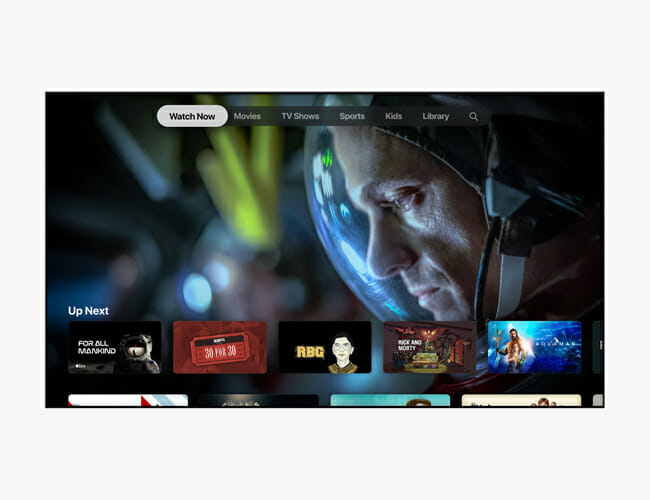
The free trial: You get a 1-year free trial of Apple TV+ when you buy an new Apple device. If you haven’t bought a new Apple device, you can get a 7-day free trial.

Normal costs: Apple TV+ costs only $5/month or $50/year, and that includes Family Sharing.

ESPN+

The free trial: ESPN+ does not offer a free trial anymore.

Normal costs: ESPN+ costs $5/month or $50/year. You can bundle a subscription with Hulu and Disney+ for $13/month, here.

Music

Spotify

The free trial: Spotify offers a 60-day free trial of Spotify Premium, its ad-free service. If you’ve been a Spotify Premium subscriber in the past, you are ineligible for the free trial.

Normal costs: Spotify Premium currently costs $10/month and $5/month for students.

Apple Music


The free trial: Apple Music offers a 3-month (90-day) free trial to first time subscribers, but you can actually get an extra month free if you buy through Best Buy.

Normal costs: Apple Music currently costs $10/month for individuals, $15/month for a family plan, or $5/month for college students.

Tidal


The free trial: Tidal typical offers a 60-day free trial to new subscribers of its HiFi and Premium plans, but right now you can get an even better deal: you can get the first four months of either plan for $1/month, tallying up to a grand total of $4. It’s technically not a free trial, but it’s a heck of an offer.

Normal costs: Tidal Premium normally costs $10/month and allows you to listen to over 60,000 tracks in standard sound quality. Tidal HiFi is the more premium subscription that normally costs $20/month and allows subscribers to listen to those same tracks in true lossless hi-fi sound quality.

Pandora

The free trial: Pandora offers a 30-day free trial of Pandora Plus and a 60-day free trial of Pandora Premium.

Normal costs: Pandora Plus costs $5/month and users can skip unlimited songs and download some songs for offline listening. Pandora Premium costs $10/month and allows subscribers to have everything the Plus plan offers, but they can download unlimited songs and they can also create and share playlists.

Amazon Music Unlimited

The free trial: New subscribers to Amazon Music Unlimited get a 3-month free trial.

Normal costs: Amazon Music Unlimited costs $8/month for Prime members or $10/month for non-members.

Note: Purchasing products through our links may earn us a portion of the sale, which supports our editorial team’s mission. Learn more here.
Tucker Bowe

Tucker Bowe has been on Gear Patrol’s editorial team since 2014. As a Tech Staff Writer, he tracks everything in the consumer tech space, from headphones to smartphones, wearables to home theater systems. If it lights up or makes noise, he probably covers it.

More by Tucker Bowe | Follow on Instagram · Twitter · Contact via Email

The Real Meaning Behind the Strange Symbol on Every Apple Keyboard

Welcome to Further Details, a series dedicated to ubiquitous but overlooked elements hidden on your favorite products. This week: the mysterious symbol on Apple’s Command Key.

If you’re over the age of about 25, there’s a good chance you didn’t learn how to use a computer on a Mac. If so, you probably never met the Command key — that large button with a pretzel-shaped logo next to your space bar — until well into your computer-using life . The Command key is arguably the most important key on a Mac, and required for just about every major keyboard shortcut. But what was the original purpose of this key that is unique to Macs and, more curiously, why does it look so weird?

The Command key dates back to the early 1980s, and its secrets are bound up in its original name: the “Apple key.” According to Andy Hertzfeld, an American software engineer who helped develop the original Macintosh computer, the original purpose of the key is to allow you to completely do away with a mouse. In combination with the other keys, it allows you to operate your machine without ever touching — or even having — a mouse, a situation that was far more common before the trackpad laptop took over computing.

The current pretzel-shaped design is used on Swedish signs to indicate an interesting point on a campground.

The name “Command” key, and the now-iconic symbol, are in part thanks to the whims of Steve Jobs. During the development of MacDraw, a drawing app that released with the Apple Macintosh in 1984, Steve Jobs decided the Apple name and logo were being overused, which was diluting the brand. The Apple logo, for instance, was everywhere — on every menu screen, all over the keyboard and, of course, directly on the Apple key. It was a situation Jobs described as “taking the Apple logo in vain.”

That decision meant there would also need to be an alternative logo, a duty that fell to Susan Kare, Apple’s resident bitmap artist at the time. Tasked with finding a symbol to represent the very abstract notion of “command,” Kare came upon the current now-iconic pretzel-shaped design, a shape used in Nordic countries to indicate a campground on a map. Almost 30 years later, the symbol still persists. And why not? Can you think of anything better?

Note: Purchasing products through our links may earn us a portion of the sale, which supports our editorial team’s mission. Learn more here.
Tucker Bowe

Tucker Bowe has been on Gear Patrol’s editorial team since 2014. As a Tech Staff Writer, he tracks everything in the consumer tech space, from headphones to smartphones, wearables to home theater systems. If it lights up or makes noise, he probably covers it.

More by Tucker Bowe | Follow on Instagram · Twitter · Contact via Email

The Trifo Lucy AI Home Robot Vacuum Cleaner Alerts You of Any House Intruder

The Trifo Lucy AI Home Robot vacuum is unlike any of its kind. It not only sweeps your house clean but also keeps it and you safe from intruders.

This innovative device works both as a surveillance camera and as a vacuum cleaner. It uses a 1080p HDR color camera and depth sensor to ensure clear day and night surveillance quality. An infrared camera allows it to stream live video and audio recording any time of the day straight to your smartphone via a companion app. Nothing gets past it as it is sensitive to movements and can identify people, pets, furniture, and even objects as small as one inch. It recognizes familiar faces in the household so it knows when there is an intruder and alerts you of the disturbance in real-time through a companion mobile app.

The Trifo Lucy AI Home Robot vacuum divides the room for you with the help of advanced scene understanding. Since it recognizes objects, it automatically names the room according to the objects it sees (beds for the bedroom and more). With smart recognition, Lucy devices efficient cleaning and patrol routes.

Not only is it great at surveillance it is efficient at cleaning too. It uses 3,000 Pa of suction and optimized brushes for a thorough clean. It is also easy to maintain since it comes with a larger dustbin and a washable primary filter.

Moreover, The Trifo Lucy AI Home Robot vacuum works with Alexa for hands-free operation. The mobile app also lets you set “no go” zones, define patrolling routes, and see, talk and listen to house members live when you’re away.

Get It Here

Trifo Lucy AI Home Robot VacuumTrifo Lucy AI Home Robot Vacuum

Images courtesy of Trifo

10 Spotify Tricks You’ll Wish You’d Known Sooner

Welcome to Product Support, a column devoted to helping you get the most out of the gadgets and software you already use.

Spotify is the biggest music streaming service in the world. If you’re like me, you’re one of those Premium subscribers and have been for years. Yet, Spotify is constantly updating, adding new features and changing its interface, so there’s a lot you probably don’t know — being a paying subscriber is more just than ad-free listening and offline downloads, after-all. We’ve rounded up the best tricks of the trade to help you get the most out of your Spotify subscription.

Manage your downloads like a pro.

One of the big perks of being a Spotify Premium subscriber is being able to download tracks, albums and podcasts directly to your device so you can listen to them offline, which is ideal for people who are on a capped cellular plan or know they’re going to a place with no service. The problem is that keeping taps on your downloads — especially if you download things across different categories, like albums, playlists and tracks — is the opposite of intuitive.

Even though Spotify doesn’t make it easy, you can still delete all your downloaded music. Open the app, go to “Your Libary” and select the big “Music” tab at the top of your screen. Then select either Playlists or Albums, whichever you want to manage, and then you’ll have to swipe up so that a search bar appears. Select the Filters button, then select Downloads from the drop-down menu. From here, you can see all your downloaded playlists and albums, and then remove them one by one.

Make a group playlist with your friends.

Spotify has a feature called “Collaborative Playlists” that lets you and a bunch of your friends share playlists with one another, with each individual able to add or delete songs, as well as reorder songs on the Collaborative Playlist. All you have to do is open one of your playlists, click the ellipses adjacent to the playlist, and select “Make collaborative.” Then tap the ellipses again and hit share.

[embedded content]

Try a group listening session.

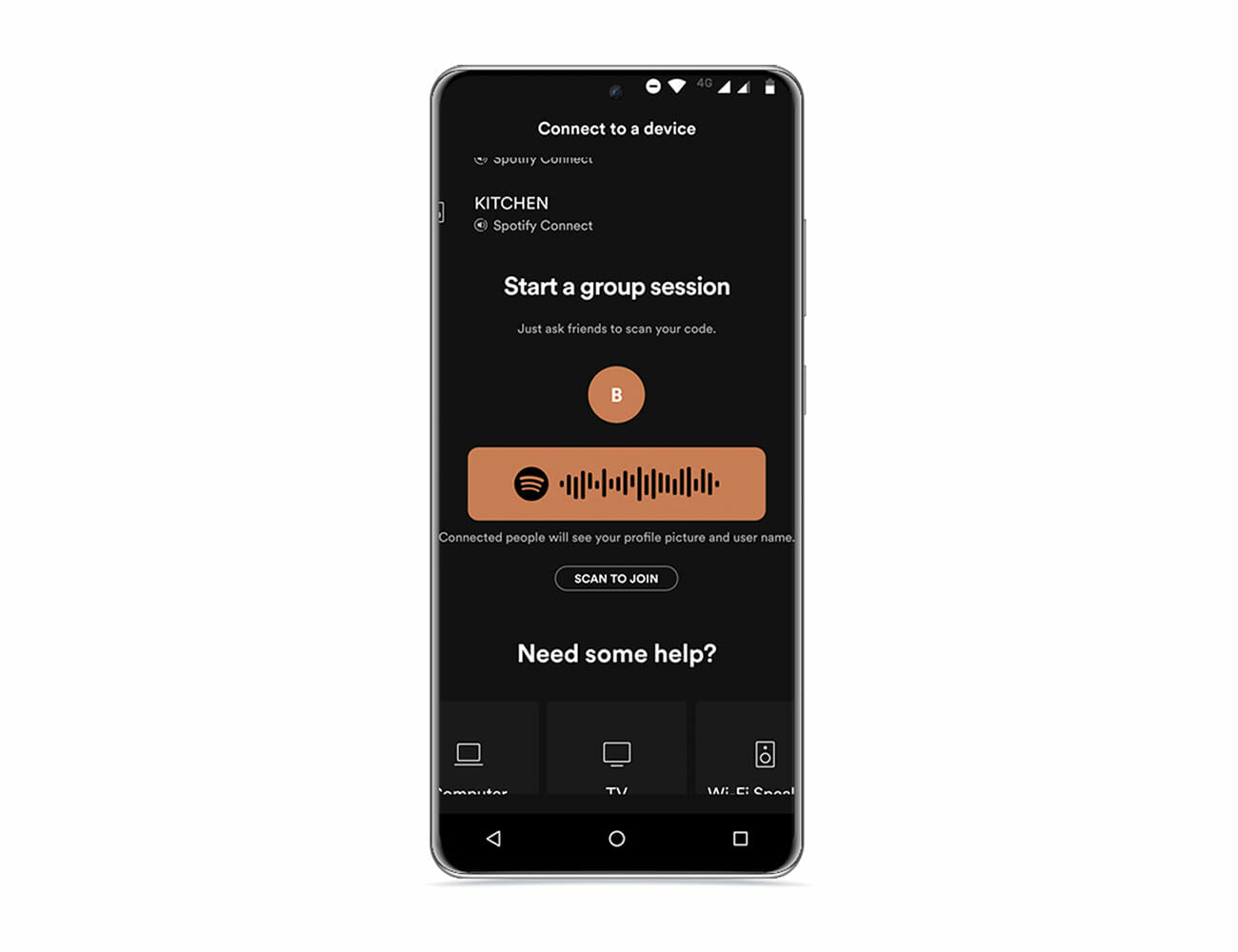
One of Spotify’s newest features is called Group Session. Instead of contributing to a playlist, like with Collaborative Playlists, a Group Session is more of a temporary listening session where anybody can take control of the music from their own smartphone. This can only be done with people who are in the same location since it involves scanning a QR code to sync up, and the music will only play from one source. If you want to create your own Group Session, simply play a song on Spotify, select the “Devices Available” logo and select “Start a group session”; you can also select “Scan to Join” if you want to join somebody else’s Group Session.

If you’re looking for a way to listen to music with a bunch of people at the same time, but you’re all in different locations (because maybe you’re quarantining), check out JQBX. It’s a web player and mobile app that lets you create a listening session where you can take turns selecting tracks while listening in unison. The catch is that everybody in the listening session has to be a Spotify Premium subscriber.

Reorder tracks (or delete them) from your favorite album.

If you’re a Spotify Premium subscriber, you can actually reorder the tracks on any music album, or simply delete them if you don’t ever want to listen to them again. For example, if you want “Snowchild” (track 5) and “Heartless” (track 7) to be track one and two on The Weeknd’s album After Hours</em, you can do that. Simply play an album, select the queue button in the bottom-right corner and from here you can actually delete tracks or reorder them.

Make sure you’re listening to the best quality audio.

Spotify streams 96 kbp/s audio tracks by default. Premium subscribers can upgrade to 320 kbp/s, which is a very high-quality stream (even if it’s still not CD quality). To adjust the audio quality, simply go to Settings > Music Quality > Very high.

[embedded content]

Set it up to sing along

One of the most requested features for Spotify has been real-time lyrics, which shows you the lyrics of the song that you’re listening to so that you can sing along in real-time. Spotify started rolling out the feature in early 2020 — but it’s not available for everybody just yet. In the meantime, the best way to achieve real-time lyrics is to download Musixmatch, register and connect your Spotify account. The interesting thing is that Spotify is partnering with Musixmatch, so in the near future you won’t need to open a separate app to have the lyrics overlayed in real-time. (Also, Musixmatch can’t show the lyrics to every song.)

Remove songs from your history

Long-time Spotify listeners will know that the streaming service keeps track of what songs, albums and artists you listen to, which is why you seem “similar” artists and albums suggested to you, even though you’ve never listened to them. It’s the same kind of thing that Netflix, YouTube and Amazon Prime Video all do. But maybe you’ve outgrown some things, or just want to start fresh. Unfortunately, Spotify still doesn’t let you delete your past listening history — even though it’s highly requested feature — but there is a little workaround. If you launch the Spotify app on your desktop, you can actually remove songs from your “Recently Played” section. Just right click on the song, artist, radio or podcast and select “Remove from Recently Play.”

Connect Shazam to your Spotify account.

There’s a good chance you haven’t used Shazam in years. The app first became immensely popular over a decade ago, circa 2008, as it was able to quickly listen to any song that was playing and identify it. Fast forward to 2020 and it’s easy to integrate Shazam into any of the most popular music streaming services, including Spotify. Once downloaded and registered (it’s free), you can link Shazam to your Spotify account and from then on, every time you Shazam a song you can directly add it to a Spotify playlist.

Keep your listening sessions private.

Anybody new to Spotify will know that all your friends can see what your listening to because the app’s Friend Activity is turned on by default. Well, it’s easy to turn off; just go to Settings, then Social and make sure to switch-on “Private Session.” When no, nobody can see what music you’re listening to.

Use Spotify like Pandora.

When Pandora first came out, one of the things that made it different as a streaming service is that it created playlists for you depending on the song or artist you were listening to. Well, Spotify can do the same thing. Just search for a song that you like, click the ellipses next to the song and select “Go to radio” from the drop-down menu. This effectively makes a radio station featuring other artists based around that one song.

Take advantage of Crossfade for parties.

If you’re hosting a party and preparing a Spotify playlist, one of the easiest-yet-most-important things to do is to turn on Crossfade. It’s a feature that lets you skip that dull silence at the beginning and end of each track, that way the songs just blend right into each other and the music seems like it never stops. To turn Crossfade on, all you have to do is select Settings > Playback > and adjust the Crossfade slider to the desired length. The higher the number, the more the songs will blend into each other.

Note: Purchasing products through our links may earn us a portion of the sale, which supports our editorial team’s mission. Learn more here.
Tucker Bowe

Tucker Bowe has been on Gear Patrol’s editorial team since 2014. As a Tech Staff Writer, he tracks everything in the consumer tech space, from headphones to smartphones, wearables to home theater systems. If it lights up or makes noise, he probably covers it.

More by Tucker Bowe | Follow on Instagram · Twitter · Contact via Email

Samsung’s Newest 4K TV Is Fit for the Outdoors (Or Your Patio At Least)

<!–Samsung’s Newest 4K TV Is Fit for the Outdoors (Or Your Patio At Least) • Gear Patrol<!– –>

The Terrace


Samsung just announced its first-ever outdoor 4K TV. It’s called The Terrace and it’s essentially an outdoor version of high-end line of 4K QLED TVs. It has an IP55 water-resistance rating, so you don’t have to bring it inside when the weather gets nasty. It comes in 55-inch ($3,499), 65-inch ($4,999) and 75-inch ($6,499) models, all of which are available to order right now.

The Terrace is integrated with some other features to optimize it for the outdoors. It has an anti-reflective coating to minimize glare. It has adaptive picture technology which Samsung claims will help it optimize its picture for its surroundings. It gets really bright (2,000 nits peak brightness) so you’ll still be able to see it even when it’s really sunny. And as Samsung predicts a lot of people watch sports and action movies on outdoor TVs, it has a high motion rate (240 Hz).

Because the sound quality on most 4K TVs isn’t the best, Samsung is also releasing an outdoor soundbar to work with The Terrace. It’s called, conveniently, The Terrace Soundbar and it can be mounted to a wall or directly to the Terrace TV. It has an IP55 rating just like the TV, so it can be a permanent fixture on your deck or patio. The soundbar comes in one size and costs $1,200.

Obviously, outdoor TVs are a niche category as not everybody has a permanent place in their backyard for a TV. But for those who do and are willing to pay over the odds (outdoor TVs are expensive after all), well, Samsung’s now in on the action.

Note: Purchasing products through our links may earn us a portion of the sale, which supports our editorial team’s mission. Learn more here.
Tucker Bowe

Tucker Bowe has been on Gear Patrol’s editorial team since 2014. As a Tech Staff Writer, he tracks everything in the consumer tech space, from headphones to smartphones, wearables to home theater systems. If it lights up or makes noise, he probably covers it.

More by Tucker Bowe | Follow on Instagram · Twitter · Contact via Email

<!–

–>

<!– –><!–

–>