All posts in “tech”

The Biggest Announcements from Today’s Big Apple Event

At WWDC 2021, Apple announced a string big software upgrades that will come to all your Apple devices in the coming months. This includes updates to iOS, iPadOS macOS, watchOS and tvOS. We’ve roundup all the biggest announcements below.

FaceTime is getting some big upgrades

With iOS 15, the next big iPhone software update coming, Apple is bringing some meaning updates to FaceTime. Specifically, your iPhone’s video calls are getting support for spatial audio and Portrait Mode, so that the people in your calls will sound and look significantly better. There’s a new feature called SharePlay that allows people on the same FaceTime call to easily share their screens, so you can share things watch the same movies and listening to the same music — all on the same video call. Also, Apple is introducing FaceTime Links, which will allow Android and Windows users to join FaceTime calls.

Your iPhone’s notifications.

Apple is introducing a feature called Notification Summary with iOS 15, which basically changes the way you can receive notifications on your iPhone. It will bundle a bunch of your “less pressing” notifications, such as news updates from apps like Yelp, ESPN and other third-party apps, and then deliver them all at the same time in a group. You can then quickly check out all your notifications at once. It should more important notifications, such as iMessages, won’t be lumped into this bundle.

This article is currently being updated…

This content is created and maintained by a third party, and imported onto this page to help users provide their email addresses. You may be able to find more information about this and similar content at piano.io

Disable Amazon’s Creepy New Echo Feature Before It Turns On

Welcome to Product Support, a column devoted to helping you get the most out of the stuff you already use.

Amazon is gearing up to launch Sidewalk, its new Wi-Fi network that pools people’s existing Wi-Fi networks together to create a stronger Wi-Fi network for the neighborhood. In theory, it allows nearby homes to share Wi-Fi networks so that their smart devices stay better connected. The problem is that it involves homes sharing their Wi-Fi with other homes, which brings about a lot of concerns about privacy.

Amazon promises that your privacy and security of paramount importance and claims Sidewalk’s Wi-Fi network is encrypted to protect people from viewing other people’s data — you can read their statement on privacy and security, here. But on the other hand, you could always just turn it off before it even kicks on.

Amazon is going to roll out Sidewalk on June 8 and when it does, it will be able to access the Wi-Fi of any home that has an Echo smart speaker or Ring smart security system.

If you don’t like the idea of Amazon sharing your Wi-Fi with your neighbors, and vice versa, don’t worry. You can prevent this from happening by just adjusting a setting in your Alexa app. It takes less than a minute. Here’s how.

  1. Open the Alexa app.
  2. Select the More tab (bottom-right corner).
  3. Select ‘Settings.’
  4. Select ‘Account Settings.’
  5. Select ‘Amazon Sidewalk.’
  6. Turn the ‘Enabled’ slider off.
    1. LEARN MORE

      This content is created and maintained by a third party, and imported onto this page to help users provide their email addresses. You may be able to find more information about this and similar content at piano.io
    Huawei Watch 3 Series: Premium craftsmanship running feature-packed HarmonyOS

    Since the trade ban in 2019, Huawei’s popularity is at an all-time low. Its supply chain for critical components was affected and it also lost access to a crucial software package. The Chinese tech brand is lauded for the outstanding craftsmanship and features of its gadgets. This is clearly intact on the Huawei Watch 3 and Huawei Watch 3 Pro – its latest wearables.

    The two are launching in select regions this June 2021. It’s still too early to call if the new operating system ecosystem is the second wind the company needs. Nonetheless, the smartwatches all look premium and tout telephony functionalities.

    Both variants have eSIM support, which means you can choose to leave your smartphone at home. Other specifications shared by the two include a 1.43-inch 466 x 466 round AMOLED display, wireless charging, and a comprehensive health monitoring system.

    These wearables also borrow some gimmicks from the Apple Watch series with the digital crown and side button. Similar to Samsung’s rotating bezel controls on their flagship smartwatches, you can also turn the digital crown to navigate the menu.

    The Huawei Watch 3 comes with a 46-mm stainless steel case in black PVD or silver. Depending on the edition, it ships with a silicone rubber strap, a leather strap, or a stainless-steel bracelet. On the other hand, the Huawei Watch 3 Pro has a 48-mm titanium case with two variants that are paired with either a leather strap or a titanium bracelet

    Those of you who are coming from the Huawei GT2 series are in for a rough surprise. It appears the Huawei Watch 3 and Huawei Watch 3 Pro cannot hope to match the 14-day battery life of their predecessors. Perhaps HarmonyOS and its expanded capabilities sap more power than before.

    Learn more

    [embedded content]

    Images courtesy of Huawei

    Love a Free Trial? Here’s What All the Most Popular Streaming Services Are Currently Offering

    We’re streaming more content than ever. A recent Nielsen report said that since the quarantine started in March 2020, streaming on televisions is up 85 percent, leading to an estimated grand total of 400 billion minutes of streamed TV minutes. (Oddly, people are streaming less music now that we’re home.) This means that you’ve likely exhausted most of the movies and shows that your current service, be it Netflix or Apple TV+, is offering, and you’re wondering what else is out there.

    We’ve rounded up the most popular streaming services (including movies, shows and music) and what free trials they are currently offering. That way you can try something out without having to hand over your hard-earned dough.


    Movies and Shows

    HBO Max

    HBO-MAX-gear-patrol-lead-feature

    The free trial: HBO no longer offers a free trial of HBO Max. That said, if you had an HBO Now subscription, there’s a good chance you’ll automatically get grandfathered into an HBO Max subscription for free. If you have an HBO subscription (or you get HBO Go) through AT&T, which owns WarnerMedia and HBO, there’s a small chance you can get either a one-month, three-month or one-year subscription for free; check your HBO subscription through the AT&T app (myAT&T). If you don’t get HBO through AT&T, there’s a strong likelihood that you’ll have to pay the full price for HBO Max.

    Normal costs: A subscription to HBO Max costs $15/month. HBO recently launched a cheaper version of HBO Max, which costs $10/month, but it comes with ads and doesn’t support 4K or offline downloads.

    LEARN MORE

    Netflix

    Samsung-Ax-Netflix-gear-patrol-feature


    The free trial: Netflix currently offers a 1-month (30-day) free trial.

    Normal costs: Netflix offers three different plans. The Basic Plan costs $9/month, allows one person to be signed on at a time, and it delivers up to an SD quality stream. The Standard plan costs $14/month, allows two people to be streaming at once, and delivers up to an HD quality stream. And the Premium plan costs $18/month, allows four people to be streaming at once, and delivers up to an Ultra HD quality stream.

    LEARN MORE

    YouTube Premium

    YouTube-Music-gear-patrol-lead-feature

    The free trial: YouTube Premium offers a 1-month (30-day) free trial for first time subscribers.

    Normal costs: YouTube Premium costs $12/month after the free trial is over. Subscribers get ad-free access to all YouTube and YouTube Music content.

    LEARN MORE

    Discovery+

    discovery plus

    Courtesy

    The free trial: First-time subscribers get a 7-day free trial when they sign up for Discovery+.

    Normal costs: There are two different tiers for paying Discovery+ subscribers. A $5/month subscription still comes with advertisements, while $7/month subscription is completely ad-free.

    LEARN MORE

    Hulu

    Hulu-logo-gear-patrol

    The free trial: Hulu offers a 1-month (30-day) free trial of its standard service or a 7-day free trial of its Hulu and Live TV package.

    Normal costs: Hulu offers four different plans. Hulu Basic costs $6/month and gets you access to most of Hulu’s content, but there will be ads. Hulu Premium costs $12/month and gets subscribers ad-free content to most of Hulu’s content. Then you can bundle the Basic and Premium plans with Hulu’s Live TV package for $55/month and $61/month, respectively. You can bundle a subscription with ESPN+ and Disney+ for $13/month, here.

    LEARN MORE

    Amazon Prime Video

    Amazon-Prime-Video-Gear-Patrol

    The free trial: If you’re an Amazon Prime subscriber, you get a free premium subscription of Amazon Prime Video.

    Normal costs: If you’re not an Amazon Prime member, a subscription to Amazon Prime Video costs $9/month. (Amazon Prime costs $13/month or $6.50/month for students.)

    LEARN MORE

    Disney+

    Disney-Plus-Deal-Gear-Patrol-Feature


    The free trial: Disney+ offers a 7-day (30-day) free trial when you first sign up.

    Normal costs: Disney+ costs $7/ month or $70/year. You can bundle a subscription with ESPN+ and Hulu for $13/month, here.

    LEARN MORE

    Apple TV+

    Apple-TV-Plus-gear-patrol-feature

    The free trial: You get a 1-year free trial of Apple TV+ when you buy a new Apple device. If you haven’t bought a new Apple device, you can get a 7-day free trial.

    (Note: Apple extended its free trial period for people who first signed up for Apple TV+ until July 2021, meaning they actually get a 21-month free trial.)

    Normal costs: Apple TV+ costs only $5/month or $50/year, and that includes Family Sharing.

    LEARN MORE

    Paramount Plus (Previously CBS All Access)

    paramount

    Courtesy

    The free trial: Paramount Plus offers a 7-day free trial when you first sign up for a monthly plan.

    Normal costs: Paramount Plus costs $5.99/month. It’s an “ad-supported” plan that will still show you a limited amount of commercials.

    LEARN MORE

    NFL Game Pass

    nfl game pass

    Courtesy

    The free trial: NFL Game Pass offers a 7-day free trial.

    Normal costs: NFL Game Pass costs $100 as a one-time payment, or $30 in four installments.

    LEARN MORE

    ESPN+

    ESPN-Plus-Gear-Patrol

    The free trial: ESPN+ used to have a free trial, but no longer offers it.

    Normal costs: ESPN+ costs $6/month or $60/year. You can bundle a subscription with Hulu and Disney+ for $14/month, here.

    LEARN MORE

    Music

    Spotify

    Are-You-Listening-to-the-High-Res-Audio-Gear-Patrol-Spotify

    The free trial: Spotify offers a 2-month (60-day) free trial of Spotify Premium, its ad-free service. However, if you sign up for PayPal, you can get a 3-month (90-day) free trial. If you’ve been a Spotify Premium subscriber in the past, you are ineligible for the free trial.

    Normal costs: Spotify Premium currently costs $10/month for an individual play. A Duo plan, which is two Premium accounts that’s designed for “a couple under one roof, costs $13/month. A Family plan, which includes up to six Premium accounts for “family members living under one roof,” costs $16/month. There are $5/month plans for students, too.

    LEARN MORE

    Apple Music

    Are-You-Listening-to-the-High-Res-Audio-Gear-Patrol-apple-music


    The free trial: Apple Music offers a 3-month (90-day) free trial to first time subscribers, but you can actually get an extra month free if you buy through Best Buy.

    Normal costs: Apple Music currently costs $10/month for individuals, $15/month for a family plan, or $5/month for college students.

    LEARN MORE

    Tidal

    tidal deal gear patrol lead featured

    Tidal


    The free trial: Tidal offers a 30-day free trial to new subscribers of its HiFi and Premium plans.

    Normal costs: Tidal Premium normally costs $10/month and allows you to listen tracks in standard (320 Kbps) sound quality. Tidal HiFi is the more premium subscription that normally costs $20/month and allows subscribers to listen to tracks in true lossless (1,411 Kbps) sound quality.

    LEARN MORE

    Pandora

    music-streaming-gear-patrol-pandora

    The free trial: Pandora offers a 30-day free trial of Pandora Plus and a 60-day free trial of Pandora Premium.

    Normal costs: Pandora Plus costs $5/month and users can skip unlimited songs and download some songs for offline listening. Pandora Premium costs $10/month and allows subscribers to have everything the Plus plan offers, but they can download unlimited songs and they can also create and share playlists.

    LEARN MORE

    Amazon Music Unlimited

    Amazon-Music-Gear-Patrol

    The free trial: New subscribers to Amazon Music Unlimited get a 3-month free trial.

    Normal costs: Amazon Music Unlimited costs $8/month for Prime members or $10/month for non-members.

    LEARN MORE

    Deezer

    deezer music app

    The free trial: Deezer offers a 3-month (90-day) free trial of both its paid subscription plays: Deezer Premium and Deezer Hi-Fi.

    Normal costs: Deezer offers two different paid subscription plays, Deezer Premium and Deezer HiFi, with the latter the one that allows you to listen to FLAC tracks in lossless quality. Deezer Premium costs $10/month and Deezer Hi-Fi costs $15/month.

    LEARN MORE

    Qobuz

    qobuz

    Qobuz

    The free trial: Qobuz offers a 30-day free trial for new users of its main subscription plan (called Studio Premier).

    Normal costs: The subscription plan normally costs $15/month (or $150 annually), but Qobuz is offering a deal where if you subscribe now, the plan will cost you $12.49/month.

    LEARN MORE

    This content is created and maintained by a third party, and imported onto this page to help users provide their email addresses. You may be able to find more information about this and similar content at piano.io

    How to Use Google Chrome As a Password Manager

    Chrome is the most popular web browser, and odds are you spend a lot of your time in there, from shopping on Amazon to checking your email to filing your taxes. One way you can get more out of it, is making use of the built-in Google Password Manager

    Google’s built-in password manager is more than just convenient. It enables you to create stronger passwords so that it’s less likely that your account gets hacked and your personal information stolen.

    In order to take advantage of Chrome as a password manager, you need to have a Google account and use Chrome as your web browser. After that, Chrome will automatically remember your usernames and passwords. And as long as you’re logged into your Google account and using Chrome, your usernames and passwords will sync across your various devices, like your smartphone and desktop.

    The catch, of course, is that in order to make use of it, you’ll have to ensure that you’re always using Google Chrome. If you don’t want your choice of password manager to lock you into a particular browser (or be part of Google’s information domain), then it’s time to look at independent alternatives. The downside there, is that you’ll probably have to pay at least a small fee for a similar suite of services.

    How to use Chrome’s password manager

    One of the great advantages of using a password manager is that it allows to quickly check a username and password for any of your accounts, in case you forget them or wish to share them. And you can easily change a password whenever you want.

    1. Open Chrome.
    2. Click your profile picture (in the top-right corner).
    3. Click the key icon (under your email).
    4. You can then see all your stored usernames and passwords.
      1. If you want to see your login credentials for a specific website, simply scroll down to that website and you’ll see your username and hidden password. To reveal your password, click on the eye icon and, when prompted, type in your Google password. You can easily change your password, too, by selecting the three vertical dot icons (located next to the eye icon) and selecting “Edit password” from the dropdown menu.

        If you don’t want Chrome to store your usernames and passwords — maybe because you’re using a different password manager, such as 1Password or LastPass — you can easily turn it off by deselecting the “Auto Sign-in” feature within Chrome’s password manager (which you get to by following the above steps).

        This content is created and maintained by a third party, and imported onto this page to help users provide their email addresses. You may be able to find more information about this and similar content at piano.io

      10 Most-Asked Questions About the New iMac, Answered

      The latest MacBook Pro and MacBook Air harness the power of Apple’s M1 chipset, and now the new iMac has been completely redesigned around it. The M1’s power and efficiency has enabled Apple to drastically reduce the size of key components, such as the thermal and cooling system, so that the new iMac is thinner and lighter (and yes, still more powerful) than ever before.

      And owing to its complete redesign, the M1 iMac is actually quite a bit different from all iMacs that have come before it. If you’re thinking about buying the new M1 iMac — available now, starting at $1,299 — you likely have a number of questions you want answered before moving forward. We answer the biggest ones below.

      How does the M1 iMac compare to the previous iMac?

      There are two major differences when comparing the new M1 iMac with the previous 27-inch iMac, which Apple released in the summer of 2020 (less than a year ago). The first is computing power. Apple claims that the M1 iMac has improved CPU performance up to 85 percent compared to the previous Intel-based Mac. And having used the M1 iMac myself, I believe it. Whether you’re browsing the web, touching up images in Photoshop or streaming shows on Apple TV+ — the new M1 iMac flies.

      The other big difference is the design. The M1 iMac has a new thin and lightweight design that’s about half the volume of the previous iMacs. On the flips side, the 27-inch iMac looks basically like every other iMac for the last eight years. Also, the M1 iMac comes in color.

      Is there any reason to buy the 2020 Intel iMac over the 2021 M1 iMac?

      Actually yes! Last year’s 27-inch iMac has a few key advantages. It’s more customizable because you can purchase it with significantly more storage and RAM configurations. It also has more ports than just USB-C, so there’s a change you won’t have to use a hub or adapter. And while both desktops have a very nice display, the 27-inch iMac’s is slightly nicer with its 5K display while the M1 iMac has a 24-inch display that tops out at 4.5K, though it’s unlikely most people would notice the difference.

      How does the M1 iMac compare to the M1 MacBook Pro?

      The M1 iMac and M1 MacBook Pro are actually very similar machines as far as performance goes because they have the same exact processor. In fact, the M1 iMac is very similar to the M1 MacBook Air as well; the primary difference between the devices is, obviously, their form factor. That, and additional fans help the M1 chip in the MacBook Pro and iMac rev up to fuller potential.

      Which M1 iMac configuration is best for most people?

      We generally recommend that you go with the configuration next up from the entry-level model — and this is definitely true as it pertains to the M1 iMac. If you go with entry-level model of the new M1 iMac, which costs $1,299, there are some distinct trade-offs. The entry-level M1 iMac doesn’t come with a Magic Keyboard that has Touch ID. It only comes with two ports instead of four. And it’s not available in all seven colors — it’s not available in purple, orange or yellow.

      How good is the M1 iMac’s webcam?

      It’s not 4K, but it’s a good webcam. The new M1 iMac has a 1080p webcam, which is an improvement on the 720p webcam that’s still on all the latest MacBook Pros and MacBook Airs. It’s actually a small improvement over the 27-inch iMac’s 1080p webcam, too, because of the M1’s image signal processor, which helps adjust the color so you look like your best self.

      How are the M1 iMac’s built-in speakers?

      The speakers on the new M1 iMac are actually a big upgrade on previous iMacs. Instead of the stereo speakers that have traditionally been on iMacs, the new M1 iMac has a six speaker system — consisting of two pairs of force-cancelling woofers, each of which are paired with a high-performance tweeter — so there’s a good chance you won’t need a separate set of computer speakers. Also, it’s the first iMac to support Dolby Atmos. (It’s not the first Mac to support Dolby Atmos, however, as that title belongs to the 16-inch MacBook Pro that was released last year.)

      Can I buy the Magic Keyboard with Touch ID separately?

      No, you can’t buy the Magic Keyboard with Touch ID separately. And even if you could, Touch ID would only work with other Macs that have the M1 chip. So, if you have an older Intel-based Mac and you were hoping to coup a new wireless keyboard with Touch ID, unfortunately that can’t happen. The reason being that the M1 chip enables a secure wireless connection between the Magic Keyboard and the Mac, and that can’t be replicated between an Intel-based Mac and the new Magic Keyboard with Touch ID.

      Can I use the M1 iMac as an external display?

      No. The new M1 iMac doesn’t support Target Display Mode, a feature that in the past has allowed you to use an older iMac as an external display.

      Can I use an external monitor with the M1 iMac?

      Yes, you can technically use one external monitor with the M1 iMac to turn it into a dual monitor setup. The M1 iMac supports one external monitor (up to 6K resolution with up to a 60Hz refresh rate, just like the Apple Pro Display XDR), which is different from previous non-M1 iMacs. For example, the 2020 27-inch iMac allows you to connect to multiple external monitors.

      Will I need to get a dongle?

      Probably, yes. The M1 iMac only has USB-C ports. The entry-level model has two USB-C Thunderbolt ports, while the higher-end models add an additional two USB-C 4 ports. This means that if you want to connect anything other than USB-C connection to the M1 iMac, you’ll need to buy a dongle or an adapter.

      Apple

      Apple M1 iMac (2021)

      SHOP NOW apple.com

      $1,699.00

      This content is created and maintained by a third party, and imported onto this page to help users provide their email addresses. You may be able to find more information about this and similar content at piano.io

      The Best and Biggest Gadgets of May 2021

      Spring is here, and so are the gadgets! Here are the highlights you should know about.

      BenQ TK700STi 4K Projector

      tech roundup

      BenQ

      The BenQ TK700STi is a new 4K HDR projector that’s a great fit for gamers who own latest-generation consoles, like the Xbox Series X or PS5. It can produce a native 4K picture — so there’s no need for upscaling, which is what most so-called 4K projectors do — so that games designed for those next-gen consoles can be shown off in all their HDR glory. The catch is that the TK700STi supports HDMI 2.0 rather than HDMI 2.1, meaning that it can only produce a 4K picture at 60Hz rather than 4K at 120Hz (but very few games actually take advantage of that yet). Few people will care about that those when looking at this 100-inch (max) screen.

      Price: $1,699

      LEARN MORE

      Nebula R2-D2 Capsule II Portable Projector

      tech roundup

      Nebula

      Nebula (and its parent company, Anker) celebrated Star Wars Day by releasing a R2-D2-inspired version of its miniature portable projector. The Nebula R2-D2 Capsule II is exactly the same as the company’s other Capsule II portable projectors — a max 100-inch picture, Android operating system, built-in speaker, 200 lumens of brightness and a bunch of connectivity options — but also has a R2-D2 paint job and makes some droid-like noises when you start it up. The catch is that the R2-D2 model costs $700, while the normal model costs $580. (However, if you order before May 9 you can get $80 off the special edition model by using the code: WSMAY4TH.)

      Price: $700

      LEARN MORE

      Toshiba C350 Series of Smart TVs

      tech roundup

      Toshiba

      Toshiba announced its new line of 4K smart TVs this week that promises a lot for every little. Each 4K TV supports HDR10 and Dolby Vision (but not HDR10+) and runs on Amazon’s Fire TV operating system. The C350 Series comes in a range of sizes (43″, 50″, 55″, 65″ and 75″), but the kicker is the 43″ model starts at $350, making it one of the cheapest 4K smart TVs that supports HDR that you can buy. These 4K TVs are available for preorder right now and will start shipping at the end of this month.

      Price: $350+

      LEARN MORE

      Hisense Dual-Cell LCD TV

      tech roundup

      Hisense

      Hisense gave us a first look at its upcoming TVs that are poised to rival OLEDs. They’re called dual-cell LCD TVs and, by sandwiches two liquid crystal panels on top of each other, they’re supposedly able to achieve OLED-esque levels of contrast, brightness and overall picture quality. The 75-inch TV will be available this summer and cost a cool $3,500. CNET‘s David Katzmaier has the full details, which you can read by clicking the link below.

      Price: $3,500

      LEARN MORE

      Google Pixel Buds A-Series

      tech roundup

      Google

      Google didn’t officially announce new wireless earbuds this week, but one of its official Twitter accounts (@Android) briefly did. Yep, for about 10-minutes, the company’s tweet announcing the all-new Pixel Buds A-Series was live. They look very similar to the company’s existing Pixel Buds, but the “A-Series” designation suggests that they’ll be more affordable than $179, which what the current Pixel Buds demand. The Pixel Buds A-Series will support fast pairing with Android devices and come in an all-white color — but that’s really all we know so far.

      You can read the full story on the leaked wireless earbuds on 9to5Google, below.

      Price: TBD

      LEARN MORE

      Bluesound Node and Powernode (3rd-gen)

      tech roundup

      Bluesound

      Bluesound announced new and refreshed versions of its Node and Powernode digital music streamers. They don’t look drastically different, but Bluesound decked each new model with a more powerful processor and an improved DAC that supports high-resolution audio (up to 24-bit/192kHz and MQA files). They also have touch preset controls so you can quickly start playing music (from your choice of source) just by touching the device. As before, the updated Node is designed to work with powered or active speakers, while the Powernode has a built-in power amplifier so it can work with a pair of passive speakers.

      Price: $549 (Node); $899 (Powernode)

      LEARN MORE

      Wyze Buds Pro

      tech roundup

      Courtesy

      Wyze has just announced its first pair of truly wireless earbuds, the Wyze Buds Pro — and they look almost exactly like Apple’s AirPods Pro, just in black. They also have many of the same features, such as active noise cancellation and wireless charging. The big difference is price. While Apple’s AirPods Pro cost $249 (although they’re often on sale for around $200), the Wyze Buds Pro are priced at just $60.

      The Wyze Buds Pro are available for preorder right now. Wyze expects them to start shipping in late July.

      Price: $60

      LEARN MORE

      Naim Uniti Atom HE (Headphone Edition)

      tech roundup

      Naim Audio

      Naim is releasing a version of its beautiful all-in-one streamer, the Uniti Atom, that’s optimized for audiophiles listening on headphones. It looks very much like the award winning streaming streamer — same LCD display and wonderfully large volume knob — but Naim engineered it with a new discrete headphone amplifier. It’s compatible with a wide-variety of headphones and works with most streaming services, including Spotify, Apple Music, Tidal and Qobuz. It supports AirPlay 2 and Chromecast streaming, too. If you want, the Uniti Atom HE can work as streaming preamp, as well, for those who pair it with a set of powered speakers or an integrated amplifier. It’s available now.

      Price: $3,290

      LEARN MORE

      Fluance A-Series Bookshelf Speakers

      tech roundup

      Courtesy

      Fluance is a Canadian-based audio company that’s best known for its line of affordable yet high-end turntables. This week, it announced two new pairs of powered bookshelf speakers that can partner those turntables. There’s the Ai41 and Ai61, the latter being the slightly larger, more powerful and better-sounding of the two — but besides that, they’re basically identical. Both speakers can be connected to any turntable with a built-in preamp. They have built-in Bluetooth so you can stream directly from your smartphone or computer. And you can even use them as TV speakers via an optical or RCA connection. The best part? Both pairs cost less than $300.

      Price: $249/pair (Ai41); $299 (Ai61)

      LEARN MORE

      SteelSeries Rival 5

      tech roundup

      Courtesy

      The Rival 5 is SteelSeries’s newest gaming mouse. It’s affordable and versatile, and should be a good fit for most gamers, whether they’re playing Valheim, Fortnite or Minecraft. It has a number of primary and thumb buttons, toggle bars, an RGB-backlit scroll wheel and a DPI switcher. It also has a TrueMove Air optical sensor for accuracy. Its lightweight and ergonomic design should make it comfortable, too. And at just $60, it’s a good chunk cheaper than a lot of other gaming and standard mice (like Apple’s $79 Magic Mouse).

      The Rival 5 is available now.

      Price: $60

      LEARN MORE

      Bose SoundControl Hearing Aids

      tech roundup

      Courtesy

      Bose announced its first-ever pair of hearing aids, the SoundControl Hearing Aids, this week, and they’re designed to help adults with perceived mild to moderate hearing loss. There are two really cool things about the SoundControl Hearing Aids. First, you can buy them and get them up and running without going to the doctor, getting a hearing test or prescription. And secondly, they cost $850, which is actually very affordable compared to most other hearing aids. According to Bose, the SoundControl Hearing Aids were “optimized, conceptualized, developed, and tested solely to improve hearing and does not stream music or calls.”

      Price: $850

      LEARN MORE

      Amazon Echo Show 8 and Echo Show 5 (Updated)

      tech roundup

      Courtesy

      Amazon quietly announced slightly refreshed models of its Echo Show 8 and Echo Show 5 this week. The larger of the two, the refreshed Echo Show 8, has been outfitted with a camera system with a wider field of view; this allows it to pan, zoom and track a subject as they walk around the frame (this is the same thing that the Echo Show 10 has been able to do). The Echo Show 5 has a slightly better camera, too, (but can’t do track the subject around the frame like the refreshed Echo Show 8); more significantly, Amazon dropped the price by $5.

      Price: $85 (Echo Show 5); $130 ( Echo Show 8)

      LEARN MORE

      Syng Cell Alpha

      tech roundup

      Courtesy

      The Cell Alpha is a high-end spaceship-looking wireless speaker that’s been designed by an ex-Apple engineer who worked on the HomePod (as well as a vast number of other Apple products). According to the company, it’s the world’s first “Triphonic” speaker, meaning it’s able to play spatial dynamic audio that’s way more immersive than traditional stereo. It supposedly sounds great on its own, but the company actually recommends pairing three together in a room for the best possible sound — which is a very expensive proposition. The speaker supports Spotify Connect and AirPlay 2, and it has dual USB-C ports for analog connections. It’s available for purchase now.

      Price: $1,799

      SHOP NOW

      Grado Labs Prestige “X” Headphones

      tech roundup

      Courtesy

      For years, Grado’s Prestige line of headphones have been some of our favorite affordable hi-fi headphones — and this week it’s released upgraded versions of every headphone in that line. They’ve been upgraded with the company’s new “X Driver,” which promises superior soundstage. They also come with more durable cables and thicker, comfier headphones, too. The new headphones, which are marked by the “x” at the end of their name, include the SR60x, SR80x, SR125x, SR225x and SR325. As for price, well, they’re still very reasonable.

      Price: $99 – $295

      SHOP NOW

      Amazon Echo Frames

      tech roundup

      Courtesy

      Amazon first released the Echo Frames, its first pair of Alexa-compatible audio eyeglasses, back in December. Fast forward to this week and the e-commerce giant is giving people new options to choose from. There are two sunglass options to choose from, with either classic and blue mirror polarized lenses. Or, if you’re looking for eyeglasses, you can now get Echo Frames with blue-light-filtering lenses. Every one of these new options costs $270.

      Price: $270

      SHOP NOW

      Apple Watch Pride Edition One Loop

      tech roundup

      Courtesy

      Apple launched a special Pride Edition version of its Braided Solo Loop for Apple Watch to celebrate and support the LGBTQ+ movement. You can also download a free Pride Woven watch face for your Apple Watch, so your watch and watch strap can match. Like the company’s other Braided Solo Loop, the watch strap costs $99 and has a unique stretchable design that allows you to quickly slip on and take off your Apple Watch.

      Price: $99

      SHOP NOW

      McIntosh MB20 Bluetooth Transceiver

      tech roundup

      Courtesy

      The McIntosh MB20 is the company’s latest accessory that’s designed to quickly and easily bring Bluetooth streaming to your current high-end audio system. It’s made by McIntosh, so it’s obviously a little nicer (and more expensive) than your standard Bluetooth receiver. It has ten times the range of a standard Bluetooth device and it’s one of the few Bluetooth receivers with a number of different analog and digital inputs and outputs. It also supports a number of digital codecs, such as AAC and aptX HD, for high-resolution streaming.

      Price: $500

      SHOP NOW

      Bang & Olufsen Beosound Explore

      tech roundup

      Courtesy

      Bang & Olufsen announced a new ultra-portable Bluetooth speaker called the Beosound Explore. The speaker is designed to be super rugged and drop resistant, and it is thanks to its hard anodised aluminium shell. It also comes with a small carabiner so you can attach to your backpack. Other than its unique design, the Beosound Explore’s standout feature is battery life — it promises 27 hours playtime, which is pretty incredible given its size. The speaker is available in three different beautiful finishes, including black, green and gray. Available now.

      Price: $199

      SHOP NOW

      Belkin Soundform Connect

      belkin soundform connect audio adapter

      Courtesy

      Belkin’s newest audio adapter, the Soundform Connect, connects to any traditional sound system or powered speaker — via an optical or 3.5mm audio jack — and adds AirPlay 2 support. With AirPlay 2 support, you can integrate the connected speaker or receiver system into a multi-room audio system with other AirPlay 2 speakers. It also lets you control your music with “Hey Siri” commands. If you think about it, this little $100 adapter does effectively the same job as the $449 Sonos Port (only the Soundform Connect can’t integrate your speaker or receiver into a Sonos multi-room system, obviously), making it a pretty good deal for anybody with an iPhone who subscribes to Apple Music.

      Price: $100

      SHOP NOW

      Anker Nano II Wall Adapters

      tech roundup

      Courtesy

      Released in 2018, Anker’s Nano wall adapters were the first to feature GaN (gallium nitride), a material that is significantly more energy-efficient and space-efficient than silicon, which allowed the wall adapters to be smaller, lighter and still really powerful. Three years later, Anker has released a line of Nano II wall adapters featuring GaN II, a next-generation material that helps the wall adapters be even more energy efficient and better regulate its temperature. Basically, Anker’s new wall adapters are still tiny, but even more powerful. The Anker Nano II lineup consists of three wall adapters: a 30-watt model ($30), a 45-watt model ($36) and a 65-watt model ($40). All three wall adapters have a single USB-C port and come with PowerIQ 3.0 technology, which helps manage/control the wattage.

      All three new wall adapters are available for preorder and are scheduled to ship in June.

      Price: $30 — $40

      SHOP NOW

      JLab JBuds Frames

      tech roundup

      Courtesy

      The JLab JBuds Frames are neat because they are essentially clip-speakers; they allow you to turn any pair of eyeglasses or sunglasses that you already own into a pair of audio glasses akin to Bose Frames. The kicker is that the JBuds Frames cost just $49, which is a much cheaper proposition than the Bose Frames, which can cost 3x to 4x that amount.

      Price: $49

      SHOP NOW

      Sony SRS-XB13

      tech roundup

      Courtesy

      The Sony SRS-XB13 is the company’s smallest portable Bluetooth speaker — it’s effectively half the size of a soda can. It’s the next-generation version of the SRS-XB12, which looked identical, but the SRS-XB13 now charges via USB-C and delivers true 360-degree sound. Other than that, the SRS-XB13 is still a good portable speaker for people looking for a small and affordable option. If you’re looking for more room-filling sound, we recommend spending a little more on Sony’s SRS-XB23, which you can pick up for just below $100.

      Price: $59

      SHOP NOW

      Wyze Night Light

      tech roundup

      Courtesy

      The Wyze Night Light is the company’s newest affordable smart light — you can get a 3-pack for $20. The Wyze Night Light is unique for a few reasons. First, each light is battery-powered that you recharge via USB-C; Wyze claims the each light can last 128 days by itself or 85 days when it’s linked with other Wyze Night Lights. Second, each light can be placed wherever you want thanks to an included mounting system — no need to worry about wires or the location of an outlet. And third, each Wyze Night Light has a built-in light and motion sensors, so they’ll automatically turn on when it’s dark and/or motion is detected.

      Price: $20 (3-pack)

      SHOP NOW

      Sonos One SL (Updated)

      tech roundup

      Courtesy

      Sonos didn’t give us an entirely new speaker this week, but it did update the One SL, which is a One without built-in microphones . That said, you won’t notice the update. The refreshed One SL looks exactly the same and has the same functionality as before. Sonos gave the speaker a new wireless radio to make it more power efficient. It also removed some excess plastic from the speaker’s base to make the product more recyclable. The price of the new One SL remains the same.

      Price: $179

      SHOP NOW

      Native Union Rise Dock

      tech roundup

      Courtesy

      The Rise Dock isn’t a MagSafe charging stand on its own. It’s a stand that requires you to own Apple’s MagSafe Charger, which Apple sells for $39, to work. That said, the weighed stand is able to house Apple’s wireless charger in such a way that it elevates your iPhone 12, which is pretty cool. Plus, its dark finish will match perfectly with anybody who has any of Apple’s space gray accessories.

      Price: $50

      SHOP NOW

      Kanto YU Passive Bookshelf Speakers

      tech roundup

      Courtesy

      Kanto launched two new sets of passive bookshelf speakers, both of which cost less than $200. There’s the YU Passive 5.25″ ($199/pair), which features a 5.25-inch Kevlar woofer and 1-inch silk dome tweeter, and the YU Passive 4″ ($159/pair), a 4-inch woofer and 1-inch silk-dome tweeter. The two sets of speakers look basically identical, other than the YU Passive 5.25″ being slightly larger, and being passive bookshelf speakers, they’re also very flexible. You can use them as desktop speakers if you a DAC/amplifier, or you can use them as TV or stereo speakers with a receiver. Available now.

      Price: $159 (4″); $199 (5.25″)

      SHOP NOW

      This content is created and maintained by a third party, and imported onto this page to help users provide their email addresses. You may be able to find more information about this and similar content at piano.io

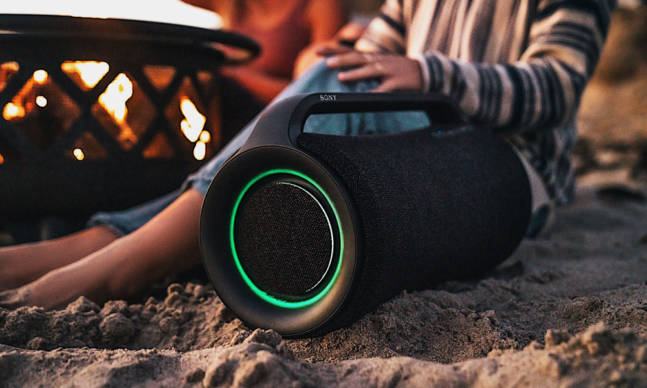
      Sony Is Kicking off Summer With a New Line of Wireless Speakers

      When it comes to proper warm weather shindigs, you only need a few things to make sure everyone is enjoying themselves. You need: good food and company, plenty of libations and entertainment and, most importantly,…

      The post Sony Is Kicking off Summer With a New Line of Wireless Speakers first appeared on Cool Material.

      Despite its classic look the Sequent Titanium Elektron is an innovative smartwatch

      Google’s 2021 I/O event was full of exciting updates regarding many of its products. One of the most interesting surprises was Samsung’s decision to switch back to Wear OS from its Tizen platform. On the flip side, this announcement dashes hopes for a Pixel smartwatch. While waiting for what comes next, we found out about this cool Kickstarter project called Titanium Elektron.

      What the Titanium Elektron has going for it is its traditional watch face. Swiss smart technology group Sequent is behind it development and promises to deliver premium design and craftsmanship and address a longstanding gripe with smartwatches.

      Although it ships with a charger, if it stays on your wrist most of the time, you won’t need to plug it in. It relies on Sequent’s Supercharger2 hybrid self-charging mechanism. The open caseback shows what appears to be an oscillating rotor similar to that of an automatic calibre.

      It may look like an analog GMT timekeeper, but it packs cutting-edge tech for tracking activities and more. Sequent will be offering three versions of the Titanium Elektron. All three will ship in a 42.10-mm grade-2 titanium case with an option for a black DLC variant and sapphire crystal.

      The standard Titanium Elektron features basic sleep/activity tracking, while the HR/HR Viu model support heart rate and blood oxygen monitoring. The first two sport a matte black dial, while the HR Viu uses a transparent material to expose the inner workings of the smartwatch.

      Super-LumiNova lume on the hour markers and hands help with low-light visibility. You can pair the Titanium Elektron with your compatible device via Bluetooth. We think it’s a great choice for people who are not yet ready to go full-digital just yet.

      Get it here

      Images courtesy of Sequent

      Every Reason You Should Go Back to Wired Headphones

      A version of this story first appeared in Gear Patrol Magazine. Subscribe today for more stories like this one, plus receive a $15 gift card to the Gear Patrol Store.


      My favorite headphones don’t adhere to recent trends. They’re the Massdrop x Sennheiser HD 6XXs, and unlike the latest from Bose or Sony, they do not ‘actively cancel’ noise; they just blast it into my ears. And with their open-back design, not all of it gets there. Unlike AirPods (vanilla or Pro), they do not play nice with an iPhone at all. Wireless protocols? Please, these babies are wired into my desktop with a 3.5mm plug. And while some headphones will contort into compact shapes and fit inside a carrying case, these cans are remorselessly large and unbending. It’s a decidedly low-tech experience. I can’t recommend it enough.

      Courtesy

      HD 6XX Headphones

      Massdrop x Sennheiser drop.com

      $220.00

      Don’t get me wrong, AirPods are great. But like many modern gadgets, they’re designed for a specific purpose. When the iPod and its ilk made music mostly mobile for a whole new generation, headphones evolved to match that mobility. Wires that snag on doorknobs gave way to Bluetooth. Form factors shrunk to better suit backpacks and pockets. Once specially designed for pilots, active noise cancellation was turned to attack the sounds of the modern commute. But if you, like me, have not made a commute in over a year, it might be time to re-evaluate your priorities.

      Once you’re tethered to a desk with no coworkers in sight, a great number of the advantages of high-end wireless headphones evaporate and a different animal reigns supreme. Wired headphones never run out of battery life. They’re impossible to misplace. Giant ear cups are almost cartoonishly comfortable. And the massive drivers they accommodate sound effortlessly better than anything you can squeeze into a “bud.”

      m2w

      Henry Phillips

      Wired headphones will never run out of battery and they’re impossible to misplace.

      Open-back headphones, the king of the form, take the logic to its excellent extreme. With skeletonized ear cups to let the air flow freely, the speakers can operate at peak efficiency, at the cost of a little sound leakage no one will be around to hear. And they are almost always more affordable than their more portable cousins to boot. Top of the line, wireless noise-cancelling cans like Bose’s Headphones 700 and Sony’s WH-1000XM4 will run you well over $300, even on sale. Airpods Pro clock in at a more modest $249, full price. But for just $220 you can get a roomy pair of HD 6XXs that you will literally never have to charge. And options like the honkin’-huge Audio-Technica ATH-AD700X get you all the way down toward $120 without throwing quality or comfort out the window.

      Word of warning: going this route can open a Pandora’s box. A pair of nice wired headphones may lead to a dedicated headphone amp, and the next thing you know, you’re spending four figures on a portable music player with multiple DACs so you can listen to your FLAC files on the go.

      Maybe that’s a bottle you’ll enthusiastically uncork. For me, though, it’s about more than just audio quality and comfort. A nice pair of wired headphones is truly a vibe. When I sit down at the desk in my home office, there’s a dozen different things I might do. Maybe I’ll bleed a few hours of my life into Twitter, or stare blankly at my inbox as the number ticks up. Maybe I’ll get right back up, or sink into my phone despite the giant screen in front of me.

      A nice pair of wired headphones is truly a vibe.

      But when it’s time to actually get to work, the first order of business is always the same: take my big, old headphones off their nail on the wall, pin the wire under my arm and start typing. At home, surrounded by distractions like the cat and the fridge and literally everything besides what I need to be doing, this ritual is an invaluable part of getting my brain into second gear. No fancy wireless pea-sized jobby can do that.

      Massdrop x Sennheiser HD 6XX Headphones

      Courtesy

      HD 6XX Headphones

      Massdrop x Sennheiser drop.com

      $220.00

      This content is created and maintained by a third party, and imported onto this page to help users provide their email addresses. You may be able to find more information about this and similar content at piano.io

      Do Apple’s HomePods Support Lossless Audio?

      Come June 2021, Apple is updating Apple Music in a big way. Specifically, it’s adding lossless audio tracks and making them available to all Apple Music subscribers for free. This means that not only is Apple Music set to become a rival to other lossless streaming services (such as Tidal, Deezer, Qobuz, Amazon Music HD and the upcoming Spotify HiFi), but it’s also going to be the cheapest lossless option — a subscription to Apple Music will continue to cost $10/month.

      But can you play that lossless music on your HomePods? No. Not yet.

      When this big lossless update rolls out, Apple Music subscribers will gain access to roughly 20 million ALAC (Apple Lossless Audio Compression) tracks, with that number set to rise to 75 million tracks by the end of 2021, which are audio tracks that are roughly CD quality (16-bit / 44.1kHz). Apple says that you’ll be able to stream even higher-resolution audio tracks (up to 24-bit / 192kHz), but you’ll need to have an external DAC that supports it to experience them.

      Do HomePods Play Lossless Audio?

      Not right now, but they will.

      Apple initially stated the both the HomePod and the HomePod mini would not be able to play lossless audio tracks from Apple Music, but the company has since backtracked on that statement. Via a support document, Apple now states that with a future software update, both its smart speakers will be able to support ALAC files and thus will support lossless streaming. Currently, HomePod and the HomePod mini only support AAC audio files, which is why they aren’t able to play lossless tracks at the moment.

      Do AirPods, AirPods Pro or AirPods Max Play Lossless Audio?

      No, and they won’t be able to.

      According to Apple, AirPods, AirPods Pro and AirPods Max (as well as all its Beats headphones) will all not be able to play lossless audio tracks because their Bluetooth connections cannot support it. The kicker is that the AirPods Max will not be able to play lossless audio tracks even when wired into your iPhone, iPad or Mac.

      The reason is the AirPods Max only have a Lighting jack and not a 3.5mm jack, so you can’t use Apple’s Lightning-to-3.5mm adapter ($9), which has a built-in DAC that supports lossless audio (up to 24-bit/48 kHz). So if you use Apple’s special adapter you’ll be able to listen to lossless audio on other wired headphones, but just not on its AirPods Max.

      This content is created and maintained by a third party, and imported onto this page to help users provide their email addresses. You may be able to find more information about this and similar content at piano.io

      How to Adjust Your TV’s Color Balance Using an iPhone and Apple TV

      Apple recently rolled a software update — tvOS 14.5 — to its streaming boxes, both Apple TV HD and Apple TV 4K, giving them the ability to optimize the color balance of your TV. In a nutshell, you can now quickly adjust the picture quality of your specific TV so that the content you watching on your Apple TV looks best.

      Here’s what you need

      • An iPhone that has Face ID, which is a 2017-released iPhone X or newer. That iPhone needs to be running iOS 14.5 or later, too. It’s necessary because this feature uses the iPhone’s TrueDepth front-facing camera.

      • An Apple TV that’s running tvOS 14.5 or later. You don’t need the 2021-released Apple TV 4K to adjust the color balance of your TV. You can do the same thing with an Apple TV HD or 2017-released Apple TV 4K. It just needs to be able to run tvOS 14.5 or later.

      • A TV, can be HD or 4K, that doesn’t support Dolby Vision. The truth is that the tvOS 14.5’s Color Balance does effectively the same job as Dolby Vision, which automatically adjusts the colors and brightness of your TV. So if you have a TV that supports Dolby Vision — and Dolby Vision is enabled on your Apple TV — there isn’t any need to adjust the color balance.

      How to adjust the Color Balance of your TV

      1. Turn on your Apple TV.
      2. Open the Settings menu.
      3. Scroll down and select the Video and Audio tab.
      4. Scroll down to Calibration and select Color Balance.
      5. A message will appear on your TV instructing you to bring your iPhone near it. Do so.
      6. Once your iPhone is near the TV screen, you’ll see a pop-up notification asking if you want to measure your television’s color. Select Continue.
      7. Follow the instructions. You’ll be asked to hold your iPhone inside a silhouette that appears on your TV. It will flash a bunch of colors and afterward your TV will be calibrated.
        1. Once calibrated, your Apple TV will give you the option to view the original and calibrated images so that you can see the difference and choose which one you prefer. Obviously, it’s recommended that you choose the calibrated picture for the best quality picture.

          LEARN MORE

          This content is created and maintained by a third party, and imported onto this page to help users provide their email addresses. You may be able to find more information about this and similar content at piano.io

        The 3 Main Reasons to Upgrade to the New Apple TV 4K

        The new Apple TV 4K ($179+) looks and feels exactly like the company’s two previous streaming boxes, the Apple TV 4K and Apple TV HD, both of which are themselves getting up there in years. But the new Apple TV 4K’s internals make for a marked upgrade.

        The 2021 version’s faster processor allows 4K HDR video at 60 frames per second and smooth operation of (and transition between) apps. It also sports modern creature comforts like HDMI 2.1 and support for Wi-Fi 6 to help it integrate better with more modern networks. And, maybe most excitingly, the new Apple TV 4K comes with a redesigned Siri remote, which is thicker, asymmetrical and comes with a dedicated power button.

        I’ve been using the new Apple TV 4K for the past week or so, and it’s a noticeable upgrade from the previous versions I’ve been using for years. Sure, it still runs the same tvOS and it still has access to the same apps. But while the new Apple TV 4K can do everything that the old Apple TV 4K could do, it just does it all a little bit better.

        So should you buy the new Apple TV 4K? The answer is if you have a 4K TV and a non-4K Apple TV streaming box: yes. If you have the old Apple TV 4K, however, it’s not as straight forward. These are the three main reasons an upgrade would make sense.

        Apple

        Apple TV 4K (2021)

        Apple apple.com

        If you stream high frame rate sports and movies.

        The new Apple TV 4K is a significantly faster machine than its predecessor. With the A12 Bionic chip, it’s able to support 4K HDR at 60 fps. For reference, this is twice as much as the old Apple TV 4K, which only supports 4K HDR video at 30 fps.

        The big benefit of watching 4K HDR video at 60fps is that it makes content with fast-moving action, such as live sports and action movies, look a lot more smooth and realistic. The problem, as it relates to movies, is that not everybody likes the hyper-realistic effect of a high frame rate film; this is one big reason why most Lord of the Rings fans weren’t super happy with Peter Jackson’s recent Hobbit trilogy.

        As it relates to live sports, frankly there isn’t much 4K HDR at 60 fps content available yet. It was made a big deal that last year’s Super Bowl was streamed at 60 fps, but that was one of the first options. It’s well known that a lot many popular streaming apps, such as FOX Sports, NBCUniversal and Paramount+, are all working on providing more streamable content in high frame rate HDR, but it’s still early days for that.

        apple tv 4k

        Apple

        If you hate the old Apple TV remote.

        The new Siri Remote shouldn’t be your sole reason to upgrade to the new Apple TV 4K. That’s because you can buy the new Siri Remote separately. At $59, it’s pretty expensive, but it definitely solves the major problems that a lot of people have with the previous model and it will work with your existing Apple TV.

        Admittedly, I’ve always had a soft spot for the old Siri Remote. I liked its small size and trackpad, although I did quite often lose it between couch cushions. But I do like the Siri Remote, too. It’s not a night-and-day overhaul compared to the previous model, but it’s definitely easier to hold and its new design makes it easier to find the power and Siri buttons in the dark.

        That said, there’s definitely a learning curve for using its new five-way touch controller (which replaces the trackpad); I found myself relearning how to rewind and fast-forward videos because there’s new controls and it feels very different. And, especially at launch, the new controls (and Back button) work better when using Apple’s TV app, mostly likely because other apps — like HBO Max, Netflix and YouTube — haven’t had the chance to update their UI just yet.

        All in all, if you’re not a fan of the old remote and the other features of the new 4K TV are tempting, it just might put you over the edge.

        If you’re an avid Apple Arcade gamer.

        If you or your kids are avid gamers and play Arcade, Apple’s subscription gaming service and you want to play those games on your big screen TV — and to do so, you need to have an Apple TV. Not all Apple Arcade games don’t really need (or benefit from) the high refresh rates that new Apple TV 4K can deliver. However, there are some sports games, like the latest NBA 2K and Ultimate Rivals, and open-word-esque games, like Oceanhorn 2, that run smoother and look nicer on the new Apple TV 4K.

        The new Apple TV 4K plays the exact same Arcade games as any of Apple’s other streaming boxes — there aren’t any exclusive games. So you should probably be a really avid Apple Arcade gamer who spends a lot of time playing on their big screen to upgrade to the new Apple TV 4K. That said, Apple is always adding new games to its streaming service so this new streaming box could open up more opportunities for more intense games (especially now that you can use your Xbox or PS5 gaming controller with it).

        Apple

        Apple TV 4K (2021)

        Apple apple.com

        This content is created and maintained by a third party, and imported onto this page to help users provide their email addresses. You may be able to find more information about this and similar content at piano.io

        The 2021 iPad Pro: Here’s How It Compares to Last Year’s Model

        apple

        Gear Patrol

        The 2021 iPad Pros are the first to feature Apple’s fancy M1 processor, and they are finally available to buy (shipping starts this Friday, May 21). Like the 2020 iPad Pros that were released a little over a year ago, the 2021 models come in two different sizes — 11-inch and 12.9-inch — and they actually look identical in pretty much every way. So how exactly are they different?

        The main differences are that the 2021 iPad Pros have the M1 processor, the same as in its most recent iMacs, MacBook Pros and MacBook Airs. Apple also decked the newest 12.9-inch iPad Pro with a Liquid Retina XDR display, a first for the line. The newest 11-inch iPad Pro does not have this fancy display, instead sporting a similar 120Hz display as the 2020 iPad Pros. The 2021 iPad Pros also have a USB-C port that now supports Thunderbolt for use with external hard drives or monitors (for mirroring only), a wide-angle webcam and the option for 5G, if you get a cellular model.

        Apple has stopped selling the 2020 models, but you can still find them (discounted) at other online sellers like Amazon, Best Buy and B&H. To tell them apart, pay close attention to the names. The 2021 11-inch iPad Pro is generally referred to as the “11-inch iPad Pro (3rd-generation).” And the 2021 12.9-inch iPad Pro is also referred to as the “12.9-inch iPad Pro (5th generation).”

        Advertisement – Continue Reading Below

        iPad Pro (2021)

        Apple apple.com

        $799.00

        The newest iPad Pros are the first to have Apple’s M1 chip, which is the same processor used it Apple’s latest iMac, MacBook Pro and MacBook Air. It also has a few other meaningful improvements.

        • Faster than last year’s, with Apple’s M1 chip.
        • Thunderbolt port opens it up to more accessories.
        • The 12.9-inch model’s XDR display arguably best ever put in a tablet.
        • Wide angle webcam for improved FaceTime and video conferencing.
        • Supports 5G.
        • The 11-inch model doesn’t have the fancy new display.
        • The 12.9-inch model starts at $1,099, which is very expensive.
        • No design updates for your money.

        iPad Pro (2020)

        Apple amazon.com

        $799.99

        Last year’s 11-inch and 12.9-inch iPad Pros look basically identical to Apple’s newest offerings. They pack a slower-yet-still-powerful A12Z Bionic processor and work with (almost) the same accessories. Also, you can get a good deal on one now. 

        • Looks identical to the newest iPad Pros.
        • Works with all the same accessories.
        • Beautiful 120Hz display.
        • Runs all the same apps as the newest iPad Pros.
        • You can find a better deal on these older models now.
        • The 12.9-inch model lacks the fancy Liquid Retina XDR display.
        • No Thunderbolt Support.
        • No support for 5G.
        • Its older A12Z Bionic chip will likely become unsupported sooner than the newer M1 processor.

        This content is created and maintained by a third party, and imported onto this page to help users provide their email addresses. You may be able to find more information about this and similar content at piano.io

        Advertisement – Continue Reading Below

        Are These Apple and Beats’s New Wireless Earbuds?

        It looks like Apple and Beats by Dre are gearing up to release a new pair of truly wireless earbuds. According to the reports, these new headphones will supposedly called “Studio Buds” — and they’re poised to have a drastically different design than what we’re used to.

        The code for the Studio Buds was first spotted in iOS and tvOS 14.6 betas by MacRumors contributor Steve Moser — and if the images are accurate it would mark the the first time that Beats has released a pair of wireless earbuds without ear hooks or tethering wires.

        Unlike the company’s existing Powerbeats Pro and the Powerbeats — both of which have an ear hook design and are primed for workouts — the Studio Buds are expected to adopt a more traditional earbud design that’s compact and rounded. In fact, the Studio Buds could have a similar fit to the company’s existing Beats Flex, but in a true wireless form factor.

        This content is imported from Twitter. You may be able to find the same content in another format, or you may be able to find more information, at their web site.

        In recent years, Apple has integrated its W1 and H1 chips into several sets of Beats headphones and wireless earbuds, allowing them to work extremely well with iPhones and other Apple gadgets — and the upcoming Studio Buds will most definitely be no different. However, the Studio Buds’s all-new design will likely made them a better fit for iPhone users who don’t want AirPods or AirPods Pro, nor a wireless earbud with an ear hook design like the Powerbeats Pro.

        There’s no word on any extra features that the Studio Buds might have, such as noise-cancellation or transparency modes. To date, no Beats wireless earphone has had active noise-cancellation. There’s no word on a potential release date, either, but given the leaks we could be seeing an announcement of these Studio Buds sometime in the near future.

        LEARN MORE

        This content is created and maintained by a third party, and imported onto this page to help users provide their email addresses. You may be able to find more information about this and similar content at piano.io

        Need Help Organizing All Your Online Shopping Tracking Info? This App Streamlines It All

        I’m going to go out on a limb and say I’m not the only one who has developed something of an online shopping addiction during the pandemic. Spending that much time at home made me start to see all the things in my apartment I didn’t like, all the gaps in my wardrobe (even though I had nowhere to wear anything) and, like many people, I bought a quarantine cat to keep me company. Ok, I adopted him, but you get it, cats are kind of expensive.

        One of the most frustrating things about buying from different retailers online is wrangling all of the tracking numbers and actually remembering what I bought and from what site. There’s a plant coming from Bloomscape, a 40-pound box of litter coming from PetSmart and a pair of pants from Mr. Porter. Where is the tracking number for each one? Will I be home when it gets here? Which email address did I use? You can see how it quickly gets to be too much to keep track of. This is where my new favorite app comes into play, the aptly-named Shop App.

        Made by e-commerce giant Shopify, the free Shop App works in step with Shop Pay and Shopify-powered websites to seamlessly update your orders and tracking information within the sleek, well-designed app. The interface is super simple to work with and has a few cool-looking features like an interactive map and photos of what you ordered that move dynamically within each module. You can even shop at tons of places within the Shop App, because of course you can. But thankfully that is a level of addition I have thus far abstained from.

        What if everything you order isn’t from a Shopify store? Well, that is okay, too. You can set up the app so that it automatically imports orders from Outlook, Gmail or Amazon accounts along with what is already coming in from your Shop Pay account. Shop Pay is also a breeze to set up: Order once from a Shopify store and all of your info is saved. Then when you enter your email on another shop, you will be prompted to enter a code that has been texted to you and all of your info populates. If you use an email that isn’t automatically uploaded, like an Apple email, you can easily just copy and paste the tracking number into the app.

        A wonderful additional feature of the Shop App and, frankly, another great excuse to use it, is that Shopify is working to plant mangrove trees in Senegal that will eventually offset the carbon emissions from every order placed through Shop Pay and the Shop App. It is working with WeForest to restore the Casamance Mangroves, which will not only capture CO2 but will grow fish populations, allow for sustainable harvesting and rebuild habitat for endangered species. The current goal is to plant 4.6 million trees before 2022, which seems doable considering how e-comm has boomed in the past year. With all of the buzz around sustainability and some of the claims being dubious at best, it is awesome to see a company that is doing a lot of work for small businesses also do great things for the environment.

        Essentially, I got tired of searching my email accounts for tracking numbers. Then I found the Shop App and it’s allowed me to keep tabs on all my packages in one, streamlined interface. Whether you are a rampant pandemic impulse buyer who likes to see a package on your doorstep every day (like me) or just want to ensure that you have a close eye on everything you spend your money on, downloading this app can make your life so much easier.

        LEARN MORE

        This content is created and maintained by a third party, and imported onto this page to help users provide their email addresses. You may be able to find more information about this and similar content at piano.io

        It’s Your Last Chance to Buy Apple’s ‘Space Gray’ Accessories

        One of the coolest things about the iMac Pro Apple introduced back in 2017 was that it introduced the first ‘space gray’ accessories. So, for the first time, anybody could buy a Magic Mouse 2, Magic Keyboard (with a Numeric Pad) or Magic Trackpad in Apple’s beloved space gray finish.

        Fast forward to present day and Apple has officially discontinued the iMac Pro. For fans of its space gray accessories, it looks like those have officially discontinued those as well. If you go to Apple’s website, it shows that all these space gray accessories are still available — but only “while supplies last.”

        So if you’ve been thinking about buying one of its space gray accessories for your current desktop setup, you’re going to want to do so before it is too late. You can find most of them still available at Apple’s website, as well as from Amazon and a few other third-party e-commerce sites below.

        Apple

        Apple Magic Mouse 2 – Space Gray

        Apple amazon.com

        $94.00

        Apple

        Apple Magic Keyboard with Numeric Keypad – Space Gray

        Apple amazon.com

        $136.50

        Apple

        Apple Magic Trackpad 2 – Space Gray

        Apple amazon.com

        $136.50

        This content is created and maintained by a third party, and imported onto this page to help users provide their email addresses. You may be able to find more information about this and similar content at piano.io

        This Digital Notebook Is the Coolest Gadget I’ve Used in Years

        Have you ever wished you could write on a Kindle? If you’re the type of person who has, odds are you’ve seen the reMarkable tablet, maybe through a targeted Instagram ad like I did. I’d been vaguely aware it for several years, but my interest was newly piqued with reviews of the new reMarkable 2 ($399)–or RM2 as the fans call it. And after a few weeks of testing, I can confidently say that, while not without it’s flaws, the RM2 is not the gimmick I worried it might be.

        Unlike so many modern gadgets, the RM2 is a gleeful unitasking device with the primary goal to replace a stack of paper, and not much else besides. Like the original reMarkable before it, the RM2 lets you create “notebooks” using dozens of templates (lined rule, gridded dots, day planners, music staffs, storyboards, blank), and are organized in folders. You write, notate papers, highlight books, draw sketches, etc., using a wide variety of digital writing implements, which each mimic the look of their IRL versions, thanks to the RM2’s 4,000+ levels of pressure sensitivity. The pencil leaves an imperfect graphite line; the calligraphy pen makes everything you write look effortlessly fancy. All your writing and drawing can be erased, rotated, copied, pasted, moved and otherwise manipulated with a tap or two. Create layers, a la Photoshop, and manipulate them separately for more complex creations.

        man using remarkable 2 tablet

        reMarkable

        All of these files and notebooks and pages can be organized, rearranged, deleted, and shared between the RM2 and an app on your phone and/or on your computer (everything backs up in the cloud and appears on all the devices automatically). You can import pdfs and ePub ebooks (I know) to scribble all over, and then email those documents to whomever you please. A just-released Chrome browser extension sends text-only or pdf versions of webpages to your device for reading and marking up too. And there’s a text conversion tool that works surprisingly well, especially considering I have handwriting a friend recently referred to as “truly shocking.”

        The first reMarkable tablet (still available for $299) was an impressive product debut, but in context, the RM2 is a huge step forward. It is “the thinnest tablet” in existence: at 0.19 inches, it’s 30 percent thinner than its predecessor. It also sports a battery that lasts three times as long and its e-ink responsiveness is greatly improved (latency is just 21ns, meaning it basically doesn’t exist). Its case is aluminum, and the whole thing weighs less than a pound. It feels simultaneously substantial and gossamer; I frequently feel like I’ll snap it in half, but have also accidentally dropped it once or twice with zero ill effects. RM2 charges with USB-C and features loads of magnets to attach it to folios and to keep styluses in place when not in use. Its processor is fast and storage is ample–8GB goes a long way with pdfs.

        The result is a device that I literally cannot stop using. I read and highlight books and screenplays, send drafts of my own documents to the RM2 so I can mark them up like a sadistic professor, and take notes in real time when I’m hosting the Gear Patrol Podcast. I doodle when I’m on the phone with friends. I’ve even downloaded PDFs of crossword puzzles to do while I ignore Netflix.

        writing on a remarkable 2 tablet

        reMarkable

        The downsides aren’t plentiful, but they certainly are there. First, this is an expensive device. A price of $399 is nothing to shake a stick at, and several orders of magnitude more expensive than a ream of paper and a pencil. Worse yet, that only gets you the tablet. To make use of the best part of this thing, the writing part, you will need to shell out an additional $49 for the Marker, or $99 if you want the Marker Plus with its back-end sensor for eraser emulation. There are also the folios ($69+) .if you want to be able to protect your investment from scuffs and scratches. And if you factor in spare stylus tips (which are designed to gradually wear away in order to give you that tactile drawing sensation), you’re in for about $530 which is a boatload of money any way you cut it.

        Beyond reading and some organizing, the mobile and desktop apps lack functionality. On the device, you organize and navigate mostly using menus and submenus; there’s no drag and drop functionality, and only a few touch and swipe gestures at present. It’s a little clunky, but then so is… I dunno, getting heavy books off the top shelf? There is no backlight, so reading in low light is really hard. The Reddit community argues heatedly a lot about how well the brand serves and responds to customers, often citing a lack of specific features; in fact, many have hacked and modified their own devices.

        When I show folks the RM2, most approach it as an iPad downgrade, which it isn’t. It’s a massive upgrade for all your reading material, notebooks and papers. One weirdly positive side effect: I’m more intentional with my writing, slowing down so that the RM2 can easily convert my penmanship (and so that I can read it, to be honest).

        Regardless, the RM2 is the most novel product I’ve experienced in quite some time. It’s actually the most interesting and fun anything I’ve tested since I used to test McLarens. Just not as swoopy, and slightly less expensive.

        Price: $399

        Shop Now

        This content is created and maintained by a third party, and imported onto this page to help users provide their email addresses. You may be able to find more information about this and similar content at piano.io

        The 15 Best MagSafe Cases for Your iPhone 12

        The iPhone 12 and its three other incarnations — including the iPhone 12 mini, iPhone 12 Pro and iPhone 12 Pro Max — are the first iPhones to be integrated with MagSafe, which allows them to wirelessly charger faster and be compatible with an ecosystem of magnetic accessories. Most of the MagSafe cases that are available are still made by Apple, but more and more third-party gadget makers are releasing their own iPhone 12 cases that work with MagSafe. These are our favorite that you can buy now.

        All the below MagSafe cases are designed to fit the iPhone 12 but are also available to fit the iPhone 12 mini, iPhone 12 Pro and iPhone 12 Max.

        Totallee Thin Case

        $39

        Totallee has long made some of our favorite cases that are super thin — the thinnest you can find. It’s available in a number of styles, including a clear case to show off your iPhone 12’s natural color.

        SHOP NOW

        OtterBox Symmetry Series+

        $60

        The Symmetry Series+ is a line of slim and one-piece cases from OtterBox. Available in a number of different colors and designs, including Clear (pictured) and Stardust Glitter, and designed to work with MagSafe.

        SHOP NOW

        OtterBox Defender Series XT

        $70

        The Defender Series XT is a slimmed down version of the company’s famed Defender Series. It’s slim yet protective, and fully compatible with MagSafe.

        SHOP NOW

        OtterBox Defender Series Pro XT

        $75

        The Defender Series Pro XT is the exact same case as the company’s Defender Series XT (above), only it’s coated with an antimicrobial exterior to help protect it from common bacteria.

        SHOP NOW

        Lifeproof Wake Case

        $40

        The Wake Case is made almost entirely of recycled plastic from the ocean. The waves pattern on the back provides a nice grippy texture.

        SHOP NOW

        Moment Thin Case With MagSafe

        $60

        The Thin Case is fully compatible with MagSafe, but it also is specifically designed to work with Moment’s photography accessories, such as mounts and extra lenses. It’s available in several colors.

        SHOP NOW

        15:21 Cork Case

        $39

        This iPhone 12 case is made entirely of cork, so it’s biodegradable and its production doesn’t hurt the environment. It works with MagSafe accessories, but you don’t get the fast-charging benefits.

        SHOP NOW

        OtterBox Figura Series Case with MagSafe

        $50

        The Figura Series case is made out of a “flexible, soft-touch material.” It’s available in four different colorful designs.

        SHOP NOW

        Spigen Mag Armor

        $20

        This thin case is made of durable thermoplastic polyurethane and has an integrated magnetic so it’ll work with MagSafe accessories. It’s one of the most affordable options out there.

        SHOP NOW

        Nomad Rugged Folio

        $80

        Nomad’s classic folio case has a number of slots that can hold up to six cards and cash. It’s available in two colors: black or brown.

        SHOP NOW

        Apple Silicone Case with MagSafe

        $49

        This is a silicone case that’s available in a number of colors.

        SHOP NOW

        Apple Leather Case with MagSafe

        $59

        This is Apple’s leather case. It’s available in five different colors.

        SHOP NOW

        Nomad Rugged Case

        $60

        Nomad’s classic case is made of genuine Horween leather and comes with MagSafe built-in. It’s available in three colors: black, brown or natural (sand).

        SHOP NOW

        Apple Clear Case with MagSafe

        $49

        This clear case is ideal for people who want shop off the color of their iPhone 12.

        SHOP NOW

        Apple Leather Sleeve with MagSafe

        $129

        This leather sleeve protects your iPhone 12 from scratches and drops. It has a small credit card sleeve and comes with a strap to clip to a belt loop or backpack.

        SHOP NOW

        The Best MagSafe Chargers for Your iPhone 12

        The big advantage of MagSafe is that it can wireless charge any iPhone 12 model faster than any other Qi-wireless charger. We’ve rounded up the best MagSafe chargers of 2021.

        LEARN MORE

        This content is created and maintained by a third party, and imported onto this page to help users provide their email addresses. You may be able to find more information about this and similar content at piano.io