All posts in “tech”

3 Great Phono Cartridges to Upgrade Your Turntable

Music lovers purchased more than 17 million new records in 2018, making vinyl the only physical music format to experience growth in the era of digital streaming; CD sales fell another 40-percent in 2018 and it is not impossible that record and CD sales will pass one another like ships in the night by 2020. There are more companies manufacturing turntables in 2019 than CD players, a reality that is not lost on companies who manufacture phono cartridges.

Japan, Denmark, and New York produce the vast majority of phono cartridges mounted to the millions of headshells in operation around the globe, with companies like Ortofon, Audio-Technica, Grado Labs, and Denon operating at full capacity just to keep up with demand.

Phono cartridges are not all the same. The construction of a moving magnet cartridge differs from that of a moving coil, as does the material used in the cantilever, and the quality of the diamond used in the stylus. High-end cartridges are hand-assembled and often sold in much smaller quantities which figures into the final price.

The cost to re-tip a really high-end phono cartridge can be prohibitive considering the number of hours that you may get if you listen to a lot of records on a regular basis. A $500 cartridge, however, is likely to last a long time if you properly clean it and the re-tip cost is likely to be less than $70. But is there a real perceptible difference between a $99 moving magnet cartridge from Ortofon and a $750 high-output moving coil from Dynavector? We think so.

What To Know Before Buying

Here are a few important guidelines to maximize your purchase.

Rule #1: Do not spend more on the cartridge than the table.

Rule #2: A better turntable with the right arm will maximize sound quality with even an inexpensive moving magnet cartridge like a Grado Labs Blue V2 — versus a $750 Dynavector on an entry-level turntable.

Rule #3: Proper set-up of your cartridge is more important than what you spend.

Rule #4: Clean your records and your stylus. Nothing ruins a stylus faster than dirty records.

Rule #5: A high-output moving magnet or moving coil cartridge (anything above 2.5mV) requires between 35-45dB of gain from your phono pre-amplifier as opposed to 55-65dB of gain from your phono pre-amplifier for a low-output moving coil cartridge.

Rule #6: Moving magnet cartridges tend to sound warmer or more lush than their moving coil counterparts, but the tradeoff is a reduction in overall resolution and detail retrieval.

Denon DL-103

Denon

Denon DL-103

musicdirect.com

$349.00

Best All-Around

Originally designed by Denon in 1962 for professional broadcast use, the venerable DL-103 survives as one of the most popular phono cartridges every produced. A long-standing audiophile favorite, the DL-103 has been copied and modified by more than a few third-party manufacturers including Zu Audio who offer their own version of the cartridge. The DL-103 is a low-output moving coil (0.3mV) design that sounds better in a higher mass tonearm; opening the door to used Denon, Fidelity Research, and Jelco tonearms or much more expensive tonearms from Shindo Labs, or Schick Audio. If you love jazz, there may not be a better affordable cartridge than the DL-103; provided that you are using a moving coil phono stage with 60dB or more of gain and adjustable load settings. The DL-103 is not a simple plug-and-play cartridge but when properly set-up, reproduces music with a level of vitality that few can touch.

An alternate choice: Ortofon 2M Bronze High Output Moving Magnet ($440)

Nagaoka MP-110

Nagaoka

Nagaoka MP-110

lpgear.com

$169.78

Best Budget

Nagaoka may not be a Japanese brand that’s as well known as Denon, or Audio-Technica, but they have made some of the best tracking, and musical sounding cartridges to come out of Asia for almost 70 years. Visit any hi-fi shop in Tokyo, Singapore, or Hong Kong and their MP-series of high-output MM cartridges will be well represented. Vinyl lovers in North America have to look a lot harder which is a pity because they offer a genuine alternative to the entry-level products from Ortofon and Grado Labs; the MP-110 tracks pristine and worn out grooves with authority, sounds open and detailed across the frequency spectrum, and sounds great on a U-Turn Orbit, restored Thorens, or Rega Planar-series turntable. The MP-110 outputs a healthy 5mV making it compatible with a wide range of moving magnet phono stages.

An alternate choice: Grado Labs Prestige Blue V2 ($125)

Hana SL

Hana

Hana SL

musicdirect.com

$750.00

Best Upgrade


Audiophiles with deep pockets have had a love affair with expensive Japanese phono cartridges for many decades; entry-level models from brands such as Koetsu, Miyajima, and Ikeda, start well above $2,000. Having listened to a number of these cartridges on very high-end turntables, there is no question that some of them offer something unique; but they are also not something one who listens to vinyl on a daily basis would sensibly consider. Hana is a relatively new brand, but its parent company has been an original equipment manufacturer for a number of Japanese cartridge brands for many years. Their decision to enter the marketplace with their own cartridges was a welcome one and the results so far have been exemplary. The low-output SL (0.5mV) utilizes a Shibata stylus and it is one of those rare affordable high-end moving coil cartridges that works well on many arms and one that brings its “Mifune” to every record you play. It requires a few records before it loses some hardness on top, but once it settles in, you’ll discover just how good vinyl can really sound.

An alternate choice: Dynavector 10×5 MK II ($750)

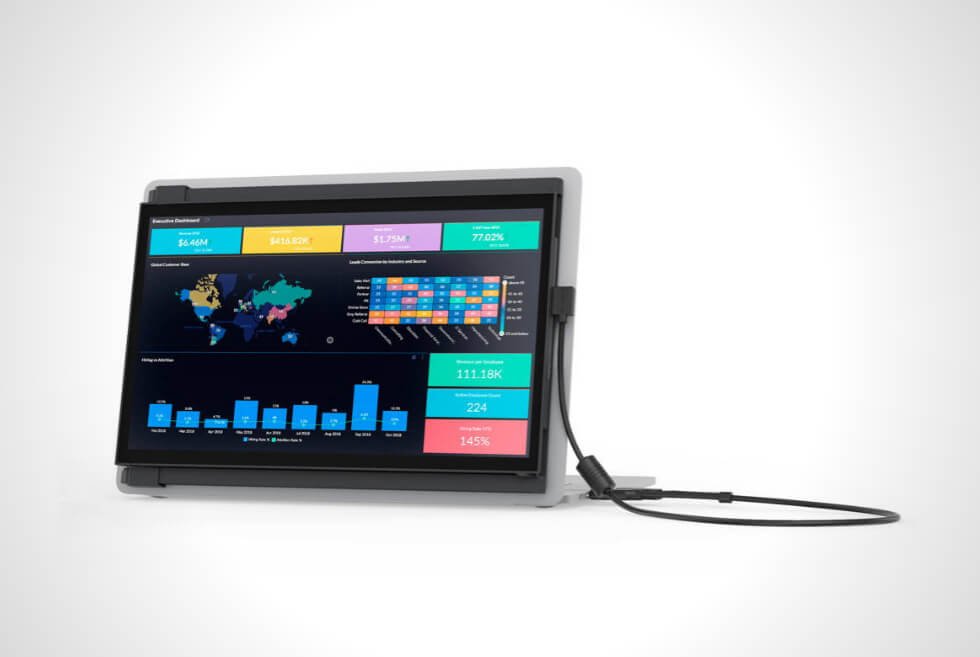
The DUEX Plus From Mobile Pixels Is A Sleek Multi-Display Accessory For Your Laptop

image

For those with desktop workstations or gaming rigs, multi-display setups are as popular as ever. On the other hand, some of us are stuck with laptops, which can be a bummer when you need the extra screens space productivity. Sure, if you don’t mind lugging an extra monitor around, then it’s a feasible solution. Another would be to invest in more portable alternatives. However, we think Mobile Pixels is on to something here with the DUEX Plus.

Who Is It For?

image

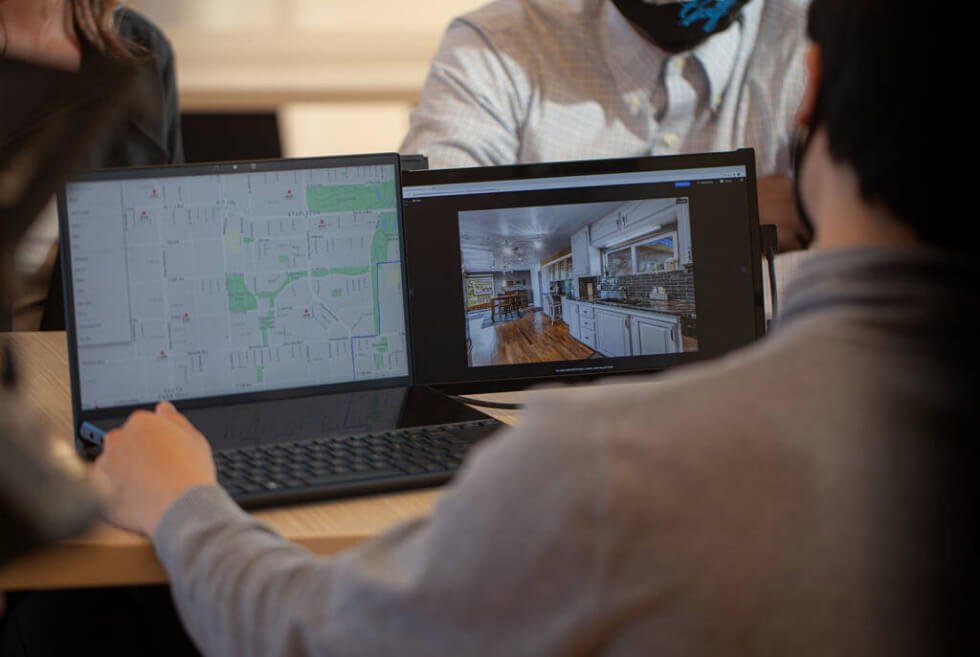
Programmers, content creators, instructors, students, and gamers will love what it brings to the table. It also addresses one key issue that most portable monitors fail to consider, which is convenience. We’ll go into more detail regarding that in a bit, but buyers should know that the DUEX Plus is designed for notebooks around 13 inches and up.

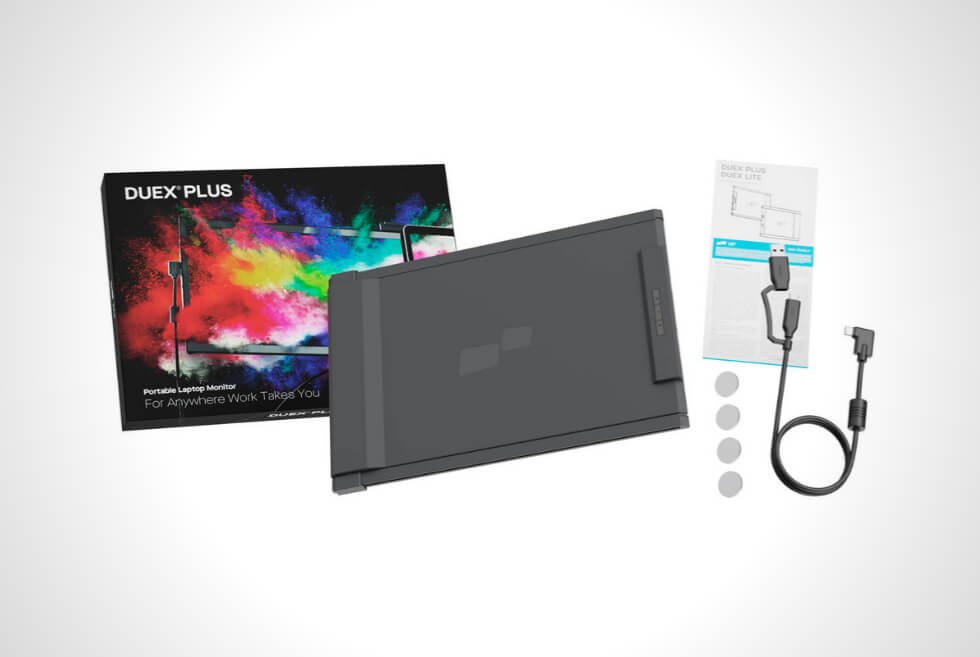
You can probably use it with smaller models such as 2-in-1s or detachables, but we believe Mobile Pixels engineered this gadget with bigger clamshell laptops in mind. The DUEX Plus is likewise compatible with Windows, macOS, and Android devices that natively support desktop mode out of the box. Moreover, it uses a hybrid signal input via USB-C and even includes an adapter for USB-A.

Hooking Up the DUEX Plus

image

You’re probably wondering what we meant about convenience here. Mobile Pixels want the experience to be as seamless as possible. Thus, you have multiple ways to use the DUEX Plus and we can hardly think of anything that could match it. By default, the assembly sticks to the lid of your laptop with the help of adhesives. It uses a mounting system that relies on strong magnetic pucks to hold the portable monitor in place.

Using the DUEX Plus

image

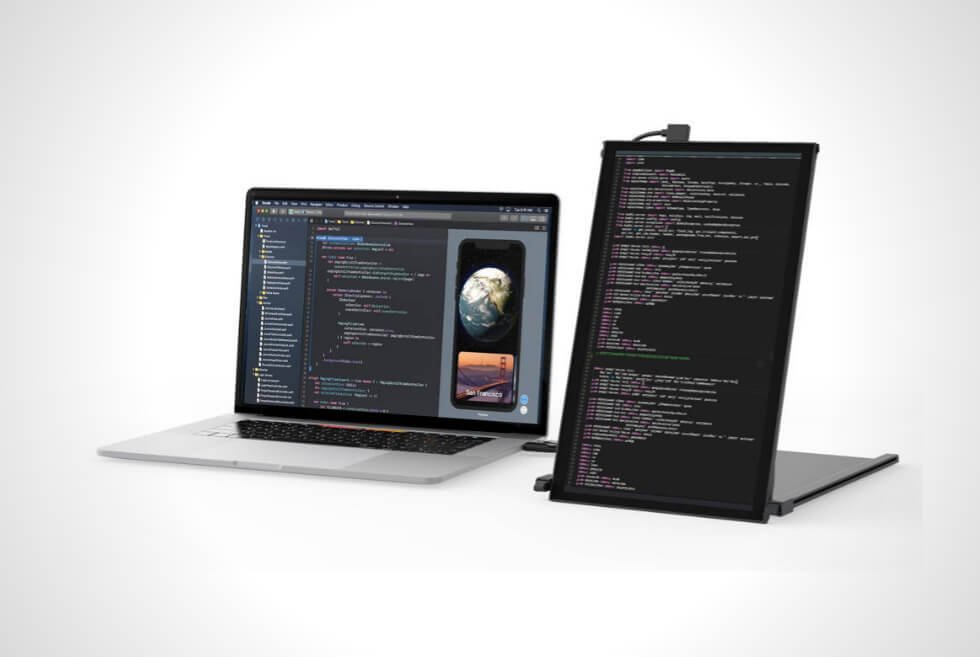
With a firm tug, the 13.3-inch display slides out of its frame and turns into your secondary screen. Easily swap it to the left or right and use the swivel to adjust the angle. It even flips all the way back which is useful for presentations. Another would be to take it off the magnets and position it vertically on any surface as the swivel firmly holds it in place.

The integrated auto-rotation sensor should take care of the rest. For a horizontal orientation separate from your laptop, Mobile Pixel offers an optional Origami Kickstand. Another cool feature of the DUEX Plus is its native compatibility with the Nintendo Switch to play on a bigger screen on the go. Then there’s the ability to turn a compatible Android smartphone into a fully functional desktop computer.

Take note that a Bluetooth keyboard and mouse is needed to maximize the aforementioned functionality. Furthermore, USB-C pass-through charging technology keeps your batteries in peak condition. Mobile Pixels manufactures the DUEX Plus out of ABS plastic and aluminum for lightweight durability. 

DUEX Plus Specifications 

image

Specs

  • Screen Size: 13.3 Inches
  • Display Resolution: 1920 x 1080
  • Aspect Ratio: 16:9
  • Refresh Rate: 60 Hz
  • Display Technology: IPS
  • Dimensions (L x W x D): 12.25″ x 8.46″ x 0.25″
  • Weight: 1.3 lbs
  • Color: Deep Grey
  • Ports: 2x USB-C
Our Takeaway

image

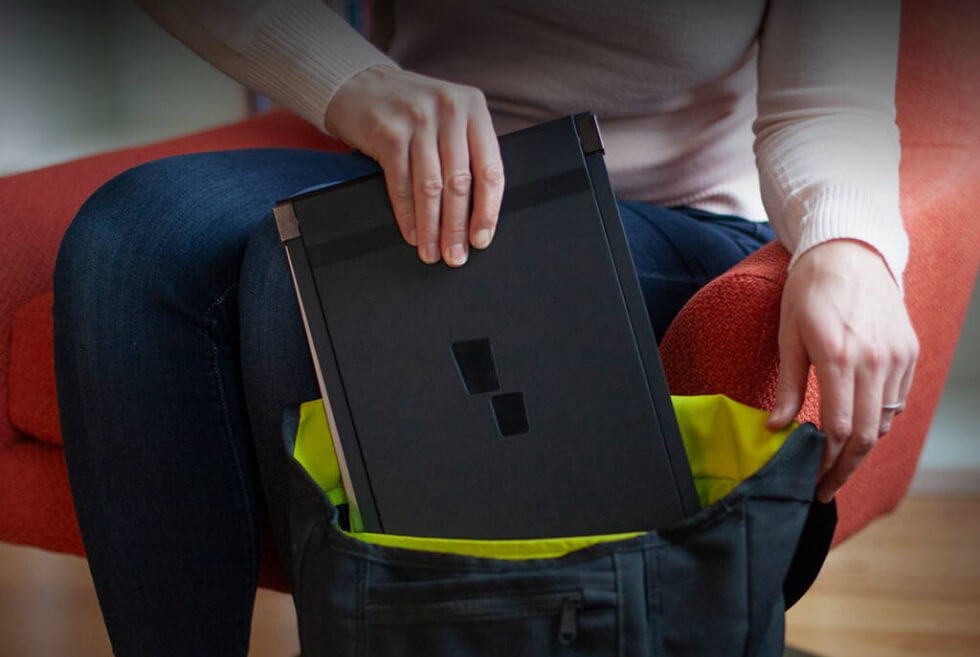
The DUEX Plus is an awesome and intuitive solution for people who want the versatility of a secondary display in a handy package. The sleek form factor of the portable monitor will fit in most standard laptop sleeves or bags which is great. It’s a perfect add-on for digital nomads who need to regularly pack up to travel. 

Meanwhile, students will benefit from the extra screen space to have more windows open when they study. As for creative professionals, the DUEX Plus can let them tackle their tasks while on the field. Overall, there are hardly any downsides here. As such, we look forward to what Mobile Pixels has in store for a future version of this platform.

Get your DUEX Plus now!

The Best and Biggest Gadgets of August 2021

The summer is drawing to a close. Here are all the most important releases from August that you should know about as we head into the fall.

JBL L52 Classic

tech roundup

Courtesy

The JBL L52 Classic are the company’s newest vintage-inspired bookshelf speakers. They’re effectively a smaller and cheaper version of the company’s $2,500 L82 Classic, which were released last year. They have the same walnut wood veneer enclosure and striking foam grille (available in black, blue or orange), only the L52 Classic will be small enough to actually fit on your bookshelf. They’ll go on sale sometime this fall.

Price: $1,000

SHOP NOW

Google’s Nest Cameras + Video Doorbell

tech roundup

Courtesy

Google announced an entirely new line of Nest smart home cameras this week. There are four new models to choose from — a Nest Cam ($99) for indoors use, a battery-powered Nest Cam ($180) that can be used inside or outside, and the Nest Cam with floodlight ($280) — that are replacing the company’s older Nest IQ cameras. Each of these new cameras has a similar-yet-slightly-softer design and is more feature-packed than their predecessors. They’re slightly more affordable, too.

Additionally, Google announced a new battery-powered video doorbell to replace the Nest Hello. It’s called the Nest Doorbell ($180). Like the new speakers, the new video doorbell has been upgraded with improved features like better face, animal and object recognition.

Everything is available for preorder right now.

Price: $99 — $280

SHOP NOW

Klipsch T5 II ANC

klipsch black earbuds

Klipsch

The Klipsch T5 II ANC are the company’s newest wireless earbuds and they share a similar look, feel and name to their 2019-released predecessors, the T5 II. The new models add active noise-cancellation (as the name gives away), but Klispch also gave these new buds a couple other improvements, including wireless charging, hands-free gesture controls, better overall sound quality (thanks to a redesigned driver) and the ability to tweak the EQ settings via a companion app. They are available to purchase right now.

Price: $299

SHOP NOW

8BitDo Remote for Xbox

tech roundup

Courtesy

If your Xbox (Series X, Series S and One) is your family’s primary streaming device, you might want to invest in a remote other than a gaming controller — it’s definitely easier for non-gamers to use. That’s where 8BitDo’s newest remotes come in. They’re officially license to work with Xbox as each remote has a dedicated Home button to wake your Xbox. 8BitDo offers a “short” and “long” models, the latter of which costs $5 more and comes with an additional number pad. Both remotes are available for preorder now.

Price: $20 —$25

SHOP NOW

JBL L75ms Music System

tech roundup

Courtesy

The JBL L75ms has similar retro vibes to the company’s also-just-announced L52 Classic, but it’s a much more modern system. It’s actually a five-channel powered speaker system — two tweeters, two woofers and a midrange driver — that’s capable of streaming high-resolution audio (up to 32-bit/192kHz). It’s also extremely versatile. You can connect to your TV (via HDMI ARC) or your turntable (thanks to its built-in phono preamp). It also supports a range of streaming options, including AirPlay 2, Chromecast or Bluetooth. It’ll go on sale sometime this fall.

Price: $1,500

SHOP NOW

HP 2021 X-Series of Gaming Monitors

tech roundup

Courtesy

HP revealed its 2021 lineup of X-Series gaming monitors this week — and there are seven of them. They range in includes 27-inch and 34-inch gaming monitors that have flat and curved screens, screen resolutions that are either 1080p or 1440p, and come in prices ranging from $260 to $460. Each monitor has the same number of ports, support for the VESA mounts (which can be lowered or raised) and a panel with the same peak brightness.

Price: $260 — $260

SHOP NOW

Logitech Zone True Wireless Earbuds

tech roundup

Courtesy

The interesting thing about Logitech’s newest wireless earbuds, the Zone True Wireless, is that they were designed with a specific type of people in mind: somebody who spends a lot of time on video conferences. They are the first wireless earbuds that certified to be used with Google Meet, Microsoft Teams and Zoom, which basically means that have certain features that work well with all three platforms. For instance, there’s a dedicated button for muting yourself. The earbuds also come with a USB receiver (just like most of the company’s wireless mice), which promises better connectivity. And each earbud has three-mic array for tip-top sound quality.

The Zone True Wireless are available for preorder now and will ship sometime this fall.

Price: $299

SHOP NOW

Samsung Galaxy Z Fold3

tech roundup

Courtesy

The Galaxy Z Fold3 is the third-generation of its Samsung’s smaller foldable smartphone, and despite looking very similar to its predecessor, the Galaxy Z Fold2, it’s better in a couple key ways. It’s more durable with an IPX8 water-resistant rating). It works with the S Pen2, making it the first foldable smartphone that works with a stylus. It’s more powerful and has an improved camera system. Also, Samsung made it a little more affordable than previous models. The Galaxy Z Fold3 starts at $1,800 and is available for preorder now.

Price: $1,800+

LEARN MORE

Samsung Galaxy Z Flip3

tech roundup

Courtesy

The other foldable smartphone that Samsung announced, the Galaxy Z Flip3, is the one you’re more likely to buy. This is because it starts at under $1,000, putting it in line with other flagship smartphones. In addition to making it more affordable, Samsung has give the Galaxy Z Flip a larger cover screen (the screen you see when it’s folded), a better camera and a more durable design; it now has an IPX8 rating, like the Z Fold3. It starts at $1,000 and is available for preorder now.

Price: $1,000+

LEARN MORE

Satechi USB-C Clamp Hub

tech roundup

Courtesy

Satechi’s newest USB-C accessory adds ports to your M1 Mac in a pretty clever way: a clamp. It attaches to the base of the display, right near its rear-port array, and adds six ports — USB-A (3x), USB-C (1x) and SD and Micro SD card readers — while also elevating off of your desk. The other neat thing is that Satechi is making the Clamp Hub in silver and blue so that it will match the colorful M1 Mac. (If you have an M1 Mac with one of the other five colors, you’re out of luck for now.)

Price: $55

LEARN MORE

Twelve South PlugBug Slim

tech roundup

Twelve South

The PlugBug Slim is a 20-watt USB-C wall adapter that’s capable of fast-charging any iPhone. The neat thing about is that is thin and vertical design, so that it can fit in tighter spaces (like outlets right next to furniture). It’s the ideal companion to the Apple’s MagSafe Charger, which requires a USB-C adapter, and it also can work with the HomePod mini.

Price: $25

LEARN MORE

Kodak Luma 400

tech roundup

Courtesy

Kodak makes a variety of different portable projectors, the latest one being the Luma 400. The new model has a variety of connections (including HDMI, USB and Bluetooth) so you can easily use it with your smartphone, laptop or video game console. It has a built-in Android operating system so you can also stream shows and movies from the likes of Netflix or Amazon Video straight from the projector (so long as there’s a Wi-Fi connection or you’ve downloaded the shows ahead of time). And it can produce up to a 150-inch screen.

Price: $450

LEARN MORE

Samsung Galaxy Watch4 (and Watch4 Classic)

tech roundup

Courtesy

Samsung announced two new smartwatches this week, both of which are redesigned to look small, slim and sleek — similar to the Galaxy Watch Active 2. There’s the Galaxy Watch4 and the Galaxy Watch4 Classic, and they are the first smartwatches to run the new Wear OS that’s designed by both Samsung and Google. The big difference between the two smartwatch is that the “Classic” model is slightly larger and more premium, plus it has a wonderful rotating bezel. The Galaxy Watch4 and Galaxy Watch4 Classic are available for pre-order right now.

Price: $250+ (Watch4); $350+ (Watch4 Classic)

LEARN MORE

Samsung Galaxy Buds2

tech roundup

Samsung

The Galaxy Buds2 are Samsung’s newest wireless earbuds, joining the Galaxy Buds Pro and the Galaxy Buds Live (the bean-shaped ones) in the company’s lineup, and they deliver active-noise-canceling and wireless charging at a pretty affordable price: $150. Samsung also redesigned the Buds2 so that they are smaller, lighter and (potentially) more comfortable to wear. You can expect these new earbuds to fall short of the Buds Pro in terms of sound quality, noise-canceling and water-resistance, but the Buds2 might be go-to wireless earbuds for people with a Samsung smartphone who are shopping on a little bit of a budget. They’re available for preorder now.

Price: $150

LEARN MORE

Q Acoustics M20

q acoustics

Q Acoustics

Q Acoustics announced a wireless music system consisting of two bookshelf-sized powered speakers. The all-new M20 isn’t as big or as expensive as the company’s recent Q Active 200 speakers, but it does carry over some similar features, such as Point to Point (P2P) cabinet bracing technology and support for high-resolution audio (up to 24bit/192kHz). Maybe most importantly, it houses both wireless (via Bluetooth 5.0)and analog connections (via optical and minijack) so you can easily stream music or connect it directly to your TV or turntable. There’s no built-in Wi-Fi or HDMI connection.

Price: $599

LEARN MORE

Jabra Enhance Plus

tech roundup

Jabra

Jabra announced a different kind of wireless earbuds. The Enhance Plus look like traditional wireless earbuds, but they are designed to help people with hearing loss; there’s a companion app that allows you to tweak settings like noise reduction and ambient sounds. The Enhance Plus are not as permanent, powerful or expensive as traditional hearing aids, so they are more of an entry-level option. The other cool thing is that, if you want, use can use them as traditional wireless earbuds to stream music or answer calls. They will be available later this year

Price: TBD

LEARN MORE

Devialet Phantom II Sage Green

tech roundup

Courtesy

Devialet didn’t announce a new speaker. Rather, it announced a new finish for one of its existing speakers. The Phantom II (previously named the Phantom Reactor), which is essentially a smaller and more affordable version of the company’s flagship Phantom I (previously named the Phantom Premier), is now be available in a sage green finish; it was previously only available in either white or black. Devialet is only making 1,000 of these sage green speakers and they cost $1,600 a pop, which is $200 more than the same speaker in either white or black. It’s also worth noting that Devialet makes the Phantom II in two models, 95dB and 98dB, and the sage green model will only available in the more powerful 98dB model.

Price: $1,600

LEARN MORE

Dell 14 Portable Monitor (C1422H)

dell portable monitor

Dell

Dell announced its first portable monitor designed to work with your USB-C laptop. The 14-inch monitor (C1422H) has a 1080p display, slim bezels and weighs less than two pounds. It also just looks like the perfect companion to your laptop. There are two USB-C ports, both of which can transmit power and video, and the monitor supports passthrough power so you can change your laptop through the monitor when connected to power. When not connected to a power source, the monitor will draw power from your laptop. (The Verge has more on the story, below.)

Price: $350

LEARN MORE

Xbox Stereo Headset

tech roundup

Courtesy

Microsoft announced a wired version of the Xbox Wireless Headset headset that it released several months ago. The Xbox Stereo Headset looks basically identically its wired counterpart, but it requires you to connect it directly to your Xbox controller (old school style). The good news is that it costs $60, which is $40 bucks cheaper than its wireless brethren.

Price: $60

LEARN MORE

Audio-Technica ATH-M50xBT2

tech roundup

Courtesy

Audio-Technica’s just announced ATH-M50xBT2 wireless headphones are a new and improved version of its 3-year-old ATH-M50x. The new cans have faster USB-C charging and add support for Alexa voice commands. Most importantly, they now support multi-point pairing over Bluetooth, so you can connect them to your smartphone and computer and it’ll automatically switch between sources depending on which device you’re listening to. Other than that, they look and sound just like their predecessor.

Price: $199

LEARN MORE

Fitbit Charge 5

tech roundup

Fitbit

Fitbit finally announced its newest and much-leaked fitness tracker, the Charge 5, and (as anticipated) it has a much-changed design from previous “Charge” wearables. It has a larger, brighter and more colorful display; it’s actually the first Charge that can actually show colors. It has a thinner and a more rounded look. It also has an always-on display, but if turned on it will cut the Charge 5’s “up to seven day” battery life to just two days. The other potential downside is that it’s $30 more expensive than the Charge 4 at launch. That said, it’s still about half as expensive as the latest Apple Watch. It’s available for preorder now.

Price: $180

LEARN MORE

Bowers & Wilkins 800 Series D4

tech roundup

Bowers & Wilkins

Bowers & Wilkins has updated its flagship 800 Series Diamond range of loudspeakers. The fourth generation series — aka “D4” — have a new cabinet design, a new suspension system, and a redesigned housing for the tweeter, all of which are meant to further eliminate distortions and deliver a lifelike and unrivaled sound. Like with the previous D3 line, the D4 line consists of seven speakers (two standmounted, three floorstanding and two center channels) that range from $5,500 to $35,000. These are serious audiophile speakers.

Price: $5,500 — $35,000

LEARN MORE

Audio-Technica ATH-S220BT

tech roundup

Audio-Technica

The ATH-S220BT is Audio-Technica’s newest pair of budget wireless headphones — they cost just $59. Yet despite their affordable price, the ATH-S220BT have a bunch of convenient features (including multipoint pointing and USB-C charging), a long 60-hour battery life and a design that, well, feels distinctly Audio-Technica. They’re available in several different colorways.

Price: $59

LEARN MORE

OnePlus Buds Pro

tech roundup

One Plus

OnePlus’s latest wireless earbuds, the Buds Pro, deliver a lot of premium features —including active noise-cancellation and super-fast charging (thanks to the company’s proprietary Warp Charge technology) — at the relatively affordable price of $150. You’ll probably want to have a OnePlus to pair them with, however, as these earbuds will pair quickly and have some other exclusive features, like a low-latency mode for gaming.

Price: $150

LEARN MORE

V-Moda BoomPro X

tech roundup

V-Moda

V-Moda announced a new boom microphone for its headphones (but it can be used with any pair of wireless headphones that have a 3.5mm jack). The BoomPro X is essentially an upgraded version of its previous BoomPro. It has improved internals, but the real reason why you’d want to get it: a colorful mic cover. That’s right, you can finally get a colorful mic cover to match the colorful “shields” on V-Moda’s headphones. Just like you wanted.

Price: $45

LEARN MORE

This content is created and maintained by a third party, and imported onto this page to help users provide their email addresses. You may be able to find more information about this and similar content at piano.io

The Best External Hard Drives to Backup Your Computer

There are two main reasons why you’d buy an external hard drive. First, your laptop or desktop is running out storage space; it’s a common problem, especially if your computer is several years old. Or secondly, if you want to backup your various digital files (photos, videos, music) so that if something happens to your computer (maybe it breaks or gets stolen), you don’t lose everything. Maybe it’s a combination of both.

You might be thinking, why would anybody invest in an external hard drive when you could just use a cheap cloud-based service, like 1Drive or iCloud? Well, there are a number of reasons.

First, an external hard drive is a one-time fee and while it’ll be a more expensive upfront cost, it will less expensive in the long run — those monthly subscription fees add up.

Secondly, there’s security. With cloud services you hand over all responsibility for your photos, documents and other data to that storage provider; with an external hard drive, you’re in the driver’s seat.

Finally, there’s speed. Even if you have a really fast internet connection, the transfer speeds with cloud services can’t compete with today’s external hard drives. Plus, they often come with a bandwidth cap.

Sure, external hard drives need more desk space and they’re less portable, but knowing the things you need are secure — that’s priceless. (Note: if you’re looking for a portable hard drive, which are smaller, cheaper and more rugged, check out the Western Digital’s My Passport or SanDisk’s Extreme Portable SSD.)

Seagate Backup Plus Hub

Seagate

Seagate Backup Plus Hub

bhphotovideo.com

$121.99

Best Hard Drive for Mac

Capacity: 4TB, 6TB, 8TB, 12TB, 14TB
Price:
$130 — $520
Connectivity:
USB-A (3.0)
Compatibility:
Mac and Windows

The newer version of Seagate’s dependable Backup Plus ($100), the Seagate Backup Plus Hub adds an extra USB 3.0 port — that’s two in total, so it doesn’t completely steal one of your computer’s previous ports — and it now rests on its side. It comes with companion software that makes managing your stored files super easy. And it’s small and compact (about the size of a book), so it won’t take up too much desk space.

Samsung T5 Portable SSD

SAMSUNG T5 Portable SSD

SAMSUNG amazon.com

$129.99

Best Hard Drive for PS5

Capacity: 1TB, 2TB
Price:
$130+
Connectivity:
USB-A (3.0)

For backup applications, all you really need is a ton of storage. But when it comes to gaming, speed is also a concern. Through extensive research, the experts at Digital Foundry have found that Samsung’s portable SSD offers the best performance for PS5 owners, but at a bit of a premium price. If you’re looking for a balance that will give you more storage but less speed, the Seagate Portable is a more economical option.

Lacie 2big Raid

Lacie

Lacie 2big Raid

amazon.com

$354.00

Capacity: 4TB, 8TB, 16TB, 28TB
Price:
$350 — $1,000+
Connectivity:
USB-A (3.0) and USB-C
Compatibility:
Mac and Windows

Lacie’s 2big Raid is a robust external hard drive that was designed with creative professionals (specifically photographers, videographers and YouTube creators) in mind. It’s available in a number of high capacity configurations, boasts super-fast transfer speeds (up to 440MB/s) and built-in cooling system (fan), and it comes with one-month free trial of Adobe’s Creative Cloud. Additionally, it has a large blue status light makes it one of the most conspicuous hard drives you can buy. The only real downsides are that it’s rather large and expensive.

Lacie d2 Professional

Lacie

Lacie d2 Professional

amazon.com

$184.99

Capacity: 4TB, 6GB, 8TB, 10TB, 14TB
Price:
$185 — $350+
Connectivity:
USB-A (3.0) and USB-C
Compatibility:
Mac and Windows

The Lacie d2 Professional is another external hard drive that was designed for photographers and other creative professionals. It’s smaller and more affordable than the company’s 2big Raid (above), and actually works very similarly. The downside is that it’s not quite as much of a beast — it lacks the same transfer speeds and built-in cooling system. That said, for people who don’t need (or want) a hard drive that’s as big and “pro-grade” as the 2big Raid, this is the next best thing.

This content is created and maintained by a third party, and imported onto this page to help users provide their email addresses. You may be able to find more information about this and similar content at piano.io

15 Best Car Dash Cams

Everyone, hands up if you’ve ever been in a road accident. Okay, keep those hands up if it was your fault. None of you? Really? We’re sorry, we’re sure you’re all excellent or at least pretty good drivers, but we find that hard to believe. If only there was a device that could determine whether or not you’re telling the truth. Well, there is…car dash cams.

You might remember these from the ten-thousand or so bizarre videos from all over the world that always seem to capture the very worst moments of someone’s life. While that’s (mostly) very amusing, the car dash cam’s actual purpose is supposed to provide unarguable evidence in the event of a crash, accident, or traffic violation.

This provides the owner with protection when challenged over the truth – as long as it’s not their fault.

This is great news for the careful and responsible drivers among us. Meanwhile, it could be an issue for the less talented drivers among us. That’s right, we know who you are!


CHECK OUT:


If you’re tired of being blamed for accidents that weren’t your fault, however, car dash cams will help you out. Heck, you could even exert some revenge on those who’ve wronged you by following them all day to capture proof of their depravity.

That said, buckle up and join us to check out the best car dash cams on the market today.

1image
Editors Rating

  • star
  • star
  • star
  • star
  • star

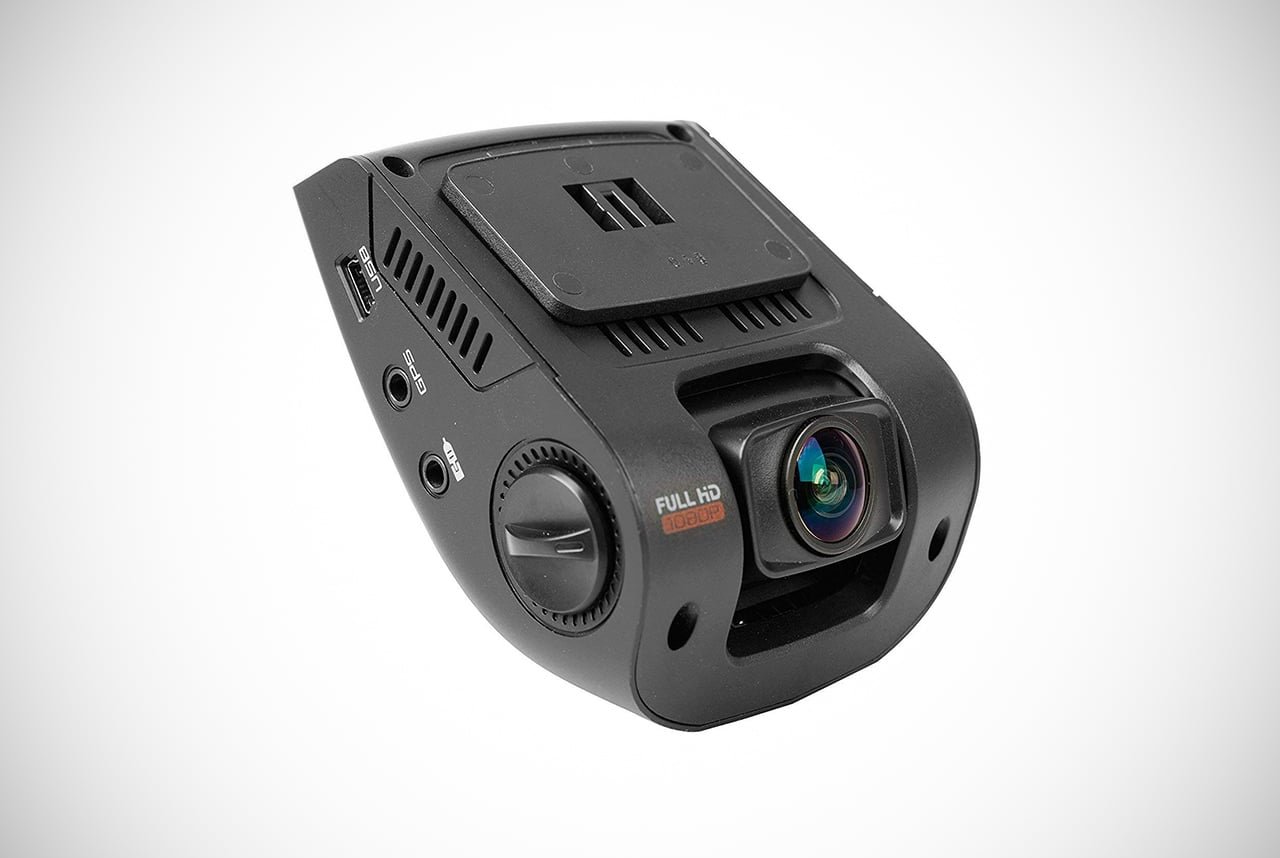
The Rexing car dash cam is designed to blend in seamlessly with the car to keep your focus squarely on the road, as well as ensure that it doesn’t look too obvious for other drivers. This model offers plenty of features to get excited about.

One of them is the full HD recording, which ensures crystal-clear images both day and night. Furthermore, the 170-degree lens achieves an incredibly wide angle, which manages to get nearly every inch of the road.

For increased protection and driver safety, there’s also accident auto-detection.

This will activate long before you’ve even realized something is up. This should offer a minor alert to allow you the ability to avoid possible accidents before they happen. Of course, this should allow everyone to make it to their destination with very few issues.

Now, isn’t that what we all want from car dash cams? We think so.

Pros:

  • Discreet design
  • Full HD recording
  • 170-degree ultra wide-angle lens
  • Accident auto-detection

Cons:

  • Can only be mounted on glass and not dashboard
  • Difficult to identify number plates on video
2image

Editors Rating

  • star
  • star
  • star
  • star
  • star

Garmin is a major leader for the technology you’ll use in or for your vehicle. It comes as a shock to no one that they made excellent car dash cams too. The video quality is better than most normal cameras, which is saying a lot. Filming at a remarkable 1440p, you’ll never be straining to see the content in videos again.

This will make you the best eye-witness on the road.

Also included are exceptionally accurate lane departure and collision warning systems. This is sure to save you and others from potential crashes during the busiest times of the day. Furthermore, voice-recognition software means the whole camera is entirely hands-free.

This allows you to switch it on and off with simple voice commands. Don’t focus on pictures on a screen, focus on the road and let the camera do the hard work for you.

Pros:

  • Wirelessly sync videos to the smartphone
  • High quality 1440p video
  • Lane departure and forward collision warning alerts
  • Compact design

Cons:

  • Heats up even when the screen is off
  • Grainy night-footage
3image

Editors Rating

  • star
  • star
  • star
  • star
  • star

The Lukas HD car dash cams come with a provided 16GB of internal storage. Included is an array of awesome and incredibly useful driving features you’ll absolutely love. With 1080p HD video, the footage is exceptional and clearly capable of getting every detail.

Meanwhile, the powerful auto exposure feature means that regardless of the weather conditions, you’ll always have perfectly viewable images.

There are also four different recording modes that can be adapted to suit your preference on how you want to record something. These modes include continuous recording and motion detection. This will surely come in handy when the car is parked overnight, at the game, or out to dinner.

Pros:

  • Full 1080p HD video with Sony CMOS image sensor
  • Powerful Auto Exposure for vivid recordings in any environment
  • Four different recording modes
  • G-sensor detects accidents and other impacts

Cons:

  • Slow GPS system
  • Microphone picks up too much low-frequency sound
4image

Editors Rating

  • star
  • star
  • star
  • star
  • star

With motion-activated sensors and extreme temperature resistance, the Anker Roav Dash Cam is a superb product. It is able to withstand all elements, situations, and conditions. It isn’t just designed for your annual adventure across Antarctica sadly.

We know, “technology,” right?

The camera delivers more than enough features to keep you and your car protected no matter where you drive it.

Its Nighthawk Vision means that you’ll receive awesome, clear videos during the darkest of nights. Meanwhile, the built-in WiFi smartphone transfer means it’s never been easier to view your videos. This will be filmed in expansive panoramic views to capture as much as possible.

Anker gets it done with several other products, but their car dash cams are absolutely stunning.

Pros:

  • Motion-activated sensors
  • Extreme temperature resistance
  • Compact and discreet design to keep you focused on the road
  • Built-in wifi transfers videos directly to your smartphone

Cons:

  • Difficult to read number plates at a distance
5image

Editors Rating

  • star
  • star
  • star
  • star
  • star

Offering nearly 360-degrees of coverage, the Vantrue N2 ProDual Dash Cam is an awesome choice for anyone. Especially those who wish to get home safe or like to capture crazy people on the road.

This camera provides you with both road camera and interior camera viewership.

This ensures you capture as much as possible so you are always able to back up any claims. We have to agree with the late Billy Mays who once said, “wait, there’s more!”

These car dash cams are also equipped with a 24-hour parking mode. This will detect motion should someone or something get a little too close. Meanwhile, the G-Sensor and looping mechanism ensure that you can set it and never worry if it’s recording. It surely will be.

Pros:

  • Two-way camera for filming interior and exterior
  • 24-hour parking mode detects motion
  • Looping recording and G-sensor
  • Infrared night vision

Cons:

  • Loose car mount
  • No wifi connectivity
6image

Editors Rating

  • star
  • star
  • star
  • star
  • star

Garmin is back again, this time with the Dash Cam 35 model. This car dash cam provides accurate forward-collision warnings and G-Sensor incident detection. This guarantees constant vigilance on the road and protects your footage as soon as something happens.

Along with this, you’ll also have a dash cam player. This allows for clear playback of anything that does happen, without having to upload it to another device.

There’s also a red light and speed camera warning system. However, you do need to pay extra for this privilege. It fits comfortably above the rearview mirror and the suction cup is very reliable, even on the most uneven roads or during heatwaves.

Be sure you’re aware that there are no audio recording capabilities. This is good and bad. While you won’t be recorded as you belt out your favorite tunes, it also won’t record audio in the case of an incident during a traffic stop.

Pros:

  • Forward collision warning
  • Red light and speed camera warnings
  • G-Sensor incident detection
  • Dash cam player

Cons:

  • Awkward mounting device
  • Adapter cord is too short
7image

Editors Rating

  • star
  • star
  • star
  • star
  • star

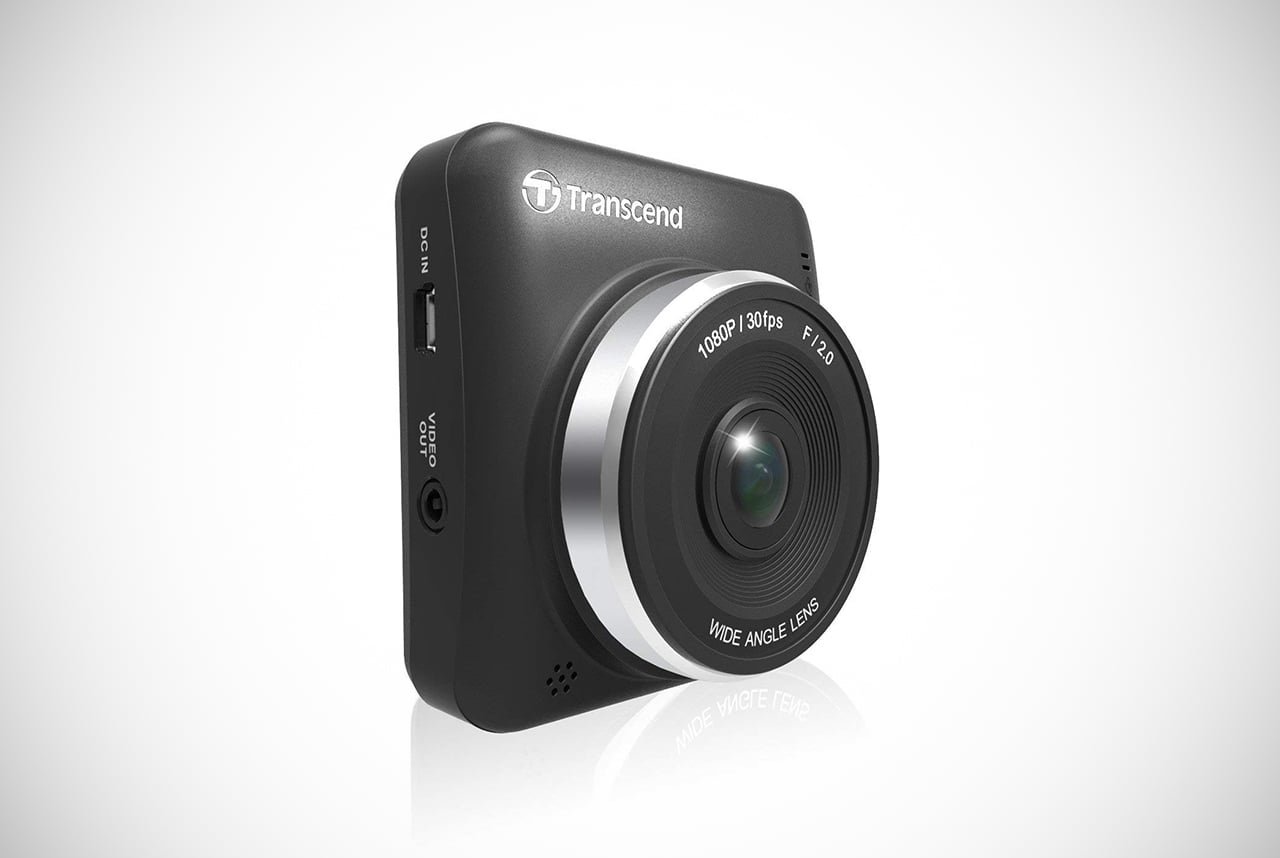
With a 32GB internal memory, you can record hours of road trips. Even if it’s just to and from the office (although we recommend you get out more, dude). Overall, the Transcend Drive Pro allows you to do exactly that.

You can drive like a pro without being concerned it won’t work or back you up in the case of an accident.

This is due to the built-in G-Sensor that’ll protect any recordings upon a crash, as well as snapshot features to capture the clearest images possible. For your convenience, these car dash cams also have access to the exclusive DrivePro520 application.

This means you can download and stream all your adventures, then identify when that idiot pulled out in front of you without warning.

Pros:

  • Motion G-Sensor detects and automatically protects the current recording
  • Exclusive DrivePro520 App to download and stream videos
  • Free 32GB microSD included
  • Snapshot feature for clear image capture

Cons:

  • Poor nighttime recording for the rear camera
  • Some software freezing issues
8image

Editors Rating

  • star
  • star
  • star
  • star
  • star

The perfect camera to give you the edge over other drivers on the road, this Z-Edge Z4 Dash Cam comes with 2K video capabilities. It truly is an awesome camera that will hang nice and discreetly from your windshield. It’s also packed full of useful features that make it more than a simple camera.

This includes collision detection, 150-degree wide angles, and parking monitor motion sensors. All of this combines to give you some of the best protection available from the sea of car dash cams. The Z-Edge also comes at an excellent price when compared with other cameras and ensures (essentially) endless hours of recording.

Just remember to overwrite existing footage. Otherwise, you may run out. That endless thing isn’t exactly infinite apparently.

Pros:

  • 150-degree wide viewing angle
  • Collision detection
  • HDR technology for clear footage
  • Parking monitor motion sensor

Cons:

  • Time-lapse mode not supported
  • Unable to read number plates at a distance
9image
Editors Rating

  • star
  • star
  • star
  • star
  • star

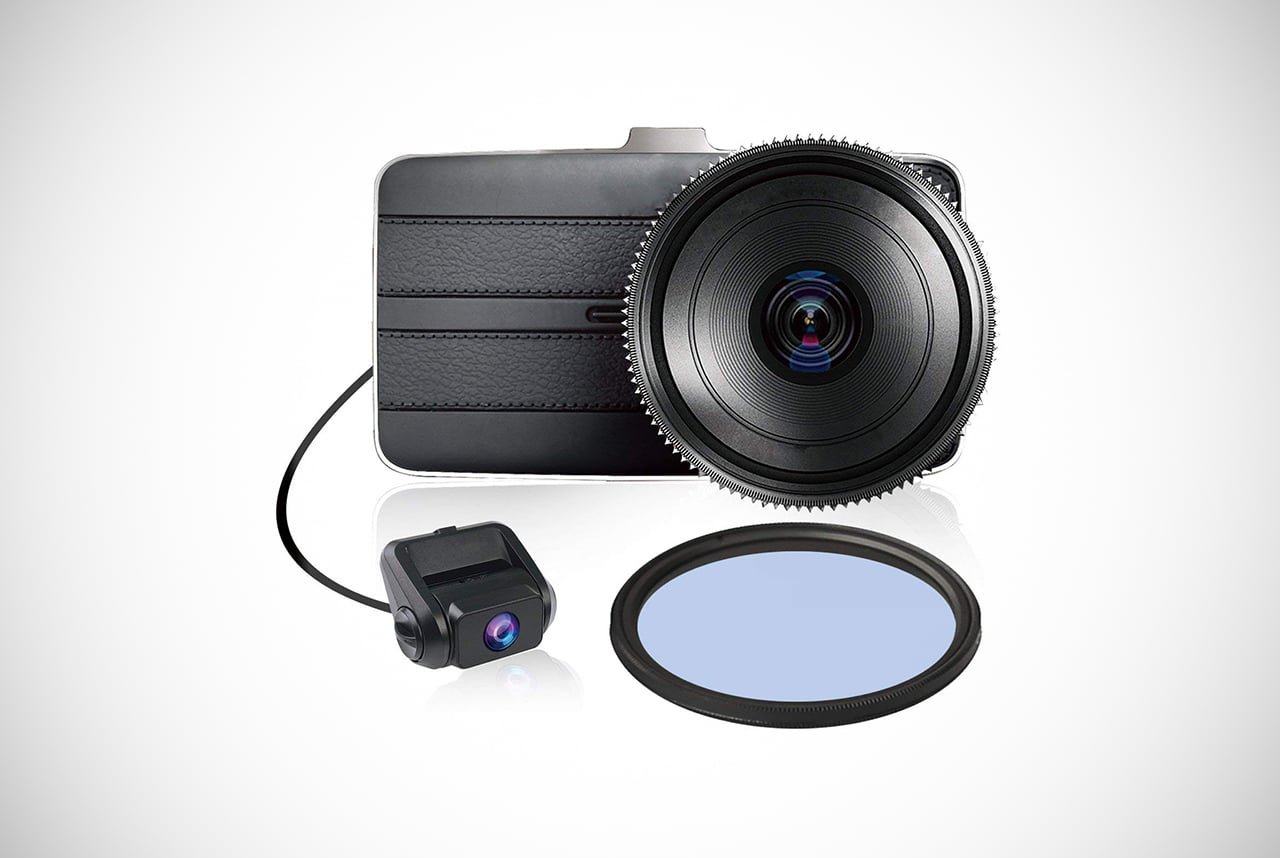
If you’re looking for the most complete coverage you can possibly find, the KDLinks super wide front and rear dash cam is the product for you. With 290-degrees of filming capability, it uses a 2-lens system that makes sure to capture every single detail.

Meanwhile, the superior F1.6 six-glass lenses provide night vision capability unseen anywhere else in the world.

Along with this, these car dash cams also come with emergency lock buttons to protect footage. This also comes with an auto-switch to turn the dash cam on as soon as you turn on the ignition. This ensures that you’ll always be protected even on those days where your brain hasn’t caught up to your body yet.

With so much high-quality coverage, the KDLinks DX2 is the answer to getting every angle you need. Plus, it could lower those insurance premiums a bit.

Pros:

  • Superior F1.6 Six-glass lenses night vision
  • Front and Rear 2-lens system
  • Emergency lock button
  • 290-degree total coverage

Cons:

  • Unable to read number plates at a distance
  • Motion detection can inhibit flow of recording
10image
Editors Rating

  • star
  • star
  • star
  • star
  • star

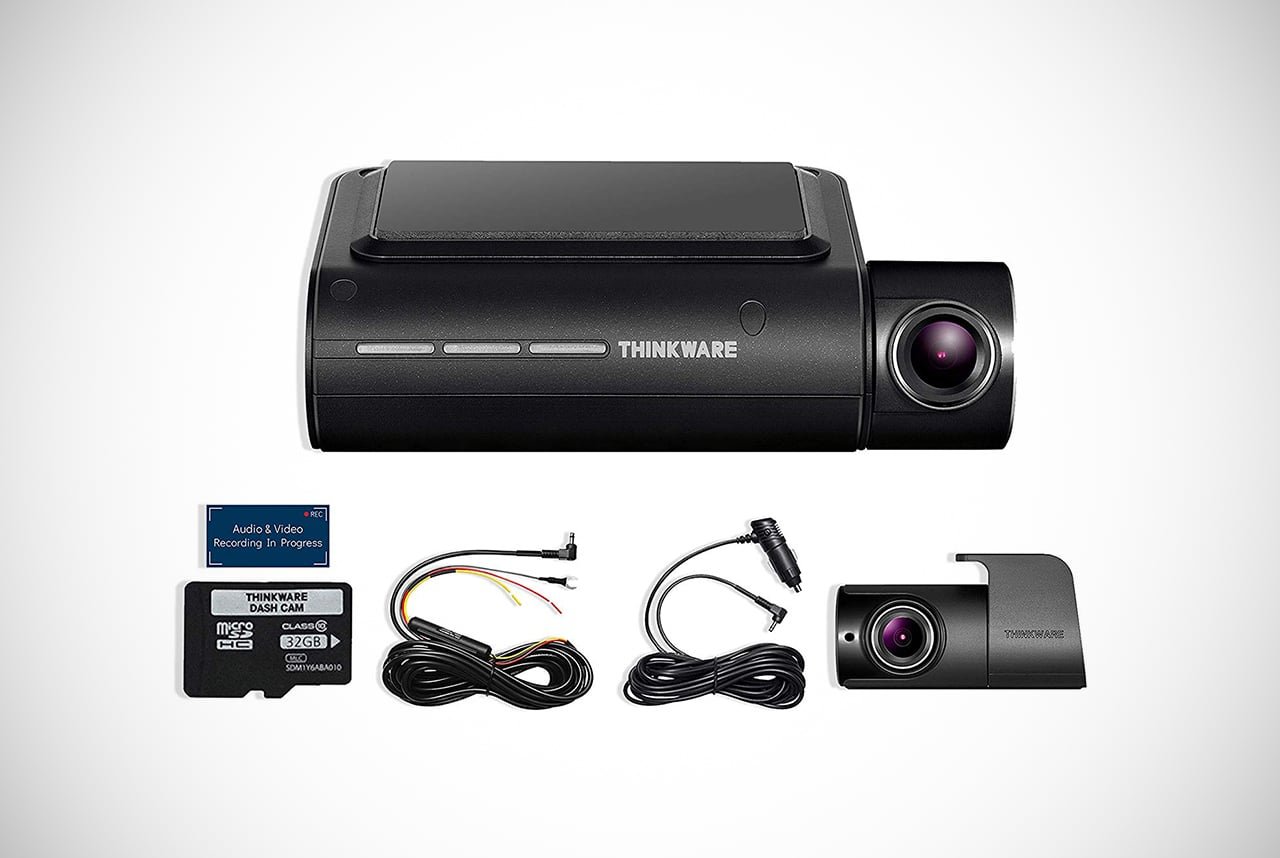
The THINKWARE F800 PRO may very well offer the car dash cams that are perfect for the thinking man. It contains both front and rear filming capabilities, but this is just the tip of the filming iceberg. It’s designed to offer you the utmost coverage and protection from both sides of the road.

It also provides incredibly crisp night time footage that will keep your car alert even when you’re not driving it.

The THINKWARE makes this possible with its reliable motion sensors that activate whenever someone walks too close. As for the performance on the road, there’s advanced driver assistance.

This will recognize when hazards are present and let you know before it’s too late.

Meanwhile, you can also keep an eye on everything from afar by using the mobile viewer. Sure it’s on the expensive side, but for those of you who are truly “in love” their cars, money isn’t an object.

Pros:

  • Super Night Vision 2.0 and parking mode
  • Mobile viewer for convenience
  • Advanced Driver Assistance System
  • 1080p footage in both front and rear camera

Cons:

  • On the expensive side
  • Troubles with app functions
11image

Editors Rating

  • star
  • star
  • star
  • star
  • star

The Transcend 16GB is a high-capacity piece of tech that’ll ensure you won’t have any mysteries during your drive-time. Coming with a 16GB microSD card, you’ll have more driving footage than Top Gear and maybe even more entertaining shots too.

The camera comes with a free app and WiFi connectivity. This makes it easier than ever to view, stream, and share your footage with the world.

Well, at least the relevant authorities.

With a 160-degree angle lens, you can ensure you’ll get greater coverage than you thought possible. Meanwhile, the G-Sensor is more sensitive than other cameras and will have your back in the event an accident with emergency recording.

Unfortunately, these car dash cams don’t come with parking mode or GPS. However, for a budget product, there’s still a lot to give you peace of mind while driving.

Pros:

  • Preview and play back videos
  • Free app and wifi connectivity
  • Emergency recording with G-Sensor
  • 160-degree wide angle recording

Cons:

  • Quicktime file format may not be recognized
  • G-sensor is highly sensitive
12image

Editors Rating

  • star
  • star
  • star
  • star
  • star

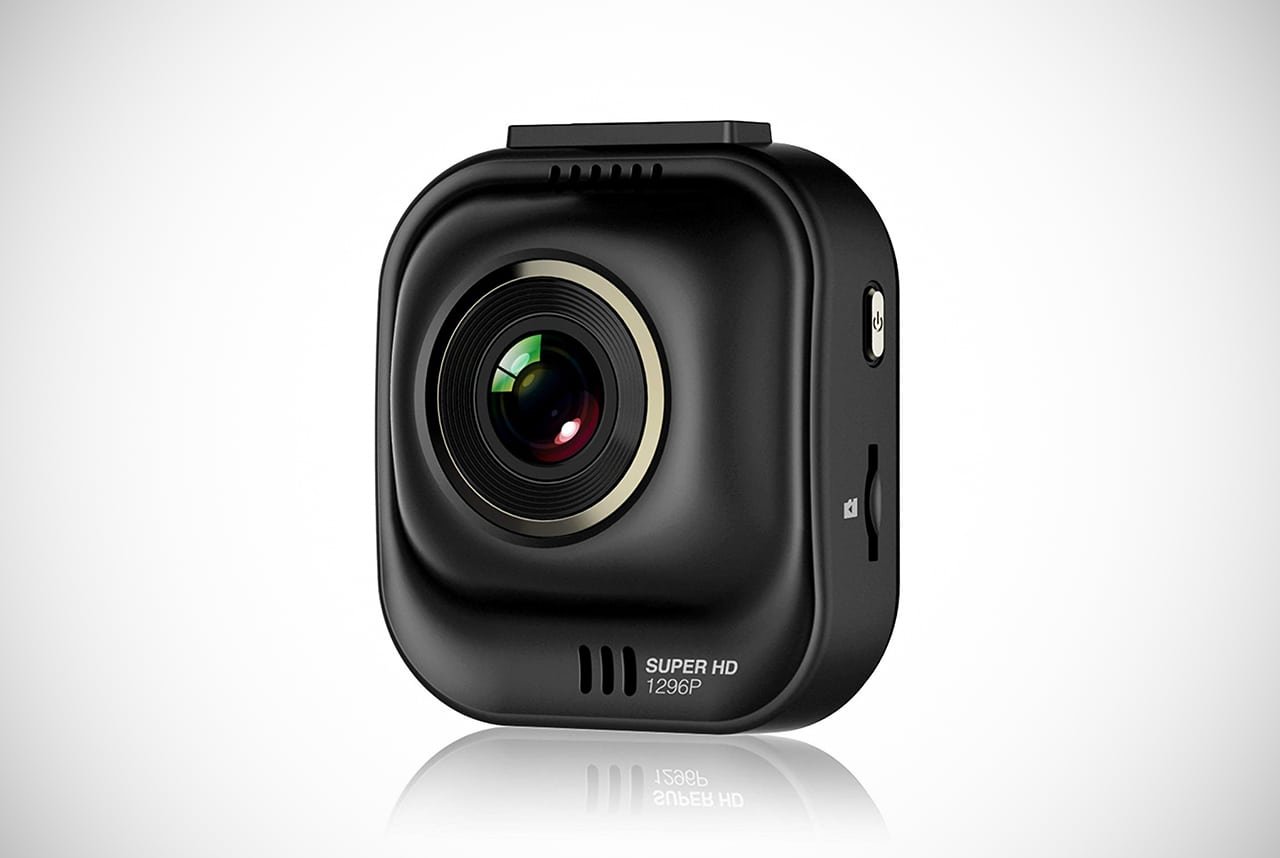
The PAPAGO Car Dash Camera boasts incredible HD recording footage that ensures you’ll capture every little thing possible. Along with top quality images, there’s 64GB microSD support that’ll capture hours of video. Plus, all of this can be viewed with the complementary app.

Unfortunately, this app is only compatible with Android, for now at least. However, if you’ve embraced Android over Apple, then this is perfect. You also get two different mounts to suit you and your car, which is pretty cool. It also comes with a Driver Assist feature that goes that extra mile to keep you protected and keep that insurance low.

If you’re looking for good car dash cams that more than provides what you need at a reasonable price, the PAPAGO is a tremendous option.

Pros:

  • 1296p super HD footage
  • Car DVR supports up to 64GB microSD
  • Two types of mounts to suit your car
  • PAPAGO! CAM ON app for viewing incident videos

Cons:

  • App-only compatible with Android devices
  • No GPS capabilities
13image

Editors Rating

  • star
  • star
  • star
  • star
  • star

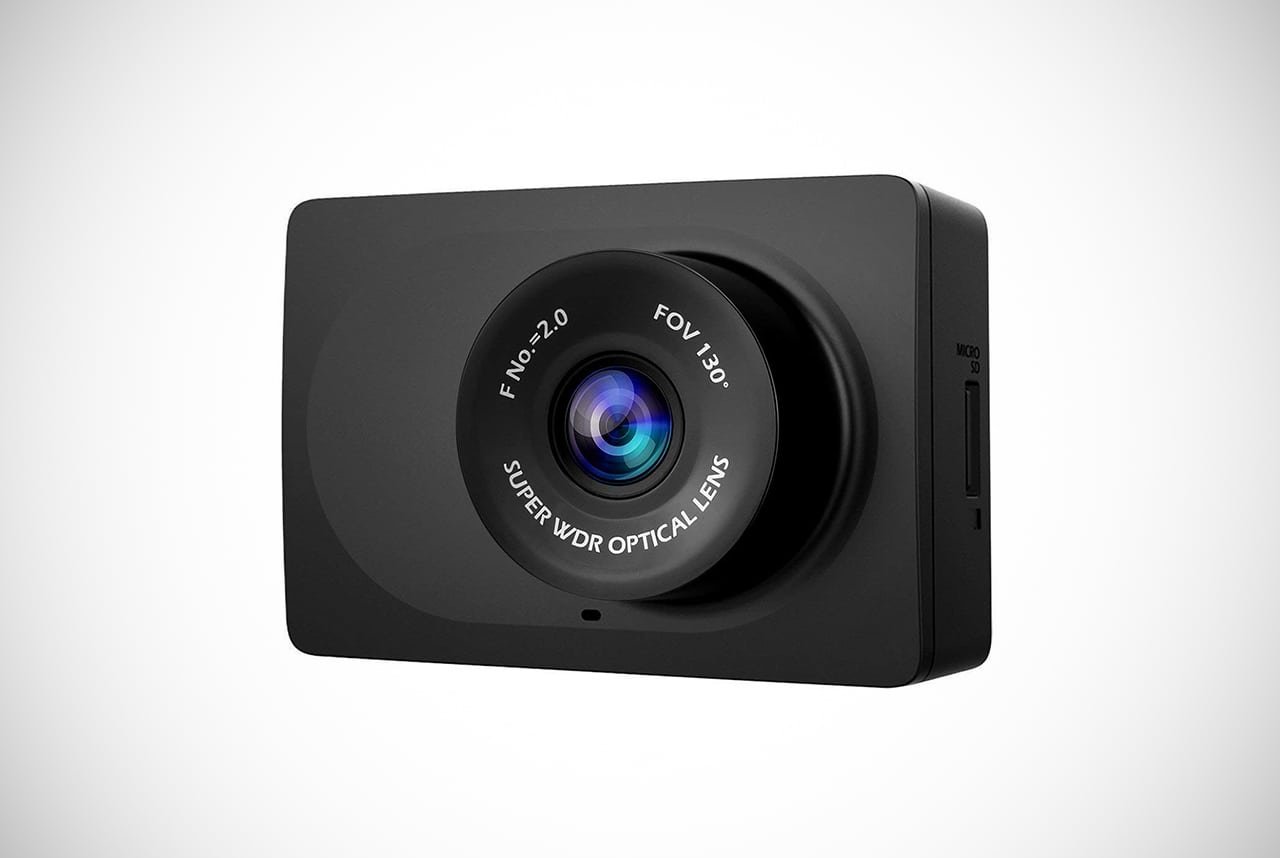
If compact is your style, then the YI Compact Dash Cam might feel like it’s been designed especially for you. One of the cheapest products on our list, it still boasts a range of great features that feel like it should cost much more.

These features include high-quality day footage and even good footage for nighttime recordings.

Despite its size, it’s also very sturdy and should withstand knocks or tumbles with ease. On the software side, the app is relatively straightforward to use. It also provides the opportunity to look back on exactly what happened in any situation you run into.

For those in warmer areas, the built-in cooling system will keep it protected against the sun. However, there have been some instances of melting, so be careful.

Pros:

  • Excellent price for what you get
  • Lightweight but sturdy
  • Excellent, high-quality footage during the day, good footage at night
  • Easy-to-use app

Cons:

  • Can’t read number plates over 10 feet away
  • Unclear audio recordings
14image

Editors Rating

  • star
  • star
  • star
  • star
  • star

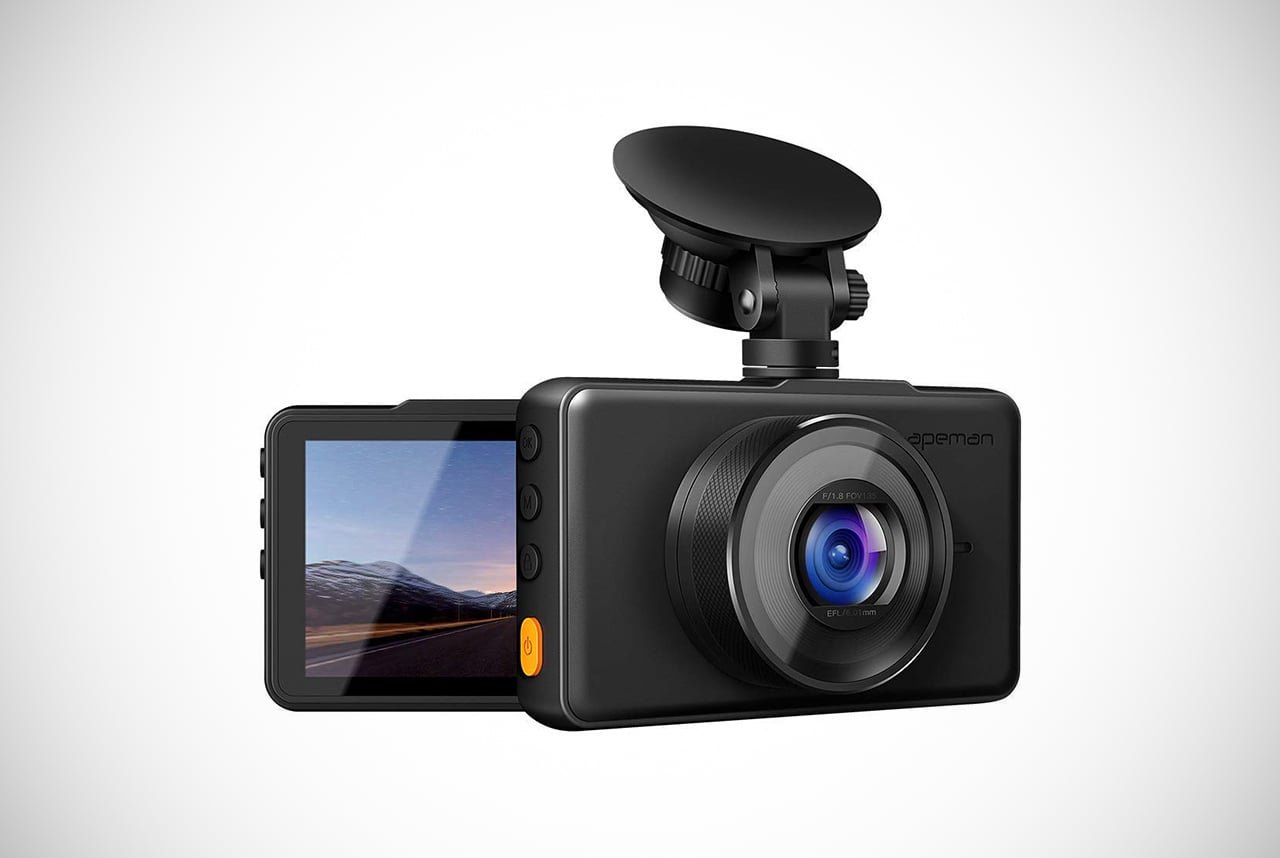
Our final choice for the best car dash cams is the APEMAN Full HD Dash Cam. It lives up to its name with high-quality video footage that allows for seamless video recording. It even does this during the day and night, both with clear results.

While the camera doesn’t technically have night vision, it still offers F1.8 exposure that’s ideal for low-light situations.

These car dash cams also come with a built-in G-Sensor that recognizes exactly when a crash occurs and locks the footage for your protection. Meanwhile, the 170-degree wide angle lens captures the majority of the road, so even the most inconspicuous happenings are recorded.

Our only real issue is that you can only mount up to a 32GB microSD card. This is a good amount, but we’d like it if there was potential for just a little bit more storage. Otherwise, feel free to go ape-man, over the APEMAN

Pros:

  • Simultaneous recording with super high resolution
  • 170-degree wide angle
  • Built-in G-Sensor
  • Easy to set up and use

Cons:

  • Only recognizes microSD up to 32GB
  • Some problems with loop recording

What are the main things to consider when buying a dash cam?

We see you’ve decided to purchase a dash cam. Congratulations, from now on you’ll never need to worry about the back and forth uncertainty of ‘He said, She said.’ Plus, you’ll never need to feel concerned about how safe your car is and you’ll also pick up a couple of hilarious videos along the way.

Before you settle on which car dash cam is the best one for you, there’s a couple of things you’ll need to consider first. This will help you out by making sure you don’t get taken for a ride.

Resolution:

In the 21st century, everything is high definition, perhaps too high definition sometimes. Whatever car dash cam you choose to buy, you can rely on it having a satisfactory image resolution. However, there’s still a range of different image qualities that you’ll notice when it comes to car dash cams.

The most common to run across is 720p, 1080p, and 1440p.

You may not know what this means, which is totally cool, few do. These same things can be seen in computers and televisions too. That said, what does 1080p, for example, actually mean? The “P” in the example stands for “progressive.”

You may see 720i as well, where the “I” stands for “integrated.”

Both are the same type of thing, it’s simply the way pixels are laid out. In the P version of things, pixels are up and down. Meaning from the top of an image to the bottom, pixels are formed. This gives an HD, defined image or video that you might see a movie in.

Meanwhile, the I version has pixels that go from side to side. This offers a crisp, sharp image or video. The P version is often better at these things which is why it’s used for car dash cams.

The higher the resolution is, the more likely the video will catch the smallest of details.

Looping:

Car dash cams with looping capabilities allow you to avoid the need for switching the camera on or off. The reason for this is due to the loop allowing the camera to automatically turn on. It’ll begin recording as soon as you switch your car on thanks to hardwiring.

If you’re somebody whose memory isn’t as great as you’d like, this is essential. Even if you have a great memory, it could be insanely useful. Plus, it’ll be another thing you won’t have to worry about.

Night Vision:

Cameras with great night vision will save you a lot of stress if an accident occurs in low-light conditions. Night driving is in some ways safer due to there being fewer cars on the road, but this is not 100% true at times. It’s also a time where people feel perfectly happy to not only hit but also run.

Hey, think about it, it’s dark, nobody saw!

Unfortunately for them, if you have a dash cam when you’re involved in a nighttime collision, they can’t truly get away. Some cameras have better night vision recording than others, however. That means you need to be sure to find one that provides as clear an image as possible once the sun goes down.

G-Sensors:

Finding and purchasing a car dash cam with G-sensor capabilities is essential for protecting your footage. It’ll help keep it perfectly fine in the event of a crash or collision without it getting overwritten by the newer footage. Cameras with G-Sensor technology will automatically switch off when they recognize the car’s ignition has been turned off.

It will then ‘lock’ the footage to ensure that is doesn’t disappear into the ether.

Driver Assistance:

Sometimes there’s a lot going on while your driving, but you’re a good driver, right? It may not matter. Clearly, you can’t be expected to do this successfully all the time sadly. In fact, you might not notice something until it’s too late.

To prevent this, the car dash cams come with collision and pull-out alerts.

This recognizes potential disaster before it happens.

Not only will you have some proof after an accident, but you’ll also be able to prevent accidents altogether. This pretty much makes you a superhero. Who needs the Batmobile anyway?

Parking Mode:

Worried about your car at when you’ve parked it? Maybe there’s been a spate of vandalism around the neighborhood recently? You’re not going to sit up all night waiting to catch the perp, after all, you shouldn’t have to.

Why do all the work when your dash cam can act as a lookout for you?

Parking mode operates using motion sensors, so you don’t need to worry about wasting the battery overnight. If someone comes within range of the car, the camera will switch on. This is sure to catch crooks and idiot kids and hopefully makes sure they don’t cause any more damage.

You might also get the occasional curious critter, but we can live with that.

Rear Camera:

Finding a car dash cam with both front and rear camera functionality ensures you get the widest range of protection possible. You can drive wherever you please without fear of possible accidents they are not caught on camera. Clearly, the best cameras can give you this.

However, it can be a bit more expensive…so you need to think before you buy.

Do you need a rear cam? We’d say it could sure offer more protection in the event an accident occurs…especially in the back of the vehicle you happen to drive. However, the normal car dash cams can do a lot for you too. That said, this will just depend on how much you’re willing to spend.

Storage:

Most car dash cams will have a built-in memory function that’ll record and subsequently save any footage that’s captured during your drives. However, what will you do once you run out of space? By using high definition video, you’ll be treated to excellent and clear footage that will identify culprits without a shadow of a doubt.

The problem is that this awesome quality also means a lot of storage space is used up. Those files can get pretty large. Cameras with high-capacity storage will be a great asset to you, without a doubt. You may also want one that can install a microSD card for even more space.

This will save you the hassle of deleting footage all the time, without much time in-between.

What are the main benefits of car dash cams?

Car dash cams are tremendous for most. The reason is mostly due to what they provide the average, every day, driver. Think about it this way, your protection and how people believe your story could hinge on these things. Car dash cams have gotten police officers out of hot water as well as fired.

That is some major power to hold.

Imagine too if you’re a young black man in America. Traffic stops are routine for them, as well as Hispanic men (even if you do nothing wrong). Most tend to go well, but at times things can get really bad.

Car dash cams can be maneuvered to get the entire ordeal on tape if something goes bad.

It’s your word against the officer’s word, which means your word is useless without proof. However, this tape you happen to have will help exponentially prove he or she was in the wrong. Heck, even the presence of one will help. This is useful for a number of other instances too, so let’s go over them.

Accidents:

Many of us have suffered an accident, been on the wrong end of a fender bender, or encountered some douchebag who thinks he owns the road. However, if we had a car dash cam, we could have had an excellent way to prove that we were, in fact, in the right.

Memories might be pretty clear, but there’s no substitute for video evidence. It’s an eyewitness that doesn’t blink, so take advantage while you can.

Peace of Mind:

Even if we have a good idea of where our vehicle is, we may still worry if it’s safe. It could be the area you’ve parked in, it could be the place on the road, it could just be that you’re very protective. Maybe too protective perhaps? With a car dash cam, any fears will be (mostly) alleviated.

The dash cam won’t necessarily save your car from damage when you leave it parked somewhere. However, it will help you identify who was responsible. This will help the local law enforcement hunt them down, then you’ll finally get the justice you deserved all along.

Fraud Prevention:

The unfortunate truth is that some drivers will go out of their way to cause collisions, accidents, and other inconveniences. They will then try to make it look as if you were at fault for their mistake. How horrible, right?

With car dash cams, you can become a hero of the road.

Well, you’ll be your own superhero. You won’t be a Batman or Green Arrow out there or anything…this is only a dash cam. However, you’ll help you avoid dealing with people who try to make you look at fault. These frauds need to be stopped and you can do just that.

Not Just a Camera:

Well, it still is a camera, but the dash cam is so much more. It can act as a parking assistant, provide collision alerts, and parking protection. Furthermore, most cameras will also have GPS capabilities. This will not only pinpoint exactly where an accident occurs but will also show your speed.

This will allow you to make sure you never go over the speed limit. We know you will, but at least you’ll have an idea of the speed limit in areas you are not familiar with.

That GPS thing is pretty handy, for sure.

The Memories:

Car dash cams are mostly associated with covering you or somebody else in the event of an accident. However, you can also use them to record your road trips! Seriously, you can.

This is pretty awesome if you ask us.

If you like packing up your stuff, jumping in the car and saying goodbye to the city for a couple of days, the dash cam will be there. It’ll catch everything so you can watch how things went when you’re done. You can check out the gorgeous scenery and marvels of nature you came across.

Heck, you can even put together in a travel video as a memento that won’t go anywhere.

Pure Entertainment:

We’ve all seen those hilarious/interesting videos captured by the sheer luck of a driver having a dash cam. If you haven’t seen them, trust us, you’re sorely missing out. While entertainment was not the intended purpose of car dash cams, you can have endless hours of weird and wonderful examples.

You can come across some of the strangest goings on in everyday society, especially when people don’t think they’re being watched. Just remember not to use these powers for evil. That’s not cool, dude.

Is it easy to set up and install car dash cams?

It really should be easy to set up car dash cams. However, that is not exactly the case regardless of how good it would be. There are certain rules regarding placement and other issues that you really need to pay attention to.

Not doing so could result in footage not working well or even become useless in court under certain situations.

Heck, you could even be breaking the law! To avoid your jail time, we wanted to make sure we made you aware of key things you need to know about. Check this out.

Where can you mount it?

Dash cam mounting isn’t as simple as the everyday hands-free mount you’ve used with your smartphone for years. Instead, it must be placed behind the rear-view mirror. This allows the image to be perfectly centered and it captures the widest angle of the road.

This includes both lanes, as well as any signs that you pass along the way.

But what about the cables?’ you lament while ignoring everything we’ve just said. Well, hold on a second. Car dash cam wires are long enough to reach a power source. This ensures there’ll be no issues with connectivity.

What kind of mount, though?

Car dash cams come with either a suction-mount or one that employs double-sided tape. Both work well, but the suction cup is much more reliable than the double-sided tape version. This is mostly due to it being easy to reset and start over if you put it somewhere wrong.

It can also go from vehicle to vehicle without much issue.

Remember, with every incorrect mounting with double-sided tape, you’ll lose precious adhesiveness. That could result in your camera tumbling from its perch, probably just before an accident occurs. With that being said, we’d advise the suction version.

How do you connect it?

Your car dash cam will come with the aforementioned wires that’ll connect to ports within your car. This will more than likely be the cigarette lighter port. However, you can elect to hardwire your camera, which will connect it to the main electronics of the car.

There are a few benefits from this, including having the wires hidden. It can also turn on whenever you switch on the ignition so you’ll never forget. Most car dash cams can be hardwired, but you can’t do it yourself. This means you’ll need to employ a professional to make sure it’s done correctly.

That said, it’s an extra expense you may or may not want.

What are the laws related to car dash cams?

Car dash cams were mostly designed to help you in the event of collisions. However, you need to be careful about whether or not you’re using them in a legal way. Remember, laws are a bit annoying but we must follow them. We know, we thought they just handed out chocolate bars too.

Why can’t we just take them, right?

That said, we put together a guide on a few nations and their laws regarding car dash cams to help you out a bit. Take a look.

United States:

In the United States, car dash cams themselves are not technically illegal. However, in the majority of states, windshield obstruction is, in fact, illegal. As long as you’re not impeding your own view of the road, then you should be okay.

We’d suggest getting in touch with a lawyer, police officer, or local DMV just to be on the safe side.

There’s also the issue of data protection, which would inhibit the privacy of anyone traveling in your car. A solution to this, though, is to either turn off the audio recording or simply inform them that they’re being recorded. Some states do not have any laws on recording someone.

This is the same for video and audio recording, as there are not as many specifics.

In many states, only one side has to know of a recording. That means, since you’re the one side, you’re good. Not every state is the same, so call up local police stations or a DMV to see what they suggest.

However, you truly want to tell someone even if you don’t have to. Proper ethics, of course.

Canada:

There are no laws about installing a car dash cam of any kind in the country of Canada. In fact, recording your journeys on the road is perfectly fine as they are considered public areas. This means you’re not intruding on anyone else’s privacy.

However, if the camera is not mounted correctly, you could suffer similar charges to those in the United States.

Obviously, you don’t want to operate one while driving, as this is very illegal in Canada as it is in America. This falls under the same type of charge as using cell phones while driving. It may be a bit minor, but too many can add up.

United Kingdom:

Car dash cams are perfectly legal in the United Kingdom, throughout every single area. However, if it is mounted incorrectly, you could face fines from local police who see this.

You could even have any footage you’ve recorded deemed inadmissible in a courtroom setting.

If you work for a ride-sharing company like Lyft or Uber or even just as a taxi driver, then you need to inform the passenger that they’re being recorded. This is technically needed in both Canada and the United States in states or provinces that have such rules.

Anywhere Else?

In case you’re planning a trans-continental trip, we should mention that you’re prohibited from having a car dash cam at all. This includes countries such as Switzerland, but could also apply elsewhere in the world.

Before going anywhere, do your research and save yourself the hassle.

Most of the time, taking car dash cams overseas or to nations close by would be weird. After all, there are a lot of rules on rental cars and most airports won’t let you take stuff like this on a plane. That said, avoid assuming it’s okay. You honestly don’t need it in many nations.

Simply use a normal camera if you’re worried things might get bad somewhere.

On a Collision Course, Or Maybe Not…

With so many car dash cams on the market it can be a challenge to choose one that’s right for you. However, you know your driving, know your area, and know which is the best for your needs. When it comes to car dash cams, it doesn’t need to be the best, the brightest, the fanciest.

Instead, it needs to be something that you trust will keep you protected in the event of a collision.

The thing about car dash cams is that they’re not just there to place the correct blame. In fact, they’re also there to keep you honest too. It’d be great if everybody drove like they had a car dash cam, but we all know that’s not the case.

Instead, it’s up to people just like you to do your bit in keeping yourself and others in check.

We’re all prone to the odd bout of road rage every now and again. However, with proper car dash cams, perhaps things will be a little different. Why not shift into a different gear and take it a little bit easier?

It would make the road a much more peaceful place to be.

Why You Should Buy A Remote for Your Xbox

You may be thinking, “Why would I want a media remote for my Xbox when I already have a Xbox controller? Plus, I already have too many remotes.”

The truth is that you likely don’t need a media remote if you use your Xbox exclusively for gaming. But if you use your Xbox as streaming box (for watching apps like Netflix or HBO Max) or playing Blu-rays — a media remote can be a godsend.

The main benefit of a media remote is that it makes it easier to navigate streaming apps on your Xbox for non-gamers. We all know how clunky the controller’s joysticks and D-Pad can be and, if you live with your parents or maybe a spouse, they’d probably prefer a more traditional remote. Lastly, it prevents you from having to drain the battery life of your controller.

Microsoft does make its own media remote for Xbox. It’s good and affordable, but it’s also been around for quite some time. The nice thing is there are number of third-party makers who also media remotes for Xbox that work great, look a little different and are still very affordable.

PDP Gaming Remote Control

PDP

PDP Gaming Remote Control

amazon.com

$19.99

Released in 2020, the PDP GamingRemote Control is an IR-based remote that was specifically designed to work with Xbox (One, Series X and Series S) consoles. It has a simple controls that include A, B, X and Y buttons (just like a controller), which gamers will appreciate. Also, it has motion-action backlit keys, which will help you use the remote in a dark room. It runs on two AAA batteries.

Xbox One Media Remote

Microsoft

Xbox One Media Remote

gamestop.com

$14.99

The Xbox One Media Remote has been around for years. It has nice backlit keys and simple controls. It works via an IR blaster (not Bluetooth), meaning you need to direct line of sight to your Xbox for controls to work. It requires two AAA batteries and yes, it’ll work with the new Xbox Series X and Series S consoles, as well as older Xbox Ones.

8Bitdo Media Remote (Short Edition)

8Bitdo

8Bitdo Media Remote (Short Edition)

amazon.com

$19.99

8BitDo is best known for making new wireless gaming controllers that look like the retro controllers of old, but now they’ve released two officially licensed media remotes for Xbox. This “Short Edition” version has the same kind of Home button that’s on the latest Xbox consoles, and pressing it instantly wakes your Xbox. It has A, B, X and Y buttons just like a controller, and quick buttons for playback.

8Bitdo Media Remote (Long Edition)

8Bitdo

8Bitdo Media Remote (Long Edition)

amazon.com

$24.99

The “Long Edition” version is exactly the same as the company’s “Short Edition” remote (above), but it’s longer, includes a number pad and comes in black instead of white. It’s also $5 more expensive. Other than that, it has great wake button and intuitive backlit buttons.

This content is created and maintained by a third party, and imported onto this page to help users provide their email addresses. You may be able to find more information about this and similar content at piano.io

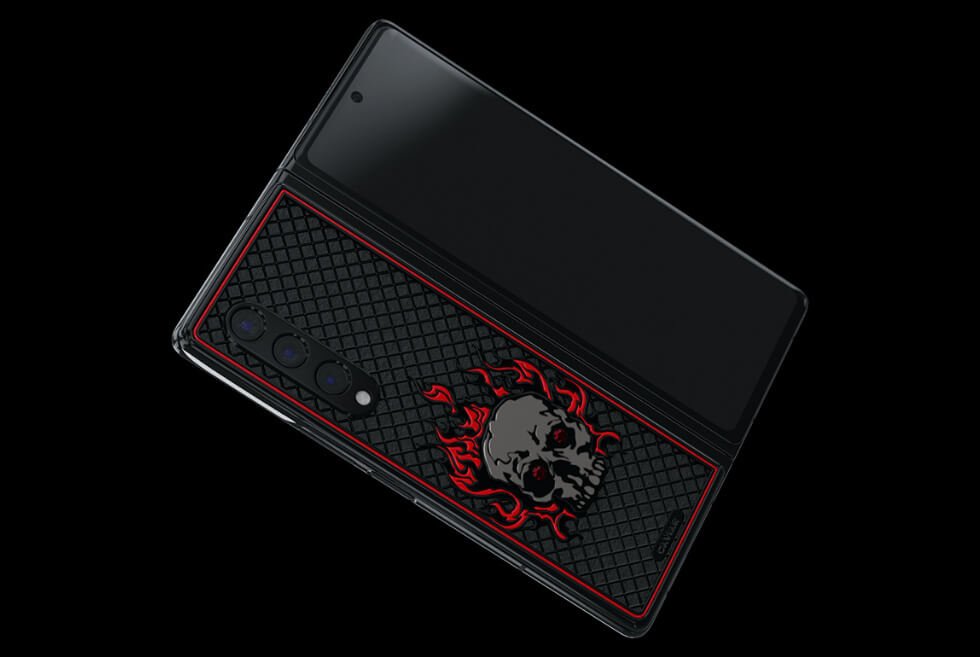
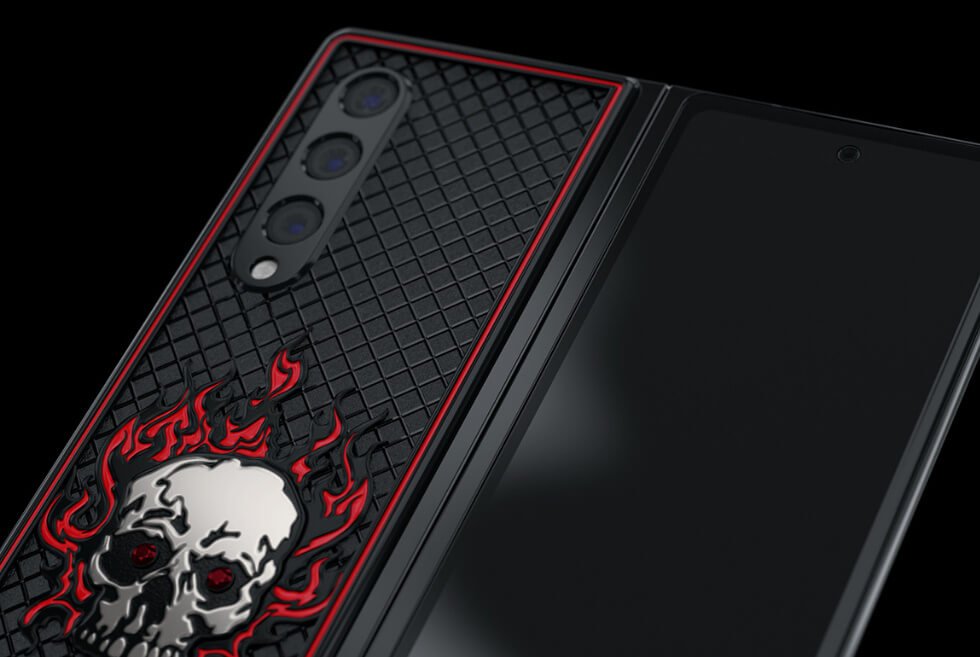
Caviar Turns Samsung’s Latest Foldable Handsets Into The Skull Capsule Collection

Tech industry insiders have been hinting at something major for Samsung’s roadmap for 2021. It was hinted that a new Galaxy Note model was not in development. Instead, what the latest Unpacked event unveiled were new foldables: The Galaxy Z Fold3 and Galaxy Z Flip3. In Caviar’s hands, we see these transform into the Ragnarok and Catrina Calavera for the Skull capsule collection.

We have been featuring the Russian jeweler’s works for so long now. Still, we remain in awe of how they turn these flagship devices into extravagant accessories. Just like the Skull capsule collection. Given the foldable smartphones already come with premium price tags, Caviar’s clients are willing to pay even more for something more exclusive.

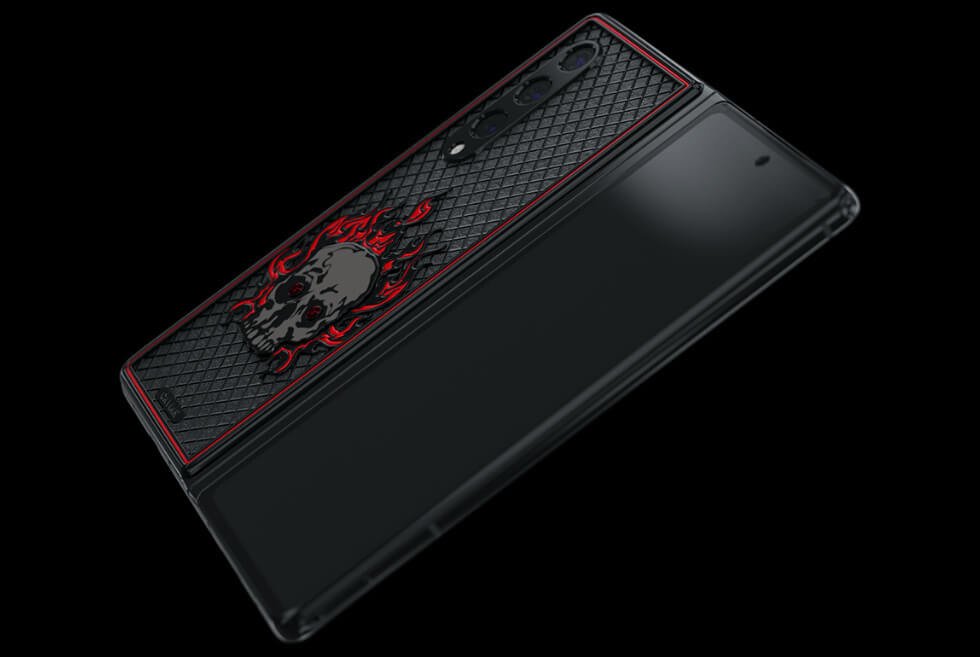
Up first is the Galaxy Z Fold3. Caviar goes for a black and red theme here as the Ragnarok now flaunts a dark titanium body with premium composites. Laser engravings of crosshatch patterns dot the rear cover. It becomes the backdrop of a polished titanium skull with scarlet jewelry enamel flames. Additionally, the eyes are actually rubies.

Next in the Skull capsule collection is the Catrina Calavera, which begins its journey as a regular Galaxy Z Flip3. The outer shell of the clamshell handset is now titanium with 18K gold inlays. A rose emblem in red and green composites occupy the upper section. Below, there is an 18K white gold skull. The decorative frame and skull sport sapphires, rubies, and emeralds.

Each is limited to a few examples only. Only 99 units for the Ragnarok, while the Catrina Calavera only gets 20. Perhaps this is a hint that there are more special editions aside from the Skull capsule collection on the way. We’re wondering what Caviar will be working on next.

Discover more

imageimageimageimageimageimageimageimage

Images courtesy of Caviar

Elon Musk Says A Humanoid Robot Helper Called The Tesla Bot Is In Development

We love our boy Elon Musk despite his eccentricities. His haters constantly nitpick at his flaws but turn a blind eye when it comes to the man’s achievements. Aside from growing his established brands, he is likewise juggling several other projects. Although some might not see the light of day, we really hope the Tesla Bot eventually makes it to production.

This reveal is a big surprise for many given Musk’s recent opinions regarding artificial intelligence. He supposedly warns that advancements in machine learning may someday become a threat to humanity. Therefore, after seeing the Tesla Bot, we’re wondering where the guy actually stands when it comes to AI.

There are already rumors at this recent unveiling is just another farce for the man, but let’s give him the benefit of the doubt. For the longest time, we have been dreaming of owning a humanoid robot. Don’t deny it because you do too.

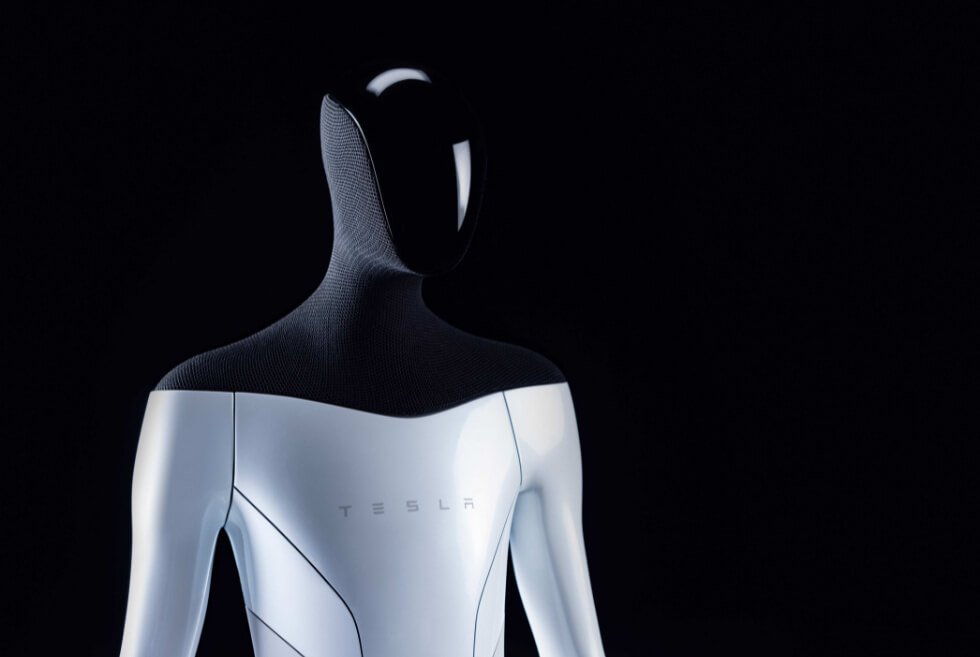
The Tesla Bot might be the first to become commercially available given the company’s resources and tech. So far, we like the overall design which shows us a faceless automaton presented in a two-tone colorway.

The outline of the body looks masculine and we’re not sure if there are plans for an effeminate model. According to the presentation, human safety is crucial, which is why users can easily disable or avoid it when things go haywire. Its primary function is to take over most of our mundane tasks like cleaning.

Packing hardware and sensors like those used by Tesla’s autopilot systems, it should have an excellent awareness of its surroundings. The Tesla Bot stands 5’8” tall and weighs 125 lbs. Movements come from 40 electromechanical actuators. We can’t wait to see a working prototype demo soon.

Discover more

image

Images courtesy of Tesla

The Nest Brush Is A Self-Dispensing UV-C Toothbrush

Body grooming and oral health care are both parts of good hygiene and whether we like it or not, it is important to also take care of our pearly whites to avoid certain diseases. But when it can be time-consuming and worse, a great contributor to plastic wastes. What with the toothpaste tube and disposed toothbrushes ending up in landfills. Thankfully, the Nest Brush solves that problem.

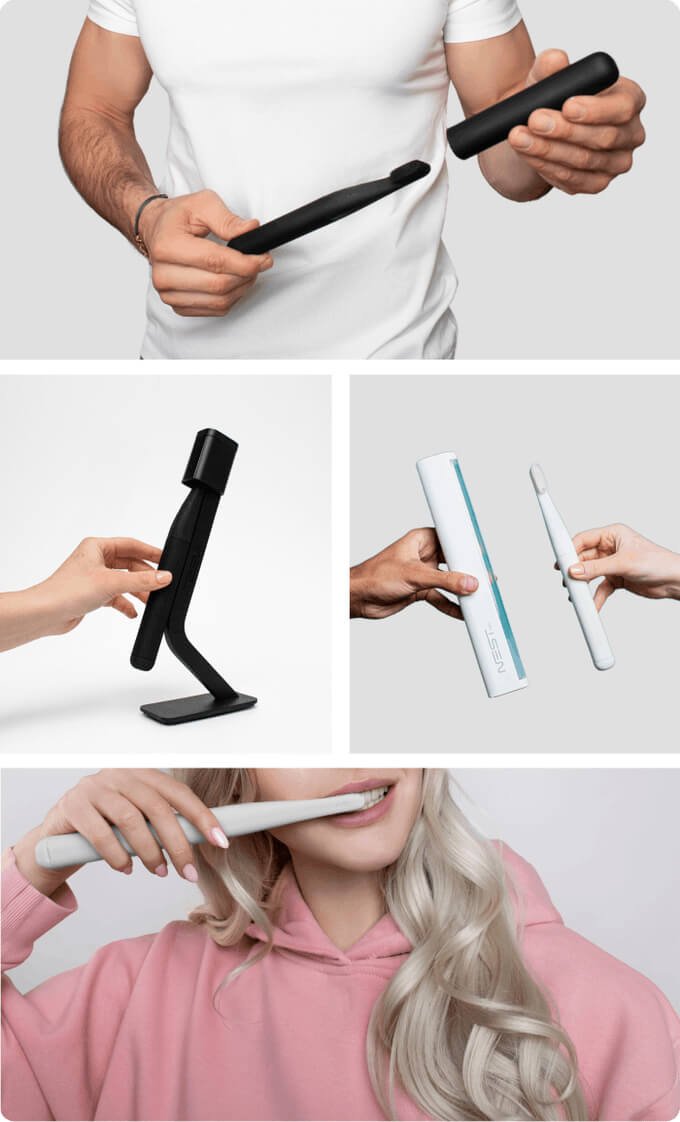
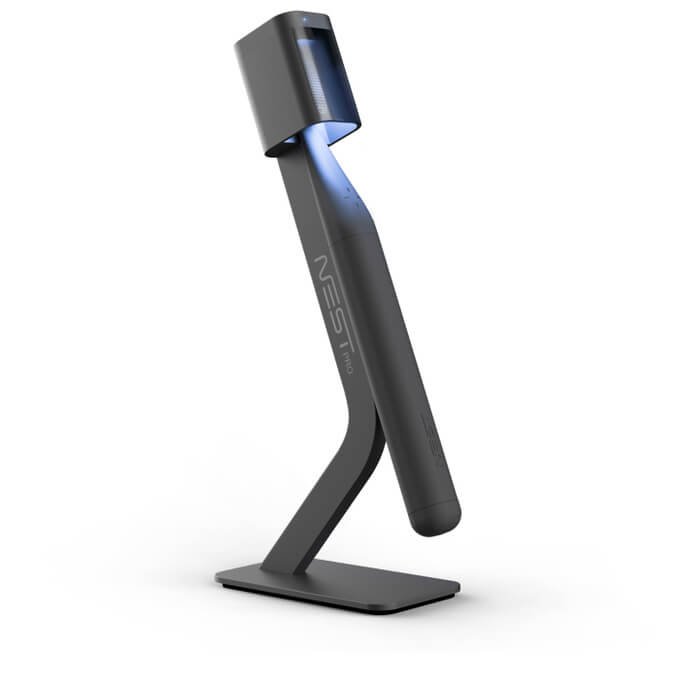
This ingenious oral care kit consists of several items that make brushing not just fun but also sustainable. It has a minimalistic silicon toothbrush that operates manually but has the power of an electric one. The handle has a built-in toothpaste refillable container, which means no more packing those tubes during travels. It can store 30 ml of paste which is good for a month of brushing. 

A press of the button on the handle pushes out a sufficient amount of toothpaste through internal channels into the silicon brush head. The silicone valve prevents the paste from drying and leaking while its ergonomic design makes it easy to clean the container from the inside.

Moreover, the Nest Brush comes with replaceable heads and a magnetic brush stand equipped with a UV sterilizer. It only takes less than a minute to sterilize the toothbrush using two powerful UV-C LED lights. The head of the stand also protects your toothbrush from dirty water splashes. 

Of course, when it comes to travel, this one also has a travel case with a UV sterilizer. Simply put the brush inside and the sterilizing process starts immediately. It is battery controlled which is good for two months. Best of all, the Nest Brush uses soft food-grade hypoallergenic silicone bristles to make brushing painless. 

Get It Here

imageimage

 Images courtesy of Nest Oral Care

Save Up to 70% off a Smartphone with UpTrade

With school right around the corner, your child’s means of communication should be top of mind. But buying them a new smartphone can often seem like money down the drain. Let’s face it, they don’t always take the best care of their belongings. The solution? Buy them a used cellphone on UpTrade. Each of UpTrade’s used smartphones is professionally inspected and certified, and comes with a full report from the engineer who inspected it. Plus, each listing contains photos of the actual phone (not simply placeholder photos), so you always know exactly what you’re getting. If you want to be sure your child has a quality phone for back to school, but can’t justify the cost of a new one, look to UpTrade — you’ll often save between 50 and 70 percent off the retail price.

SHOP NOW

This content is created and maintained by a third party, and imported onto this page to help users provide their email addresses. You may be able to find more information about this and similar content at piano.io

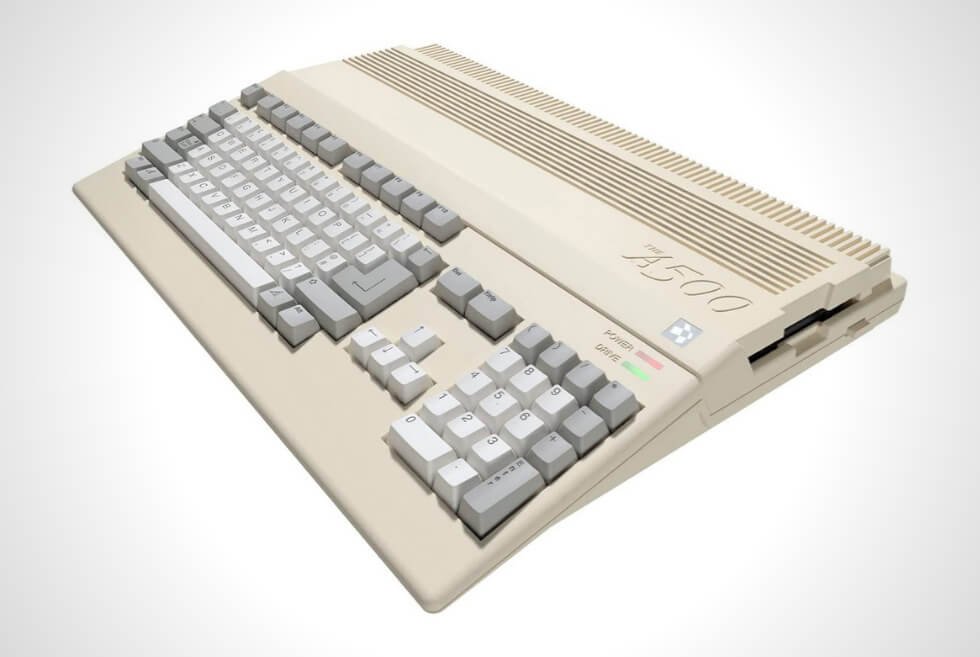
Retro Games Ltd revisits the Commodore Amiga 500 with the THEA500 Mini console

We’re already at the point of just giving up until there is enough inventory hopefully by next year. Even without dropping any names, gamers know we’re talking about the PS5 and Xbox Series X/S. Although you can occasionally spot restocks Microsoft’s new console, Sony’s game system is as elusive as ever. Thus, we might as well grab the THEA500 Mini.

The demand for modern remakes of vintage consoles is not dying out anytime soon. More so, with people stuck at home due to the pandemic, gaming is the best form of escapism right now. If like us, you already have a growing collection, then Retro Games Ltd introduces another one to add.

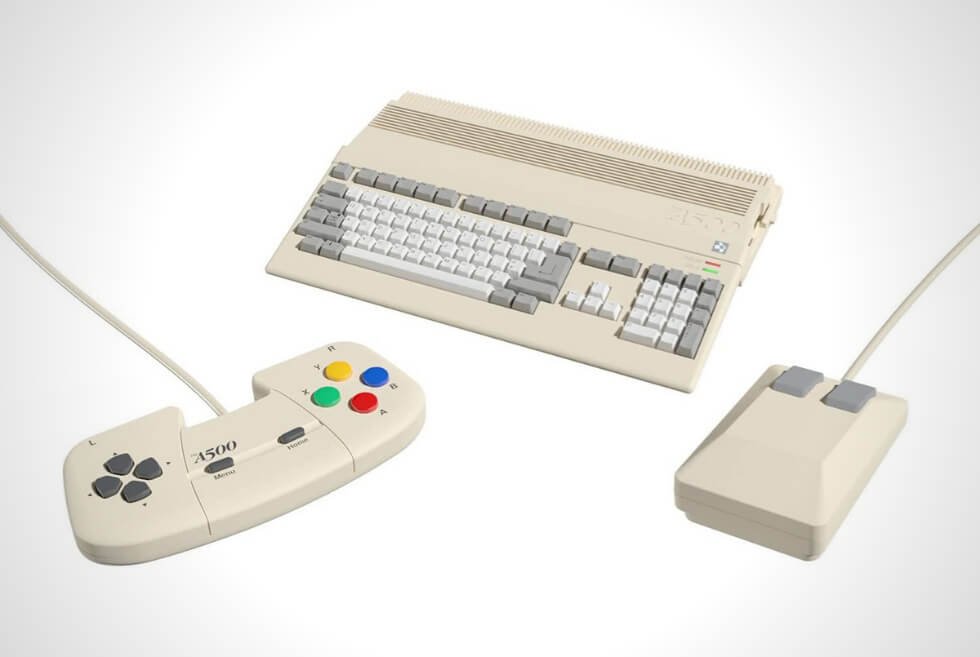
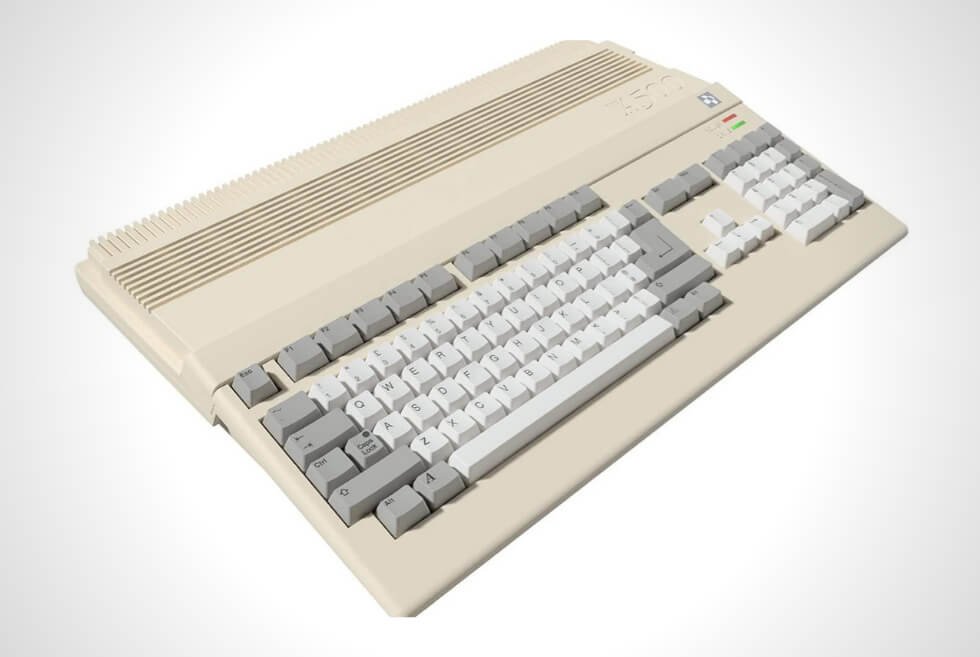
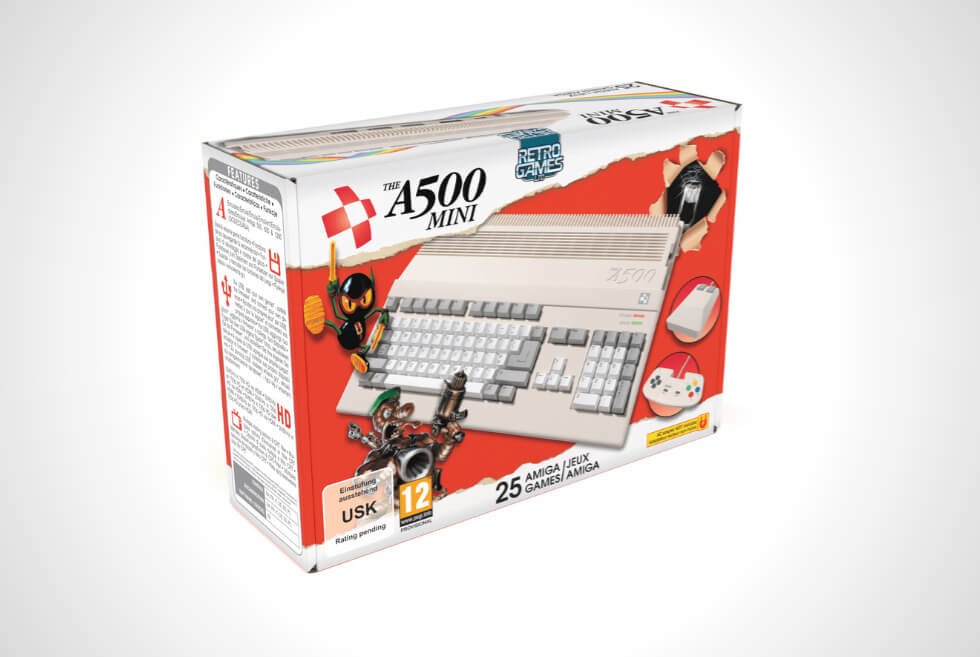
This time, they’re paying tribute to another iconic machine – the Commodore Amiga 500 – and it’s remarkable. Primarily marketed as a home computer, it didn’t take long for people to turn it into a gaming PC instead. The THEA500 Mini captures the look of the original but packs modern hardware and features.

It ships with 25 pre-installed games such as Worms: The Director’s Cut, Another World, Battle Chess, Pinball Dreams, and more. Retro Games is not locking you out of the software either. Users can download additional titles supported by the A500, A600, and A1200 platforms.

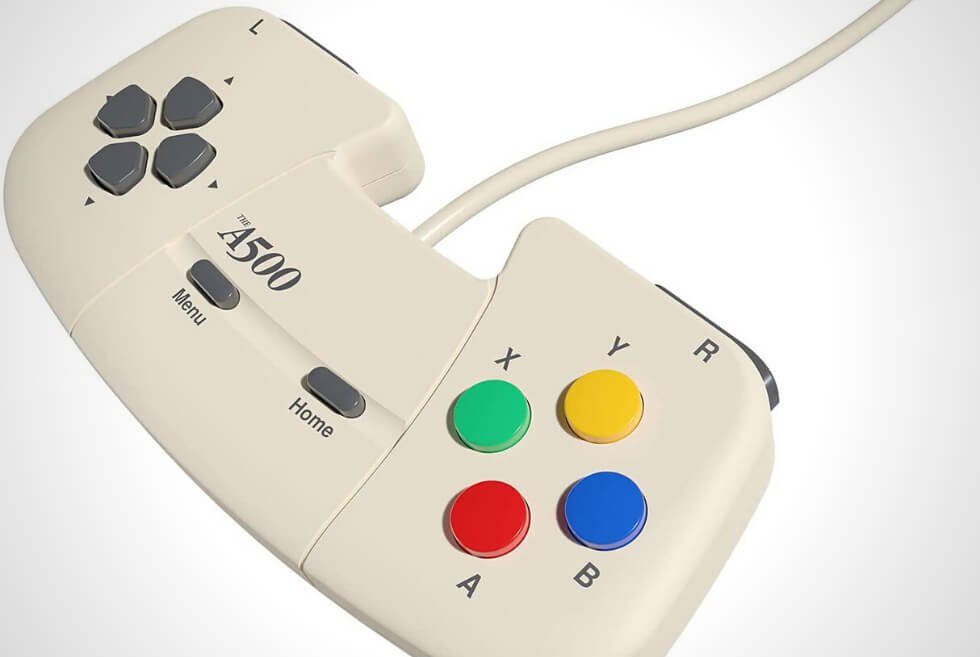
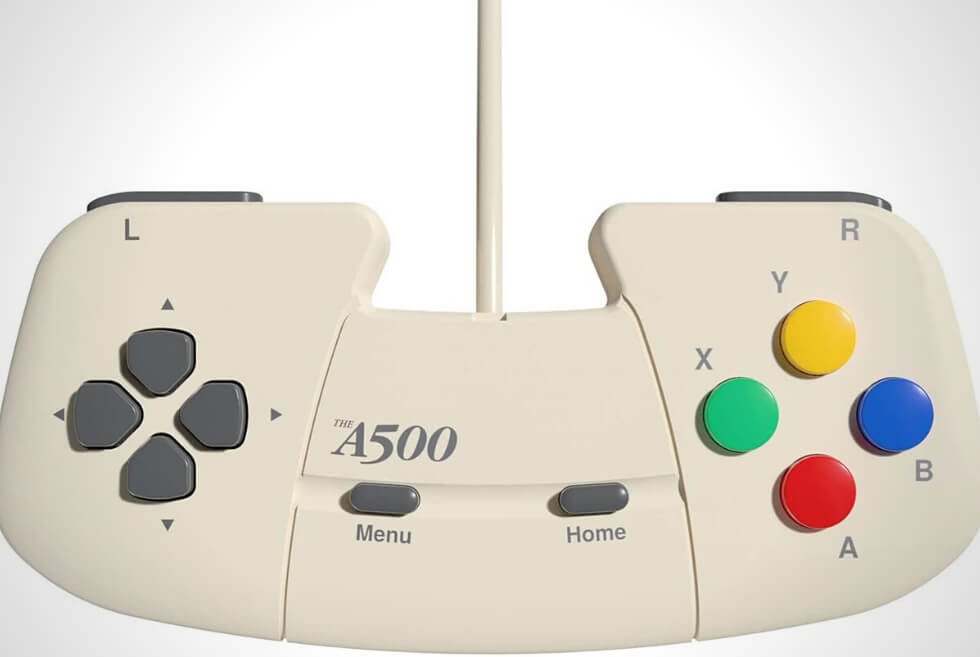
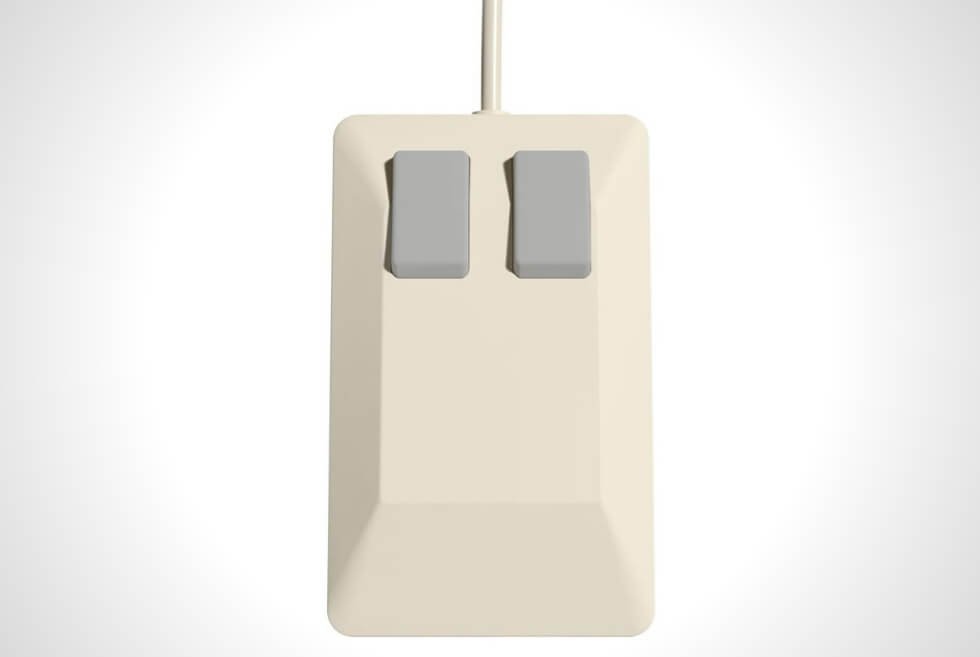
You can hook it up to your TV or gaming monitors via HDMI. Visual tweaks such as scaling, filters, and variable refresh rates are likewise available. Moreover, Save states will let you quickly jump back into the action after a break. The THEA500 Mini includes a two-button mouse and a USB gamepad. As for the keyboard, it’s purely an aesthetic element but you can always plug in one.

Discover more

imageimageimageimageimageimageimageimage

Images courtesy of Retro Games Ltd

Can These $99 Earbuds Dethrone the AirPods with Pure Style?

Since their arrival in 2016, Apple’s AirPods have comfortably become the ‘buds to beat. While some competitors skew more premium, and others more affordable, no other buds have managed to become even half as ubiquitous or iconic.

Yet.

The Ear (1) are one of the most hyped tech products in recent memory. The first product by Nothing, a startup company spearheaded by one of the co-founders of OnePlus, these wireless earbuds support premium features like wireless charging and active noise-cancellation and cost just $99. Oh also they look incredible.

After months of leaks and cryptic marketing, the Ear (1) have broken cover and are finally available for purchase. Sort of. They went on sale in early August, but only in limited supply from niche stores like Kith, HBX and Mr. Porter (which only further their hypebeast appeal); they’ll officially go on sale for everybody on August 17 when you can buy direct from Nothing’s website.

“Polishing the magnets, finding the right invisible adhesive, it was all carefully considered.”

In one sense, these buds have steep hill to climb. The Ear (1) are very late to the game and entering a very crowded market. Apple’s first AirPods were released almost five years ago and there are a ton of wireless earbud options to choose from — pretty much every tech and audio company has at least their one pair. According to a recent Statista report, the number of wireless earbuds is expected to triple from 2019 to 2022), and the Ear (1)’s sub-$100 price point takes them into impulse buy territory. But the market is only going to get more crowded from here.

Fortunately, they’ve got a killer feature virtually none of their competitors can match: pure style. Nothing collaborated on the Earbuds (1) with the wizards at Teenage Engineering, known for its evocative and hip synthesizers. Everything in each earbud is designed not only to work well, but also to look incredible, with a transparent vibe that feels both nostalgic and fresh.

“With Ear (1) we wanted to craft an iconic design, using transparency, that would stand out and celebrate the engineering underneath,” said Evangelidis. “Every design choice, from polishing the magnets to finding the right invisible adhesive, was carefully considered. We were even turned down by some suppliers who thought it wouldn’t be possible!”

“There is a sea of sameness with products blurring together.”

is, one of the co-founders of Nothing, because they are primarily an online company with a direct-to-consumer business model. “Where we do have retail channels, including HBX and Kith,” explained Evangelidis. “We’re still able to keep prices competitive because we’re only working with strategic partners who believe in what we are building with Nothing, versus simply wanting to transact.”

tech roundup

Courtesy

    The $99 price point, while on the more affordable end, isn’t exactly as uncommon as it used to be. What was once the realm of sketchy knock-offs now includes a lot more options from reputable brands, as Google, Sony, Anker and Samsung all make solid wireless earbuds that come in at under $100. However, very few of those wireless earbuds support noise-cancellation. None support wireless charging. And none of them look this strike
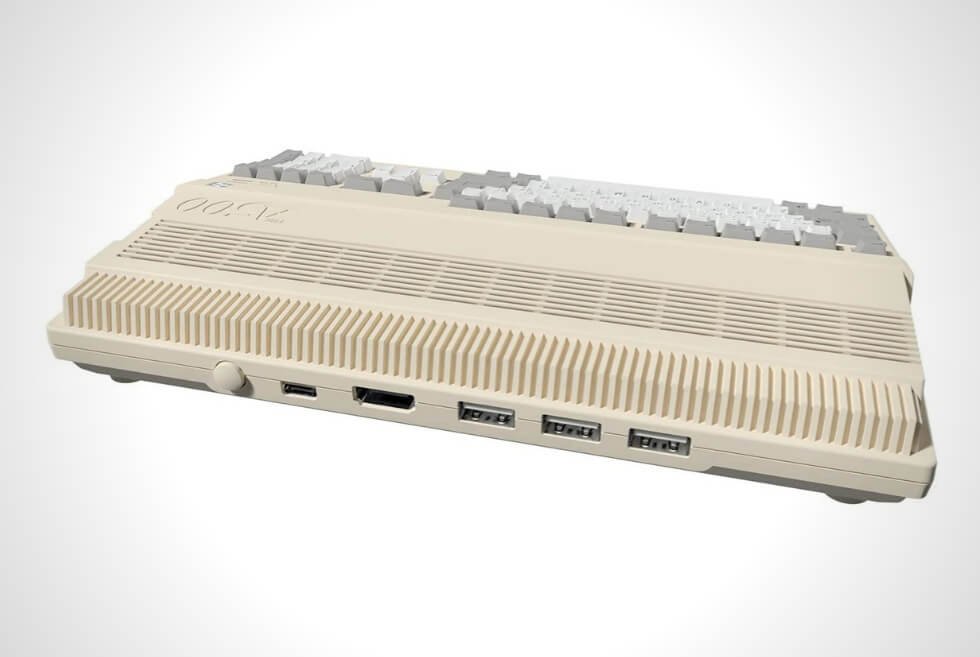
    The final product of the Ear (1) is something that looks completely unique, but it also doesn’t feel entirely unfamiliar. This is because the Ear (1) have the same general shape as Apple’s own noise-canceling wireless earbuds, the AirPods Pro. The Ear (1) have stems that are obviously transparent and the charging case is totally different, but the shape of the stem and silicone eartips are very similar.

    Evangelidis claims the stem-shaped design is more about function than anything else. “You can easily grasp the earbuds because of the stem’s distinct edges, and the flat surface is more intuitive for gesture controls, like swiping up and down for volume,” he said. “And the third microphone is placed at the bottom of the stem to make it that much closer to your mouth for better call clarity.”

    While AirPods themselves increasingly creep down towards the $99 price range (they’re on sale at Amazon for $119 right now) and competitors like Wyze are managing ANC buds as low as $60, the Ear (1)’s look is the ace in the hole, according to Evangelidis.

    “There is a sea of sameness with products blurring together,” he said. “The market is overdue for a new player that brings back some sort of excitement to the field of consumer tech, and one that celebrates design and artistry.”

      Nothing

      Nothing Ear (1)

      nothing.tech

      $99.00

      This content is created and maintained by a third party, and imported onto this page to help users provide their email addresses. You may be able to find more information about this and similar content at piano.io

8BitDo’s new Xbox Media Remote features backlit buttons and versatile compatibility

For the longest time, 8BitDo has been an awesome source of retro-themed gaming peripherals. Although many of its product designs are inspired by Nintendo’s classic silhouettes, it caters to other platforms as well. Generally, its controllers are compatible with Windows, macOS, Android, Steam, Raspberry Pi, and the Switch via Bluetooth. Now, Xbox users can grab a Media Remote for their consoles.

Just like Sony’s gaming systems, the Xbox One, Xbox Series X, and Xbox Series S all ship with multimedia capabilities. Aside from gaming, users can access entertainment services such as Netflix, YouTube, Twitch, Hulu, HBO Max, and others.

You can just use the supplied controller to navigate and operate, but a Media Remote is much more convenient. Just like when you watch cable TV, the traditional shape of a remote just feels natural. The button placements make it perfect for one-hand operation.

In fact, Microsoft sells a dedicated Media Remote, which is compatible with previous and current-generation systems. What 8BitDo markets are more affordable yet high-quality alternatives. Moreover, there are two variants available: Long Edition and Short Edition.

Both models will work with the older and latest Xbox units. The Long Edition would pair nicely with the Xbox Series X with its black color scheme. It features a full number pad alongside all the necessary buttons for various functions.

Meanwhile, the Short Edition Media Remote sports a beautiful white colorway and is more compact. It ditches the number pad and a few other buttons. Motion sensors automatically engage the backlight for low-light visibility. 8BitDo executes everything cleanly and we think you’ll love it.

Check it out

imageimage

Images courtesy of 8BitDo

The Best Webcams to Upgrade Your Video Chat

It was virtually impossible to buy a webcam in 2020, as the avalanche of video calls made so many of us realize just how bad computers’ built-in webcams can be.
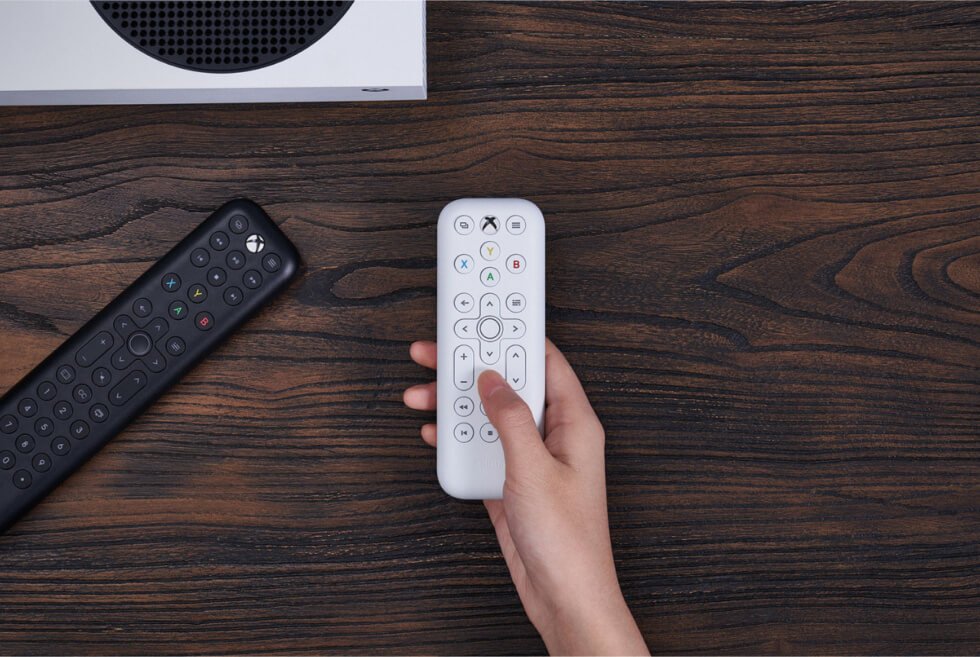
Fortunately the price spikes and shortages are now (mostly) over, and right now you can quite easily get a great external webcam for a reasonable price. And you’re going to want to do so because video conferences and remote work don’t appear to be going anywhere anytime soon.
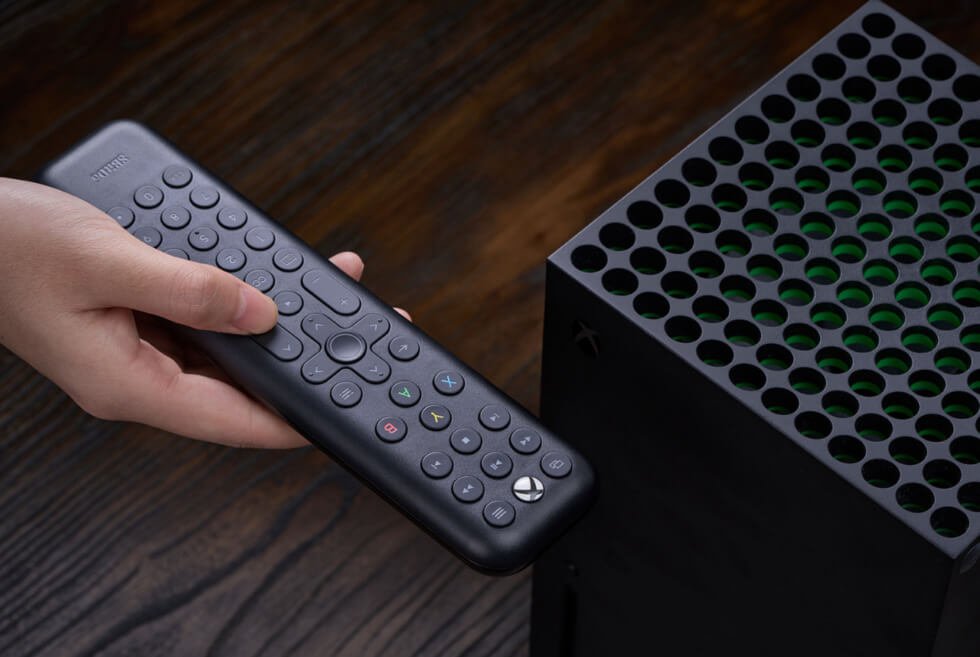
When shopping for an external webcam, you need to make sure it works with your computer, first and foremost. Then you need to decide how good (or expensive) of a webcam you actually need; most capture a 1080p video (which is likely a big improvement over what you current have), but there are a few higher-priced ones that can capture 4K.

Finally, each webcam is a little different. They have different design features, such as privacy shutters, built-in mics or lighting. Others come with built-in software that allows you to customize settings, like autofocus, exposure and field of view. You want make sure it fits your needs.

Logitech C920S Pro HD

Logitech

Logitech C920S HD Pro

Amazon

$69.95

Connection: USB-A
Compatibility:
Mac and Windows

Best All-Around

The Logitech C920S Pro HD is a plug-and-play webcam that works with either Mac and PC. It has the same L-shaped design as its predecessor, the C920, so it’s really easy to attach to a monitor and, but also comes with an attachable privacy cover. It’s capable of capturing 1080p video and its built-in dual microphone array is great at picking up audio.

Logitech Brio Ultra HD

Courtesy

Logitech Brio Ultra HD Pro

Amazon

$199.99

$164.00 (18% off)

Connection: USB-A
Compatibility:
Mac and Windows

Best 4K Upgrade

You can think of this as upgraded version of the Logitech C920S Pro HD, as it has a similar horizontal design, L-shaped mounting clip and an attachable privacy cover. The big difference is that it’s one of the few webcams that is capable of capturing 4K video. It supports premium features like autofocus, auto light adjustment and motion tracking with high dynamic range. And you can choose between three different-field of-views (65-, 78- and 90-degrees) via the companion app. The downside, of course, is price.

Razer Kiyo Pro

Razer

Razer Kiyo Pro

Amazon

$199.99

$179.99 (10% off)

Connection: USB-A
Compatibility:
Windows

Best Webcam for Streamers

The Kiyo Pro is a better version of the entry-level Kiyo — but it comes at almost double the price. It still only captures a 1080p picture, but its superior sensor allows it to capture a higher frame rate (1080p at 60fps vs the Kyo’s 1080p at 30fps) and it supports HDR (the Kiyo does not). It has a more durable lens, a better and more flexible mounting system, and you can choose between three field-of-views (80-, 90- and 103-degrees). Unfortunately, it also isn’t compatible with Macs.

Anker PowerConf C300

Anker

Anker PowerConf C300

Anker amazon.com

$129.99

$99.99 (23% off)

Connection: USB-C
Compatibility:
Mac and Windows

The Anker PowerConf C300 is an excellent all-around webcam that captures 1080p video with autofocus and has a built-in mic. It connects to your computer via USB-C, which is a rarity, so it’s a great plug-and-play option for people with newer laptops (it also comes with a USB-C to USB-A adapter). The PowerConf C300 is unique because it allows you customize a bunch of settings (including brightness, contrast, sharpness) and switch between three different fields-of-view via its companion app.

Razer Kiyo

Razer

Razer Kiyo

Razer amazon.com

$99.99

$79.99 (20% off)

Connection: USB-C
Compatibility:
Windows

Razer’s entry-level webcam, the Kiyo, was created with streamers in mind. It has a built-in ring light — which is highly adjustable — that allows you to make sure your face is well lit at all times. It also comes with companion software that allows you to customize various exposure and autofocus settings. The only real downside is that it doesn’t with your Macs at all. Also, the built-in mic isn’t the best. But if you have PC and an external mic, the Kiyo is a solid webcam that captures a sharp 1080p video.

Dell UltraSharp

Courtesy

Dell UltraSharp Webcam

Dell

$199.99

Connection: USB-C
Compatibility:
Mac and Windows

Released in mid-2021, the UltraSharp Webcam is a true 4K webcam (a rarity) that connects to your computer via USB-C (another rarity). You can adjust the resolution and the frame rates of the captured video — it can capture 4K at 30fps or 24 fps, and 1080p video at up to 60fps — and it also has some neat AI tricks to keep you in frame and in focus. The only real downside is that, considering its steep price, it still lacks a built-in mic.

Logitech StreamCam

Courtesy

Logitech StreamCam

Logitech amazon.com

$165.94

Connection: USB-C
Compatibility:
Mac and Windows

The Logitech StreamCam is a webcam that shoots 1080p video (at up to 60fps) and connects to your computer via USB-C. It was designed with streamers in mind as it works with companion software that gives you a lot of customization options; you can adjust the usual features like picture resolution, frame rate, exposure and autofocus, but you can also easily add effects like filers or text overlays. It even comes with two mounts — one that works for your computer or monitor and another that works as a standalone tripod — so you can use it in several different ways.

This content is created and maintained by a third party, and imported onto this page to help users provide their email addresses. You may be able to find more information about this and similar content at piano.io

The IKEA Starkvind Air Purifier Is An Elegant Addition to Any Room Setup

Air purifiers have taken on new meaning since the COVID-19 pandemic began in 2020, with homes and establishments always in the market for the most sustainable and reliable option. But seldom you can find one that comes in an esthetically pleasing design, such as the IKEA Starkvind Air Purifier. 

The Swedish brand takes a humble bedside table to great heights by incorporating digital upgrades. An entry into its IKEA Home smart category, this indoor device is ideal for rooms up to 215 square feet. It can be used on its own but when connected to the TRÅDFRI gateway, it turns into a wireless home cleaning device. You can control and schedule air cleaning via the IKEA Home smart app.

Moreover, the IKEA Starkvind Air Purifier gives you five different fan speeds and an auto-mode function. In auto, the fan speed adjusts accordingly to the amount of  PM2.5 in the air. It also has a built-in quality sensor that tells you the current indoor air quality through the app. 

This house humidifier also has a 3-filter system. The pre-filter captures big particles such as hair and dust. It also filters out 99.5% of smaller airborne particles such as pollens and other allergens. Then it also has gas cleaning which absorbs various gaseous pollutants, including formaldehyde, smoke from cigarettes or cooking, and other VOCs. 

The IKEA Starkvind Air Purifier is available in two versions: as a stand-alone model or as a bedside table model. It will be available in the market starting October 2021 in IKEA retail channels. 

Get It Here

image

Images courtesy of IKEA

Google equips the Pixel 6 series with its Tensor SoC and premium craftsmanship

It’s that time of the year when big-name tech brands are about to refresh their hardware. Apple is gearing up for the next iPhone, while rival Samsung is reportedly unveiling the next Fold handset. Google is not about letting its competitors draw all the publicity. Therefore, it’s announcing the Pixel 6 and Pixel 6 Pro will be shipping with their own custom chipset.

The two models are not only shipping with Google’s new silicon but revamped build quality as well. Fans of the internet search group’s handsets will appreciate the changes. Among the duo, the flagship version is the Pixel 6 Pro, which packs a 6.7-inch display with a 120-Hz refresh rate.

Google is likewise holding back on the curved edges of the screen. Other distinct features include polished aluminum frames and a 4X optical-zoom folded telephoto lens. As for the other, it comes with a 6.4-inch 90-Hz touchscreen without the curving edges. It likewise drops the telephoto shooter.

The smartphones show us that the days of flush camera modules are over. As almost every range-topping smartphone now sports powerful imaging capabilities, the sensors require more space. As such, the camera bumps on Google’s upcoming devices are somewhat on the chunky side.

Finally, we have the SoC, which Google refers to as Tensor. The company is holding off from the specifics for now but might share closer to launch. Nevertheless, the new chip should give the Pixel 6 and Pixel 6 Pro beefier capabilities. We don’t have to wait long to find out as its launch should be a few in a few months.

Discover more

imageimageimageimageimage

Images courtesy of Google

Enjoy Comfortable Mobile Gaming With The OtterBox MagSafe Mobile Gaming Clip

Mobile phone games are aplenty and those that come highly in demand (RPG games for instance), require a lot of maneuvers.  Your phone’s keypads hardly make for effective gaming controls. When it comes to iPhones, there are only a few Bluetooth controllers that work. But with the OtterBox MagSafe Mobile Gaming Clip, you can easily turn your iPhone12 into a full-fledged gaming device.

The company, known for its durable protective iOS phone cases, has tuned in to the gaming scene with the release of this mobile gaming clip for Xbox controllers. What it does is let you attach your phone to the controller through Apple’s new technology, the MagSafe.

Apple’s MagSafe is a new way to charge iPhone 12 models. It also makes it easy to attach accessories like PopSockets, wallets, tripod mounts, cameras, and more. This functions the same way for the OtterBox MagSafe Mobile Gaming Clip. It is compatible with the Xbox Series X|S Controller, Xbox Elite Wireless Controller Series 2, Xbox One Controller, and with the brand’s Easy Grip Controller Shell. The company suggests pairing it with an OtterBox for MagSafe case.

Once attached, you get access to all the features on the Xbox controller. You can also use it as a tabletop stand when detached. Plus, it is easily adjustable and you can do so with one hand. You can tilt it any way you please. This way, you don’t have to detach the clip every time and break your gaming momentum.

The OtterBox MagSafe Mobile Gaming Clip comes at a price of $40. It is easy to install, reduces wrist stress during all-day gaming, and with its precision-fit design, it stays out of the way of the features on the Xbox controller. The company suggests pairing it with an OtterBox for MagSafe case.

Get It Here

Images courtesy of OtterBox

Everything We Expect Apple to Announce At Its Big Fall Event

Apple is set to hold its next big hardware event this fall. No exact date has been revealed as of yet and it’s unclear if Apple will have one or two events — if you remember, last year it held two separate events, one in mid-September for the iPhone 12, iPad Air and the two new Apple Watches, and another event in early November for the M1 MacBook Air, M1 MacBook Pro and M1 Mac mini — but we know that Apple is definitely gearing up to release a bunch of new products. And it’s going to happen sometime soon.

Here’s what we know so far.

The iPhone 13

apple

Apple

The next big hardware event will most definitely be headlined by the iPhone 13. Like previous years, Apple is expected to release four different iPhone 13 models, but give that Apple gave us a pretty big redesign with iPhone 12 (in the form of flat edges and the integration of MagSafe), you shouldn’t expect the iPhone 13 to look that much different.

The big improvements are set to be with the display, in that the iPhone 13 might get an always-on display (like the Apple Watch Series 6) and a 120Hz refresh rate. The camera system is set to get a pretty big boost, too, in that it could bring the LIDAR sensor that helps with low-light photography and AR effects, to all iPhone 13 models instead of just the “Pro” models.

LEARN MORE

Apple Watch Series 7

apple watch series 7 rumors

Apple

Apple hasn’t given the Apple Watch a serious redesign in the last few years, but that’s expected to change with the Series 7. According to multiple sources, Apple is expected to give the Series 7 flat edges, just like the iPhone 12, which will make the smartwatch even more rugged and drop resistant. It’s expected to have slimmer bezels and a bigger display. And it will have a new sensor that tacks your blood glucose, your blood pressure and blood alcohol levels.

Last year was the first year that Apple gave us two completely new Apple Watch models in the Series 6 and the more affordable SE. It’s pretty obvious that Apple is going to release the Series 7, which is the next-generation version of the Series 6, but it’s not as clear if Apple is going to release a new version of the SE. It could leave the SE as is and just kill off the Series 3, which can’t really handle the newest software updates.

LEARN MORE

14-inch and 16-inch MacBook Pros

computer

Courtesy

The next-generation of MacBook Pros are set to get announced sometime this fall — it could happen at the iPhone event this September or sometime later on — and they’re supposed to get quite the upgrade. Not only is Apple set to finally give the M1 treatment to its high-end MacBook Pros (specifically, the 16-inch model), but the upcoming 14-inch and 16-inch Pros could get a drastic redesign, too.

According to Ming-Chi Kuo, a well-known Apple analyst, these next-gen MacBook Pros be roughly the same size but have thinner bezels and a larger edge-to-edge display. They also could get a new MagSafe power connection — which Apple killed off in 2016 but recently brought kind-of back with the M1 iMac — and this could help charge the new MacBook Pros even faster than before.

The keyboard and port situation is poised to look quite different, too. Apple could be set to kill off the Touch Bar, which has been a pretty polarizing feature, and bring back the traditional row of function keys. It’s also expected that the new MacBook Pros will have more than just USB-C ports, with Kuo predicting Apple to bring back the two things that professionals really want: an HDMI port and SD card reader.

LEARN MORE

iPad mini (6th-Generation)

apple

Apple

Apple is expected to announce a new iPad mini this fall and its rumored to be getting a big design refresh. Apple hasn’t updated the design of the iPad mini since 2016 (and hasn’t refreshed the internals since March 2019), so this update is long overdue.

The upcoming sixth-generation iPad mini is expected to more closely resemble the design of the most recent iPad Air in that it will likely have Touch ID integrated into the side power button — still no Face ID, though. It will have a slightly larger 8.4-inch display (compared to the current 7.9-inch display) and thinner bezels, with the overall size of the new mini set to remain about the same. It seems unlikely, but Apple could even give it a USB-C charging port.

LEARN MORE

AirPods (3rd-Generation)

prime day 2021 gear patrol

Courtesy

Apple is gearing up to announce the next generation of AirPods (not AirPods Pro). It’s been over two years since Apple gave us its second-generation AirPods (back in March 2019) and we’re due for an update.

The third-generation models are expected to adopt the design of the AirPods Pro — meaning shorter stems or swappable silicone ear tips — but won’t likely have all the same premium features, like noise-cancellation and transparency modes. They could have the built-in sensors (accelerometer and gyroscope) to enable spatial audio, however, which would be a big upgrade for people watching videos or movies on their iPhone.

LEARN MORE

This content is created and maintained by a third party, and imported onto this page to help users provide their email addresses. You may be able to find more information about this and similar content at piano.io

Understanding the Basics of Real User Monitoring

Real user monitoring (RUM) involves monitoring that can capture and analyze website users’ transactions on that site. It is an excellent way to determine user experience, such as transaction paths and load time. And it is one of the most important aspects of application performance management.

What it Does

RUM is a type of passive web monitoring, since these services run in the system’s background, observing interactions. A common tool used in this process is Pingdom Real User Monitoring for the business. The process can track functionality, responsiveness, and availability. It relies on processes that collect data right from the end user’s browser, and it works because of the JavaScript on every page. The script is able to gather the data from each person that visits the page, transferring the data back to you. When you are working with this process, data visualization is useful since it collects information from many users across a wide range of metrics. Being able to use area graphs and bar charts can make it easier to process the information and see what is going on.

Examples of RUM

This is used for monitoring websites and applications to check for problems that other methods of testing would not discover. For example, bank software might monitor its end-user portal to look for login problems or other issues. And a blog owner might run background monitoring to determine when pages take the longest to load. For example, during peak times, pages might timeout more, and that can cause the site to rank lower on search engines.

The Benefits

One of the main benefits of monitoring users is to determine the way they are using your app or website. And you can obtain useful metrics, such as a page’s load time. It is not hard to identify problems or prioritize issues with RUM either since you can replay users’ sessions while looking at the transaction paths. The process also helps you measure certain targets since you can track real visits to the page. That way, you can find issues at both the page and network level. If there are issues near the lower levels, they are often difficult to spot.

Best Practices

There are a few best practices to follow, which will ensure you are getting the most out of the process. For example, it is best to consider specific objectives and track them. That way, you can align your needs with company goals in order to succeed. For instance, perhaps you want to see more conversions. You could create a goal of increasing them from 12 percent to 16 percent.

It is important to relate the performance and information you gather to the business. Begin with your goals, and then allow the process to flow down to the way your systems meet your goals. Think of RUM as a dashboard that allows you to check your progress on a regular basis. You can also use this method to keep an eye on your website’s current speed. If the site loads faster, you are more likely to keep customers engaged and rank higher on search engine results pages. The same is true of mobile apps.

Today’s Best Deals on Amazon Right Now

One of my favorite things about being an Amazon Prime member is how easy it makes finding great daily deals on a variety of products. In the past year or so, I have purchased several items that were discounted for one day only to realize they are top-notch quality and extremely useful. Whether you’re in the market for a new gadget, looking to stock up on household essentials, or in the need of a new book, Amazon has you covered.

Below are a few of my favorite daily deals currently available through Amazon’s Gold Box Deal of the Day and Lightning Deals.

GearLight LED Tactical Flashlight S1000

//34% OFF

These flashlights come with a car charger and an AC wall adapter for rechargeable batteries, which is a nice extra. They each measure 1 inch in diameter by 6.25 inches long, produce 160 lumens of light, and run on 3 AAA batteries (included). I keep one in my backpack at all times because it attaches to my belt loop and can be used to use as a lantern or shine in the face of would-be attackers.

BUY ON AMAZON

Youdgee Muscle Massage Gun

//45% OFF

This massager is designed to let you exercise your own muscles and tense them up, as opposed to the masseuse working on them for you. In theory, this means it could strengthen sore muscles over time. However, my personal experience has been that it actually loosens tightness in the muscle instead of strengthening it (it still feels good though). I would recommend this for people who have very tight muscles to begin with, but anyone looking to increase their muscle strength should look elsewhere.

BUY ON AMAZON

Anker Soundcore Bluetooth Speaker

//27% OFF

The speakers float, making them perfect for riverside picnics or pool parties. The Soundcore also comes with an auxiliary cord so you can connect it to just about anything.

This is one of my favorite deals because it delivers high-quality sound for a relatively low price and the fact that it’s water-resistant means I can bring it with me on family outings without worrying about rain or spills.

ASTONISHING SOUND: Breathtaking stereo sound with deep bass is delivered with exceptional clarity and zero distortion by two high-sensitivity drivers and a patented bass port

DURABLE AND WATERPROOF: Designed with ruggedness and versatility in mind, the speaker is not only shockproof but also waterproof to withstand heavier splashes of water.

BUY ON AMAZON

Bekototek Surge Protector

//21% OFF

This 15-amp surge protector features a whopping ten outlets plus four USB ports (for smartphones and small electronics) for charging. So whether you’re looking to charge several items at once, or just one device using multiple ports, this is the deal for you.

A great way to save space and charge multiple devices at once. I keep one of these in the kitchen, where my phone and my girlfriend’s tablet charge while we cook dinner.

This surge protector features 10 AC outlets and 4 USB charging ports, so it’s great if you have a lot of electronics to plugin. I like its convenient on/off switch, which helps me save energy when not using it. It has a built-in circuit breaker switch in case you do have an overload and a safety shutter that protects against electrical hazards.

BUY ON AMAZON

Camping Fan with LED Lantern

//40% OFF


I’ve used this portable fan on camping and hiking trips, as well as in my car. It is great for outdoors because it can be attached to the top of a tent or hung from a branch or railing (with included rope), or simply placed on the ground. It helps push cold air up into the tent at night when most people are sleeping and you want to move the hot air out. The lantern is a nice addition because it provides soft light in a dark environment, which can help relax on an evening when everyone wants to go to sleep early.

This is a great product whether you are camping, fishing, or hunting in the mountains, hiking and walking on a hot summer day, driving your car to far destinations for vacation, going on a picnic with friends and families.

BUY ON AMAZON

Redragon M602 RGB Wired Gaming Mouse

//41% OFF

The Redragon M602 RGB gaming mouse has a great design, is comfortable to use for extended periods of time, and has LEDs that change colors depending on which game you are playing. The macro shortcut buttons allow you to pre-program what each key does in your game of choice (for example if a certain key switches weapons).

I was looking for a good gaming mouse and this one has been great. The buttons are very responsive and I appreciate that they can be used for both left-handers and right-handers by changing the button layout. It’s also very comfortable to use for long periods of time, which is important if you want to be able to play games all night!

BUY ON AMAZON

PS5 Charging Station

//17% OFF

I bought this charging station to organize my PS% controllers. It turns out that it is the best thing I could have done as they tend to get tangled up when set next to each other on a table in the couch room. Having them organized on a stand makes them much easier to find when I need to play.

This charging stand comes with 4 charging ports and 2 wireless controller holders. It charges fast and has a space-saving design that keeps your PS5 controllers organized on a table or shelf, ready for use whenever you are playing. It makes a great gift idea, especially for parents who want to keep the controllers out of the way, away from kids that want to play all day. I’ve been very happy with my PS5 charging station.

The charging station works as advertised and I like that it has a nice sleek design that blends in with my other electronics. It charges both controllers at once (I have two PS5 controllers) and connects to the console via a USB cord. The lights on top indicate when the controllers are charged (they turn red when fully charged) and it also has a USB port for charging your mobile device. The station charges controllers pretty quickly as well, in about 3-4 hours depending on how much charge was already available in the controller when you plug it in.

BUY ON AMAZON

Here are some other great deals available on Amazon: